You’ve uploaded your image, written a prompt, clicked generate — and watched 200 credits disappear on a result that looks nothing like what you imagined. If Kling AI’s image-to-video feels more like a slot machine than a creative tool, you’re not alone.
Between Frames and Elements modes, Motion Control settings, and confusing credit costs, most users burn through their budget before producing anything usable. This guide covers a tested workflow for image preparation, prompt engineering, settings optimization, and credit-saving strategies — plus honest alternative comparisons when Kling isn’t the right fit.
What Is Kling AI Image to Video?
Developed by Kuaishou Technology, Kling AI transforms still images into cinematic video clips up to three minutes long — one of the most feature-rich platforms in 2026.
How Kling AI’s Image-to-Video Technology Works
Kling uses a 3D spatiotemporal attention architecture that understands depth, motion, and time simultaneously. The AI interprets physical space within your image and generates motion respecting real-world physics like gravity and perspective.
Image-to-Video vs Text-to-Video: When to Use Which
Преобразование изображения в видео starts with your visual content and adds motion. Преобразование текста в видео creates everything from a description. Use image-to-video when you have a specific look or composition to preserve; use text-to-video when exploring ideas from scratch.
Kling AI Versions: What Changed From 1.6 to 3.0
- 1.6: Basic image animation
- 2.1: Improved facial consistency
- 2.5/2.6: Faster generation, Motion Control
- 3.0: Multi-Shot, Elements 3.0, native audio, OmniEdit, three-minute duration
How to Convert an Image to Video With Kling AI (Step-by-Step)
Step 1: Sign Up and Claim Your Free Credits
Create an account at kling.ai for 66 бесплатных ежедневных кредитов (720p, watermarked). Alternatives: ImagineArt (100 daily free credits), Dzine AI (free trial), or Fal.ai.
Step 2: Prepare Your Image for Best Results
Most tutorials skip this. For optimal results:
- Keep images under 10MB
- Используйте 16:9 for cinematic, 9:16 для социальных сетей, 1:1 для квадрата
- Center your subject with a clean background
- High-key lighting reduces noise and artifacts
Step 3: Choose Your Mode — Frames vs Elements
Frames mode: Upload start and/or end frames — Kling interpolates motion between them. Best for before/after reveals and controlled transitions.
Elements mode: Upload up to 4 reference images for character-driven scenes. Best for storytelling with consistent characters.
Step 4: Write an Effective Image-to-Video Prompt
The critical insight: describe motion and camera movement, not the scene. The image already provides visual context.
Ключ на вынос: Write “Subject turns head toward camera, wind moves hair, camera pushes in” — not descriptions of what’s already visible.
Step 5: Configure Settings (Duration, Camera, Generation Mode)
- Standard vs Professional: Professional delivers better quality at 2x credit cost
- Длительность : Test at 5 seconds; commit to 10 seconds only after validating your prompt
- Предустановки камеры: Push, pull, pan, tilt, orbit — combine with text camera tokens for finer control
Step 6: Generate, Evaluate, and Iterate
Expect 3–15 minute generation times. Experienced users report roughly 60–70% of generations require a redo. Budget accordingly — always test cheaply first.
Kling AI Image-to-Video Features Explained
Motion Control: Replicate Real-World Movement
Upload a reference video to transfer its motion onto your image subject. Achieves near-perfect replication of dance choreography, product demos, and viral movements.
Start/End Frame Control: Seamless Transitions
Upload first and last frames; Kling interpolates natural motion between them. Ideal for product reveals and architectural walkthroughs.
Motion Brush: Animate Specific Objects
Paint motion paths onto specific image areas — animate flowing hair while keeping the body still, or add moving clouds to a landscape.
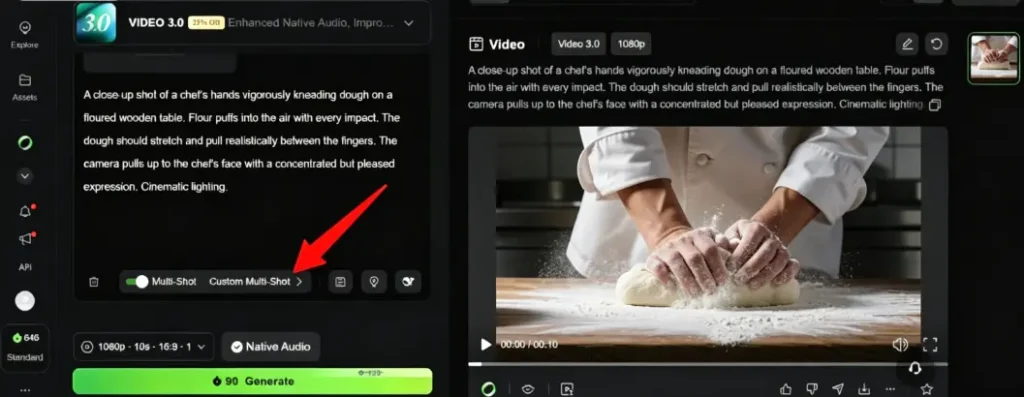
Multi-Shot Generation (Kling 3.0)
Generate multiple connected scenes from a single storyboard. Useful for short narratives, though consistency can drift after the first shot.
Camera Movement Presets
Built-in movements: push, pull, pan, tilt, orbit, zoom. Combine with descriptive camera tokens in your prompt for maximum control.
Character Consistency With Elements 3.0
Upload reference images to lock character appearance across generations. Improves consistency significantly, though face drift still occurs in longer clips.
Kling AI Pricing: What Image-to-Video Actually Costs
Credit Costs Per Generation (Version x Duration x Mode)
A Standard 5-second clip costs 10–20 credits. Professional 10-second clips run 40–100 credits. With 60–70% regeneration rates, your real cost per usable video is roughly 3x the listed price.
Free Tier vs Standard vs Pro vs Premier
| План | Цена | кредиты | Разрешение | Водяной знак |
| Бесплатно | $0 | 66 / день | 720p | Да |
| Стандарт | $ 6.99 / мес | 660 / мес | 1080p | Нет |
| Pro | $ 25.99 / мес | 3,000 / мес | 1080p | Нет |
| Premier | $ 64.99 / мес | 8,000 / мес | 4K | Нет |
Third-Party Platforms: Cheaper Access to Kling
Freepik aggregates multiple models at ~$5/month. Изображение AI в видео provides access to Kling alongside Veo and Wan with watermark-free 4K output. OpenArt charges 150 credits per 10-second clip. Note: aggregators often lack advanced features like Start/End Frame or Elements.
Credit-Saving Strategies That Work
- Generate candidate images free before committing credits to video
- Test at 5-second Standard before upgrading to 10-second Professional
- Validate prompts on Kling 2.6 before switching to 3.0 for final output
- Use ChatGPT to refine prompts before generating
Image-to-Video Prompt Tips for Better Results
The Key Difference: Describe Motion, Not the Scene
Your image already shows the scene. Your prompt should only describe что движется и how the camera behaves. Re-describing visible content wastes prompt space and confuses the model.
Prompt Templates by Motion Type
- Тонкий: “Subject breathes gently, eyes blink naturally, soft breeze moves fabric”
- Все тело: “Subject walks forward confidently, arms swinging naturally, tracking shot”
- Экологические исследования георадаром: “Rain begins falling, puddles form reflections, overcast lighting shifts”
- Camera-only: “Slow dolly in toward subject, shallow depth of field, cinematic”
Using Camera Tokens Effectively
Filmmaking vocabulary works best: “dolly in,” “tracking shot,” “crane descending,” “Dutch angle rotating.” These produce noticeably better results than generic descriptions.
Negative Prompts to Avoid Common Artifacts
Add these negative prompts to reduce artifacts: “no face morphing, no extra limbs, no jittery motion, no background warping, no blurry transitions.”
Using ChatGPT to Write Optimized Kling Prompts
Paste this into ChatGPT: “Write a Kling AI image-to-video prompt for [description]. Focus on motion and camera movement only. Use filmmaking terminology. Under 200 words.”
Best Kling AI Alternatives for Image to Video
Runway Gen-4.5 — Best for Professional Creative Control
Cinema-grade output with the most polished interface in the industry. Max 16 seconds, from $12/month. Best for client-ready results.
Google Veo 3.1 — Best for Photorealism and Long Duration
Hyper-realistic physics with native audio and clips up to 180 seconds. Free credits via Google AI Studio.
Seedance 2.0 — Best for Human Character Consistency
Benchmark leader for consistent human figures across multiple shots. Best for multi-scene narratives with recurring characters.
Pika Labs — Best for Beginners and Social Media
Most accessible option with creative effects and a watermark-free free tier. Max 10 seconds, from $8/month.
Hailuo AI — Best for Action and Motion Scenes
Excels at fluid physics and high-action content — running, dancing, sports. Free daily credits included.
Wan 2.2 (Local) — Best Free Option With Hardware
Runs locally via ComfyUI with zero recurring costs. Requires 8–24GB VRAM, ~1 hour per 5-second clip. Best free option if you have the hardware.
Kling AI vs Competitors: Head-to-Head Comparison
Comparison Table (Quality, Speed, Price, Duration, Free Tier)
| Инструмент | Максимальная продолжительность | Уровень бесплатного пользования | Начальная цена | Best For |
| Клинг 3.0 | 3 мин | 66 кредитов/день | $ 6.99 / мес | Полный набор функций |
| Взлетно-посадочная полоса Gen-4.5 | 16s | 125 единовременно | $ 12 / мес | Профессиональный контроль |
| Вео 3.1 | 180s | AI Studio credits | $ 19.99 / мес | Photorealism + length |
| Seedance 2.0 | 30s | Ежедневное обновление | ~$0.15/sec | Постоянство характера |
| Пика 2.2 | 10s | 80 / мес | $ 8 / мес | Новичкам |
| Хайлуо ИИ | 10s | 200 first login | $ 14.99 / мес | Сцены действия |
| Ван 2.2 | Неограниченные | Бесплатно (местно) | Стоимость оборудования | Zero recurring cost |
Which Tool for Which Use Case?
- Portrait animation: Seedance 2.0
- Демоверсии продукта: Kling 3.0 Motion Control
- Landscapes/environments: Veo 3.1
- Клипы в социальных сетях: Pika Labs
- Dance/action: Hailuo AI or Kling Motion Control
- Multi-scene narratives: Kling Multi-Shot
- Zero budget: Wan 2.2 (local) or Pika (cloud)
Is Kling AI Safe? Trust, Privacy, and Billing Concerns
The Trustpilot Controversy Explained
Kling AI holds a 1.3 / 5 оценка on Trustpilot across 287 reviews (89% one-star). Key complaints: billing issues, grayed-out cancel buttons, credit expiration without notice. Product quality scores 8.1/10 from expert reviewers — trust issues center on billing, not output.
How to Protect Yourself When Using Kling AI
- Использовать виртуальная карта with a spending limit
- Screenshot all cancellation attempts
- Access Kling through platforms like AI Image to Video for billing protection
- Start with the free tier before committing to paid
Privacy Considerations (Singapore Entity, Data Storage)
Kling AI Pte. Ltd. is Singapore-registered under Chinese parent Kuaishou. Review their privacy policy before uploading sensitive content.
FAQs of Kling AI Image to Video
Is Kling AI image to video free?
Yes, with limitations. The free tier gives 66 daily credits for 720p watermarked output (1–2 short clips). Paid plans start at $6.99/month for watermark-free 1080p.
How many credits does Kling AI image to video use?
Standard 5-second: 10–20 credits. Professional 10-second: 40–100 credits. With regeneration, expect ~3x the listed cost per usable output.
Can I use Kling AI image to video for commercial purposes?
Yes, on paid plans. Creators earn $3,000–$70,000+ using Kling for client work. Free tier outputs carry watermarks unsuitable for commercial use.
How long can Kling AI image to video clips be?
Up to 3 minutes with Kling 3.0 — the longest in the market. Quality degrades after 15–20 seconds, so most pros generate 5–10 second clips and stitch them in an editor.
Why does my Kling AI video look different from the source image?
Common causes: low-resolution source images, overly descriptive prompts conflicting with image content, and Standard mode instead of Professional. Focus prompts on motion only and try Elements mode for better character preservation.
What is the best alternative to Kling AI for image to video?
Depends on your priority: Runway for professional control, Veo 3.1 for realism, Seedance 2.0 for character consistency, Pika for accessibility, or Wan 2.2 for free local generation.
How do I cancel my Kling AI subscription?
Go to account settings > subscription management. If you hit issues (grayed-out buttons are commonly reported), contact support via email or block recurring charges through your payment provider.
Заключение
Kling AI offers the most complete image-to-video toolkit in 2026, earning an 8.1/10 from professional reviewers. Success comes from working strategically: prepare images properly, write motion-focused prompts, test at Standard 5-second before scaling up, and optimize prompts with ChatGPT.
When Kling isn’t the right fit, Seedance handles character consistency better, Veo excels at realism and duration, and platforms like AI Image to Video offer multi-model access without subscription lock-in.
Готовы начать? Используйте этот шаблон: “[Subject] begins to [specific motion], camera [movement type], cinematic lighting, smooth motion.” Test at 5 seconds Standard — scale up only after you see results you like.