Most AI image generators demand a subscription, your email, and a credit card before you produce a single picture. Dezgo skips all of that — open the site, type a prompt, download your image.
But here is what nearly every existing review gets wrong: Dezgo is no longer just a Stable Diffusion wrapper. In 2026, the platform aggregates premium models like Grok Imagine, Nano Banana Pro, Flux 2 Pro, and video generators including Sora 2 and Veo 3.1. This guide covers features, models, pricing, quality tests, and whether Dezgo deserves a place in your toolkit.
What Is Dezgo AI?
Dezgo is a browser-based AI image and video generator founded in France in 2022. Everything runs server-side — no GPU, no software install, no account needed. The platform serves over 10 million users and generates roughly 500,000 images daily.
How Dezgo Works
Pick a model, type a prompt, click Generate, and download a PNG within seconds. Advanced controls include negative prompts, guidance scale, sampling steps, and seed values — all accessible without any local setup.
Dezgo in 2026: Not Just Stable Diffusion Anymore
Most existing reviews describe Dezgo as a simple SD interface — that is outdated. The 2026 version aggregates models from multiple providers: Grok Imagine, Nano Banana Pro, Flux 2 Pro, plus video models like Sora 2, Veo 3.1, and Kling 2.6. This makes Dezgo a multi-model marketplace comparable to Freepik and Recraft, but with a more generous free tier.
Dezgo AI Key Features
Dezgo packs a surprisingly wide feature set for a tool that charges nothing at the door.
Text-to-Image Generation
Choose from free models (Flux 1, XL Lightning, SD1, XL) or premium options, write your prompt, and adjust negative prompts, guidance scale, aspect ratio, and sampling steps. Output arrives in PNG format.
Image-to-Image Conversion
Upload a source image and let an AI model reinterpret it using Grok Imagine, Nano Banana, Flux 2, or SD1 — useful for style transfers and reference-based generation.
Inpainting & Image Editing
Paint over a specific area and describe what should replace it. The “edit image from text” tool handles broader changes like swapping backgrounds or removing objects.
Image Upscaling & Background Removal
A Real-ESRGAN 2x upscaler and a one-click background remover are both completely free — many competitors gate these behind paid plans.
ControlNet (Controlled Generation)
Preserve the structural composition of a reference image while changing its style or content. Offering ControlNet free is uncommon among hosted generators.
Text-to-Video Generation
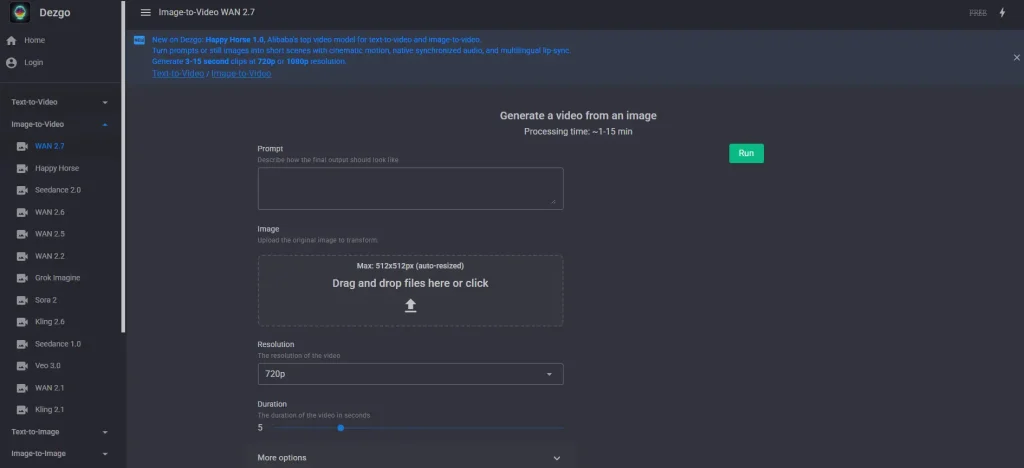
Dezgo now offers video models including WAN 2.7, Seedance 2.0, Sora 2, Veo 3.1, and Kling 2.6. No competing review covers this expansion yet. For creators wanting a dedicated image-to-video platform with 4K output and batch processing, AI Image to Video complements Dezgo’s built-in options.
API Access for Developers
Through RapidAPI, developers access 57 models across four pricing tiers ($2–$100/month) — viable for automated content pipelines and batch generation.
Dezgo AI Models Explained
Model variety is Dezgo’s strongest card — yet no competitor review covers it well.
Free Models (Flux 1, XL Lightning, SD1, XL)
Flux 1 balances quality and speed best. XL Lightning prioritizes fast generation. SD1 is compatible with the broadest range of community resources, while XL supports higher resolutions.
Premium Image Models (Grok Imagine, Nano Banana Pro, Flux 2 Pro)
Accessible through Power Mode, these cutting-edge models rival their native platforms — often at lower per-image cost.
Video Models (Sora 2, Veo 3.1, Kling 2.6, Seedance 2.0, WAN 2.7)
Pay-per-use access to leading video generators, positioning Dezgo as one of the most affordable gateways to premium AI video in 2026.
100+ Finetunes (DreamShaper, Juggernaut, Envy Starlight & More)
Community-trained variants optimized for specific styles — photorealism, anime, fantasy, concept art. Each targets a particular creative niche.
How to Choose the Right Model
| Need | Recommended Model |
| Fast drafts | XL Lightning |
| Photorealistic portraits | Juggernaut XL 10 Hyper |
| Artistic/stylized work | DreamShaper XL |
| Top-tier quality | Nano Banana Pro or Grok Imagine |
| Speed + quality balance | Flux 1 (free) |
Dezgo Pricing: Free Tier vs Power Mode
What You Get for Free
Unlimited generations at 512×512 resolution, no signup, no watermarks. All image tools — ControlNet, upscaler, background removal, and inpainting — are included. The tradeoff: slower queue times (up to 30 seconds) and lower resolution.
Power Mode Breakdown
Deposit $10 minimum and pay per image: $0.0019 each (512×512) or $0.0075 for SDXL quality (1024×1024). That initial $10 buys ~5,263 standard images, and credits never expire.
API Pricing for Developers
RapidAPI tiers range from $2/month (BASIC, ~1,000 images) to $100/month (MEGA) with volume discounts.
Cost Comparison: Dezgo vs Competitors
- Dezgo: $0.0019–$0.0075/image (pay-as-you-go)
- Midjourney: $10–$120/month
- ChatGPT Plus: $20/month
- Leonardo AI: Token-based, depletes fast at high quality
- Adobe Firefly: Credit-based, $9.99+/month after 10 free credits
For budget-conscious users, Dezgo’s per-image pricing is hard to beat.
Hands-On Testing: Image Quality Results
Photorealistic Prompts
Free models like Flux 1 handle landscapes and objects well. Faces and hands remain inconsistent — a common diffusion weakness. Nano Banana Pro via Power Mode delivers a clear jump in realism.
Artistic & Stylized Prompts
Finetunes shine here. DreamShaper XL handles illustration well, while Envy Starlight XL excels at cinematic scenes. With 100+ models, you can usually find one tuned to your exact style.
Prompt Tips for Better Dezgo Results
- Use negative prompts to exclude unwanted elements (e.g., “blurry, low quality, watermark”)
- Set guidance scale between 7–12 for a good balance of creativity and prompt adherence
- Lock the seed value when iterating on a composition you like
- Be specific — vague prompts produce generic results regardless of model
Dezgo Pros and Cons
What Dezgo Does Well
- Zero friction: No signup, no credit card, instant access
- Massive model library: 100+ models including premium third-party options
- Rock-bottom pricing: As low as $0.0019 per image
- Free advanced tools: ControlNet, upscaler, background removal, inpainting
- Commercial-friendly license: CreativeML Open Rail-M for free model outputs
- Video generation: Access to Sora 2, Veo 3.1, and other leading models
Where Dezgo Falls Short
- Dated interface: The UI looks plain compared to Midjourney or Leonardo
- Free tier resolution capped at 512×512
- Slow free queue: Wait times can reach 30 seconds
- Inconsistent faces/hands on free diffusion models
- Limited documentation and smaller community
- No mobile app — browser-only access
Dezgo vs Top Competitors
Dezgo vs Midjourney
Midjourney delivers superior artistic quality but costs $10+/month with no free tier. Dezgo wins on accessibility, price, and model variety.
Dezgo vs ChatGPT (GPT Image 2)
ChatGPT excels at prompt comprehension and conversational editing. Dezgo counters with free access, no account requirement, and more model choices.
Dezgo vs Leonardo AI
Leonardo’s free tier (150 daily tokens) offers higher baseline quality, but tokens deplete quickly. Dezgo’s unlimited free generations suit high-volume users better.
Dezgo vs Adobe Firefly
Firefly is the safest commercial option — trained on licensed content with Photoshop integration. Dezgo offers more models at lower cost but cannot match Firefly’s legal certainty.
Dezgo vs Running Stable Diffusion Locally
Local SD provides unlimited, unrestricted generation but demands a capable GPU (12GB+ VRAM) and steep setup. Dezgo offers similar models with zero configuration.
Who Should Use Dezgo AI?
Bloggers & Content Creators
Generate featured images and social graphics at zero cost — no subscription required.
Marketers & Small Businesses on a Budget
Power Mode at $0.0019 per image makes visual content viable on tight budgets.
Developers Building AI-Powered Apps
RapidAPI integration with 57 models starting at $2/month lowers the barrier for prototyping.
Students & Beginners Exploring AI Art
No signup, no cost, instant results — Dezgo removes every obstacle for newcomers.
Video Creators Looking for Image-to-Video Pipelines
Use Dezgo as the image-generation step in a broader video workflow. For dedicated image-to-video conversion with 4K output and batch processing, AI Image to Video pairs well with Dezgo’s output.
Commercial Use & Licensing
CreativeML Open Rail-M License Explained
Dezgo’s Stable Diffusion-based outputs fall under the CreativeML Open Rail-M license — you can use, modify, and distribute images commercially with no attribution required. The license only restricts harmful or illegal applications.
Can You Sell or Use Dezgo Images Commercially?
For free SD-based models, commercial use is permitted. For premium third-party models (Grok Imagine, Nano Banana Pro, Flux 2 Pro), licensing varies by provider — verify terms before large-scale commercial use.
How to Use Dezgo AI: Step-by-Step Guide
Generating Your First Image
- Visit dezgo.com — no account needed
- Select a model (start with Flux 1 for free, high-quality output)
- Type your prompt in the text box
- Click Run and wait a few seconds
- Download your image in PNG format
Advanced Settings & Controls
Access negative prompts, guidance scale (7–12 recommended), sampling steps (20–30), and seed values through the settings panel. Lock the seed to reproduce or iterate on a specific result.
Using Image Tools (Upscale, Remove Background, Inpaint)
Chain the free tools for best results: generate your base image, upscale it to double resolution, then remove the background for a clean design-ready cutout.
FAQs of Dezgo AI Image Generator
Is Dezgo AI completely free?
Yes. The free tier offers unlimited image generation with no signup. Power Mode (paid) unlocks faster speeds, higher resolutions, and premium models.
Do I need to sign up or create an account to use Dezgo?
No. You can generate images immediately without any registration.
What AI models does Dezgo offer in 2026?
Over 100 models spanning free options (Flux 1, XL Lightning, SD1), premium generators (Grok Imagine, Nano Banana Pro), and video models (Sora 2, Veo 3.1).
Can I use Dezgo images for commercial projects?
Generally yes, under the CreativeML Open Rail-M license for SD-based models. Check individual licensing terms for premium third-party models.
How does Dezgo compare to Midjourney and ChatGPT for image generation?
Dezgo wins on price and accessibility. Midjourney produces higher artistic quality. ChatGPT offers better prompt comprehension and editing workflows.
Does Dezgo add watermarks to generated images?
No. Both free and paid outputs are delivered without watermarks.
What is Dezgo Power Mode and is it worth it?
A pay-as-you-go upgrade starting at $10 that unlocks premium models, faster speeds, and higher resolutions. At $0.0019 per image, it offers strong value.
Can Dezgo generate videos?
Yes. Dezgo now offers text-to-video and image-to-video using models like Sora 2, Veo 3.1, Kling 2.6, and WAN 2.7.
Is there a Dezgo mobile app?
No. Dezgo is browser-only, but the website works on mobile devices.
Conclusion
Dezgo has evolved from a basic Stable Diffusion tool into a multi-model platform with 100+ AI models. It cannot match Midjourney’s polish or ChatGPT’s intelligence, but its zero-signup access, per-image pricing, and model variety make it a strong pick for budget creators, beginners, and developers.
Try Dezgo for free at dezgo.com — start with Flux 1 for the best free experience. To turn your AI stills into video, AI Image to Video pairs naturally with Dezgo’s output.