With over 125,000 views on a single YouTube review and a user base spanning 100+ countries, the Freebeat AI music video generator is one of the most talked-about tools in the AI music space. It also holds a 1.7-star rating on Trustpilot. So what’s actually going on?
Most AI video tools treat your audio as an afterthought, and Freebeat’s polarizing reputation makes it hard to judge. This guide delivers an honest breakdown of Freebeat AI’s features, real-world pricing, step-by-step usage, and the strongest alternatives available right now.
What Is the Freebeat AI Music Video Generator?
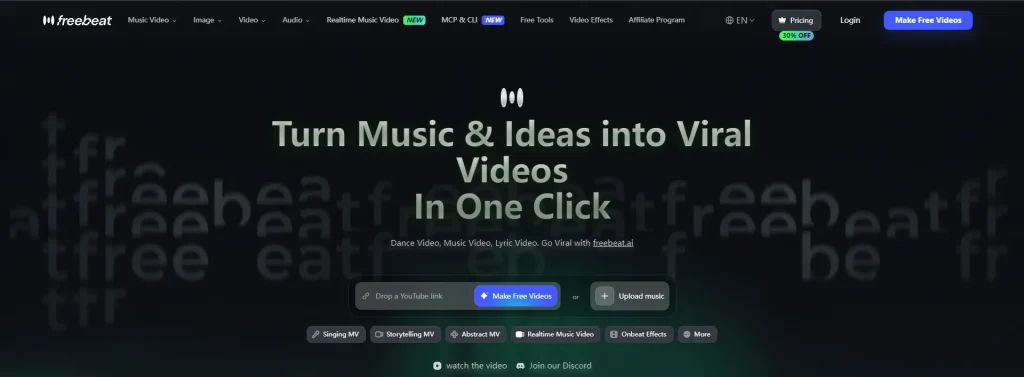
Freebeat.ai bills itself as the world’s first fully autonomous AI music video generator. It’s built around a proprietary music-vision model trained on a massive dataset of beat-paired audio-visual content.
How Freebeat AI Works: Audio-as-Prompt Technology
Rather than relying on text prompts like Runway or Pika, Freebeat treats your music as the creative driver. The system analyzes your track’s tempo, structure, mood, and lyrics to generate matching visuals. Each playback produces a unique visual interpretation of the same song.
Freebeat.ai vs. Freebeatfit: Clearing Up the Brand Confusion
Searching “freebeat” often surfaces exercise bike results. Freebeat.ai (AI video tool) is completely separate from Freebeatfit (fitness brand). Double-check you’re on the right site.
Who Is Freebeat AI Designed For?
The tool targets independent musicians, Suno/Udio creators needing visuals for AI-generated tracks, social media producers, DJs promoting releases, and hobbyists who want music videos without editing software.
Key Features of the Freebeat AI Music Video Generator
Three Creation Modes: Automatic, Singing, and Storytelling
Automatic delivers one-click generation from your track. Singing adds lip-synced AI avatars. Storytelling builds cinematic narrative videos with scene progression. Each mode suits different goals — quick social posts, performance content, or polished YouTube premieres.
Beat Sync and Audio-Reactive Visuals
Visual transitions align to downbeats, drum hits, and chorus changes instead of random intervals. The proprietary “Onbeat Effect” makes your video feel choreographed to the music rather than generically assembled.
AI Music Video Agent (MV Agent)
The MV Agent earned “breakthrough” praise on Reddit. It automates the full pipeline: song analysis, creative direction via prompts, storyboard generation, and one-click rendering. Some users report “pathing problems” where the agent makes unexpected creative choices.
Bundled AI Video Models and All-In-One Hub
Freebeat integrates multiple frontier models — Kling 2.1, Luma Ray2, Runway Gen-3, Pika 2.2, Veo 2/3, and others — in one interface. Some users argue this amounts to reselling existing technology at a premium.
Lip Sync, Lyric Videos, and Album Cover Animation
Lip sync is available but credit-intensive — approximately 406 credits per 15 seconds, scaling to ~4,872 credits for a three-minute track. Lyric overlay and album cover animation round out the toolkit.
Export Options: YouTube, TikTok, Reels, and Shorts
Supported aspect ratios include 16:9 for YouTube and 9:16 for TikTok, Reels, and Shorts. Resolution goes up to 4K, and downloads are available with or without lyric overlays.
How to Create a Music Video with Freebeat AI (Step-by-Step Tutorial)
Step 1 – Upload Your Track or Paste a Link
Upload MP3/WAV files, or paste links from Spotify, YouTube, SoundCloud, Suno, Udio, or TikTok. The Suno integration is particularly smooth — users praise the direct link-paste workflow.
Step 2 – Choose Your Creation Mode and Visual Style
Select your mode, then pick a visual preset. Options include noir cinematic, vibrant pop, and glitch aesthetic. Genre tips: noir complements hip-hop, bright palettes suit pop, glitch fits EDM, and muted tones work for lo-fi.
Step 3 – Preview, Edit Your Storyboard, and Customize
Review the storyboard before spending credits. Caution: the “Continue” button can accidentally trigger a merge that destroys your project and wastes credits.
Step 4 – Generate, Download, and Export
Expect 5-7 minutes of processing per minute of video. If generation stalls (a common issue), credits are consumed without automatic refund. Download and export once rendering completes.
Freebeat AI Pricing: What It Really Costs
Free Plan: What You Actually Get
The free tier yields approximately 20 seconds of usable footage. As one Reddit user noted, free tiers across AI video tools rarely deliver meaningful output.
Credit System Explained: Cost Per Minute of Video
Reported costs vary widely: a $26/month plan might produce 3-4 minutes with retries, while one user was quoted $115 for a single three-minute track. Lip sync burns through credits far faster than Automatic mode.
Paid Plans: Which Tier Is Right for You?
Casual creators may manage on a basic plan. Musicians releasing multiple tracks monthly should budget for higher tiers. A Pro Annual plan is available through ProAudioStar for better per-credit value.
Hidden Costs: Retries, Failed Renders, and Credit Burn
The biggest expense is iteration. Every retry consumes more credits. Multiple Trustpilot reviewers report losing credits with no usable output in return.
Freebeat AI Pros and Cons: The Honest Verdict
What Freebeat AI Does Well
- Audio-driven generation that maps to actual song structure, not just waveform amplitude
- Beat-synced transitions landing on downbeats and chorus changes
- One-click Suno/Spotify integration with no file conversion
- MV Agent workflow that automates the creative pipeline
- Batch production capability — users report creating 15-20+ social videos in a weekend
Where Freebeat AI Falls Short
- The “2-minute wall”: visual repetition and character drift make longer videos incoherent
- Unpredictable costs: credit consumption is difficult to estimate before committing
- Character inconsistency: faces change between scenes, with reported gender swaps and anatomical errors
- Unreliable rendering: stalled generations consume credits without producing usable output
Customer Service and Subscription Management Concerns
Freebeat holds a 1.7/5 Trustpilot rating with 75% one-star reviews. Complaints center on unresponsive support, Discord banning users who raise issues, and hidden cancellation options. Multiple YouTube commenters report continued billing after attempting to cancel.
Freebeat AI vs. Top Competitors: Head-to-Head Comparison
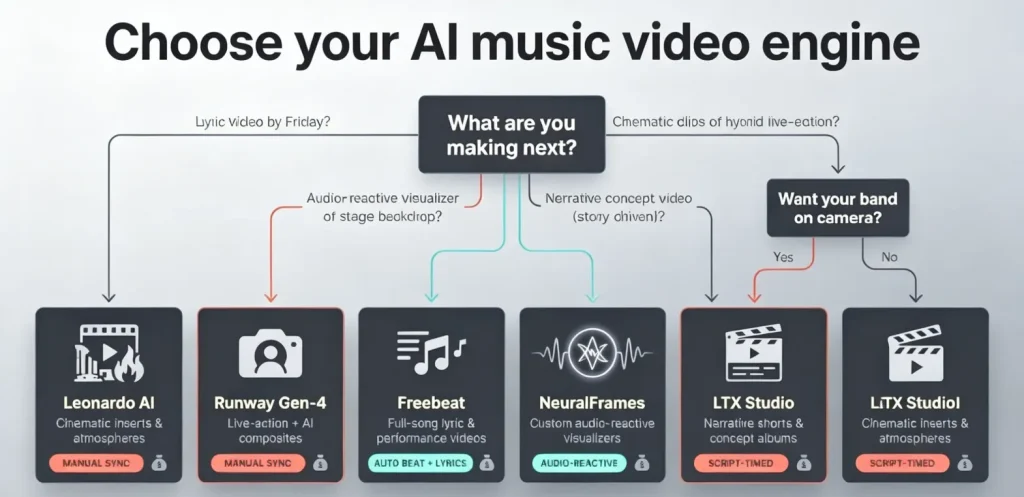
Freebeat AI vs. Neural Frames
Neural Frames specializes in abstract, audio-reactive visuals for electronic and experimental genres. It lacks song-structure understanding, while Freebeat provides end-to-end generation with beat awareness but less reliable output.
Freebeat AI vs. Kaiber
Kaiber offers Beat Sync through its Superstudio feature starting at $5/month, making it the most affordable entry point. It handles short audio-reactive clips well but can’t generate full-song videos.
Freebeat AI vs. AirMusic AI
AirMusic AI is gaining Reddit credibility for tracking musical structure — detecting tempo shifts, mood changes, and verse-chorus transitions. It’s becoming the most recommended Freebeat alternative.
Freebeat AI vs. Runway ML
Runway’s Gen-4.5 produces the highest-quality clips but has no music awareness. It requires manual editing in Premiere or DaVinci Resolve to assemble a music video.
Freebeat AI vs. DIY Workflow (Kling + CapCut/DaVinci)
Generating clips in Kling or Grok, then beat-aligning them in CapCut or DaVinci offers full creative control but demands 30-60 hours per video. For converting still images into video segments within this workflow, AI Image to Video can help.
Comparison Table: Features, Pricing, and Best Use Case
| Tool | Music Aware | Beat Sync | Max Length | Starting Price | Best For |
| Freebeat AI | Yes | Yes | ~6 min | ~$26/mo | Quick social videos |
| Neural Frames | Partial | Yes | Varies | Paid | Abstract/trippy visuals |
| Kaiber | Partial | Yes | Short clips | $5/mo | Affordable audio-reactive |
| AirMusic AI | Yes | Yes | Varies | TBD | Music-structure matching |
| Runway ML | No | No | Short clips | Subscription | Highest quality clips |
| DIY (Kling+CapCut) | Manual | Manual | Unlimited | Free | Full creative control |
Best Use Cases for Freebeat AI Music Video Generator
Quick Social Media Videos (TikTok, Reels, Shorts)
Freebeat performs best under two minutes, where the quality wall isn’t a factor. One user reported generating 20+ usable videos in a single weekend using the Suno-to-Freebeat pipeline.
Independent Artists Promoting Tracks on a Budget
If freelancer quotes of $80-$300 per track feel unsustainable, Freebeat offers a faster path to acceptable visuals — especially for volume across multiple releases.
Faceless Music Video Creation
Automatic and Storytelling modes produce fully AI-generated visuals without any face footage, making Freebeat well-suited for anonymous artists and faceless content channels.
When to Choose a Different Tool Instead
Consider alternatives for videos over three minutes (repetition issues), character consistency across a series (try Atlabs), abstract visuals (Neural Frames), or maximum quality (Runway with manual editing).
Tips for Getting the Best Results from Freebeat AI
Writing Effective Video Prompts
Describe specific settings, color palettes, and camera movements rather than vague directions. Concrete style references outperform abstract concepts every time.
Managing Credits and Avoiding Wasted Generations
Test with short Automatic clips before committing to full renders. Budget for 2-3 retries per final output. Avoid the “Continue” button unless you’re ready to merge.
Optimizing for Different Platforms and Genres
Set 9:16 for vertical platforms (TikTok, Reels, Shorts) and 16:9 for YouTube. Match styles to genre: noir for hip-hop, vibrant for pop, glitch for electronic, muted warmth for lo-fi.
FAQs About Freebeat AI Music Video Generator
Is the Freebeat AI music video generator free?
A free tier exists but produces roughly 20 seconds of video. Full music videos require paid plans starting around $26/month.
Can I use Freebeat AI videos on YouTube without copyright issues?
AI-generated visuals are generally safe to upload, but if your underlying track was made with Suno or Udio, ongoing industry copyright settlements may affect commercial use rights.
How long can a Freebeat AI music video be?
Up to six minutes technically, but the community widely agrees that quality degrades after approximately two minutes due to visual repetition and character inconsistency.
Does Freebeat AI support lip sync and lyric videos?
Yes. Lip sync costs roughly 406 credits per 15 seconds, making it significantly more expensive than standard generation. Lyric overlay is a built-in feature.
What’s the best alternative to Freebeat AI for music videos?
It depends: AirMusic AI for music-structure awareness, Neural Frames for abstract aesthetics, Kaiber for budget-friendly audio-reactive clips, or Kling plus CapCut for a free DIY approach.
Can I create a music video without showing my face using Freebeat AI?
Yes. Automatic and Storytelling modes generate entirely AI-created visuals, making them ideal for faceless channels and anonymous artists.
How does Freebeat AI compare to hiring a freelance video editor?
Freelancers charge $80-$300 per track with higher quality and creative control. Freebeat produces usable short-form videos for $26-$50 including retries — better for volume, while freelancers remain stronger for flagship releases.
Conclusion
The Freebeat AI music video generator brings real innovation with its audio-driven approach and beat-synced visuals. For short-form social content, it delivers value that manual workflows can’t match on speed.
However, unpredictable credit costs, the two-minute quality ceiling, and documented customer service gaps mean you should proceed with realistic expectations. Fully autonomous music video generation remains a work in progress across the entire industry.
Start with Freebeat’s free tier to test your music before committing to a paid plan. For image-to-video conversion, AI Image to Video offers watermark-free results. Keep AirMusic AI and Atlabs on your radar as emerging alternatives.