If you opened the Meta AI app to make a video and the generator vanished — you’re not going crazy. Meta moved it, and “vibes ai” has quietly become one of the most confusing search terms in AI video.
The problem is that the name points in three directions at once: Meta Vibes (the feed), Vibes.ai (the generator), and a crowd of copycat “vibe” apps that have nothing to do with Meta. On top of that, nobody agrees on whether it’s truly free, whether you can escape the watermark, or why it won’t load in certain countries.
This guide untangles all of it in one place. You’ll get a plain-English definition, a step-by-step walkthrough for creating and remixing a video, an honest answer on the free-and-watermark question, fixes for the errors people actually hit, and a use-case comparison against Sora 2 and Veo 3.
Last updated: July 2026.
What Is Vibes AI? Meta Vibes, Vibes.ai & the Name Confusion Explained
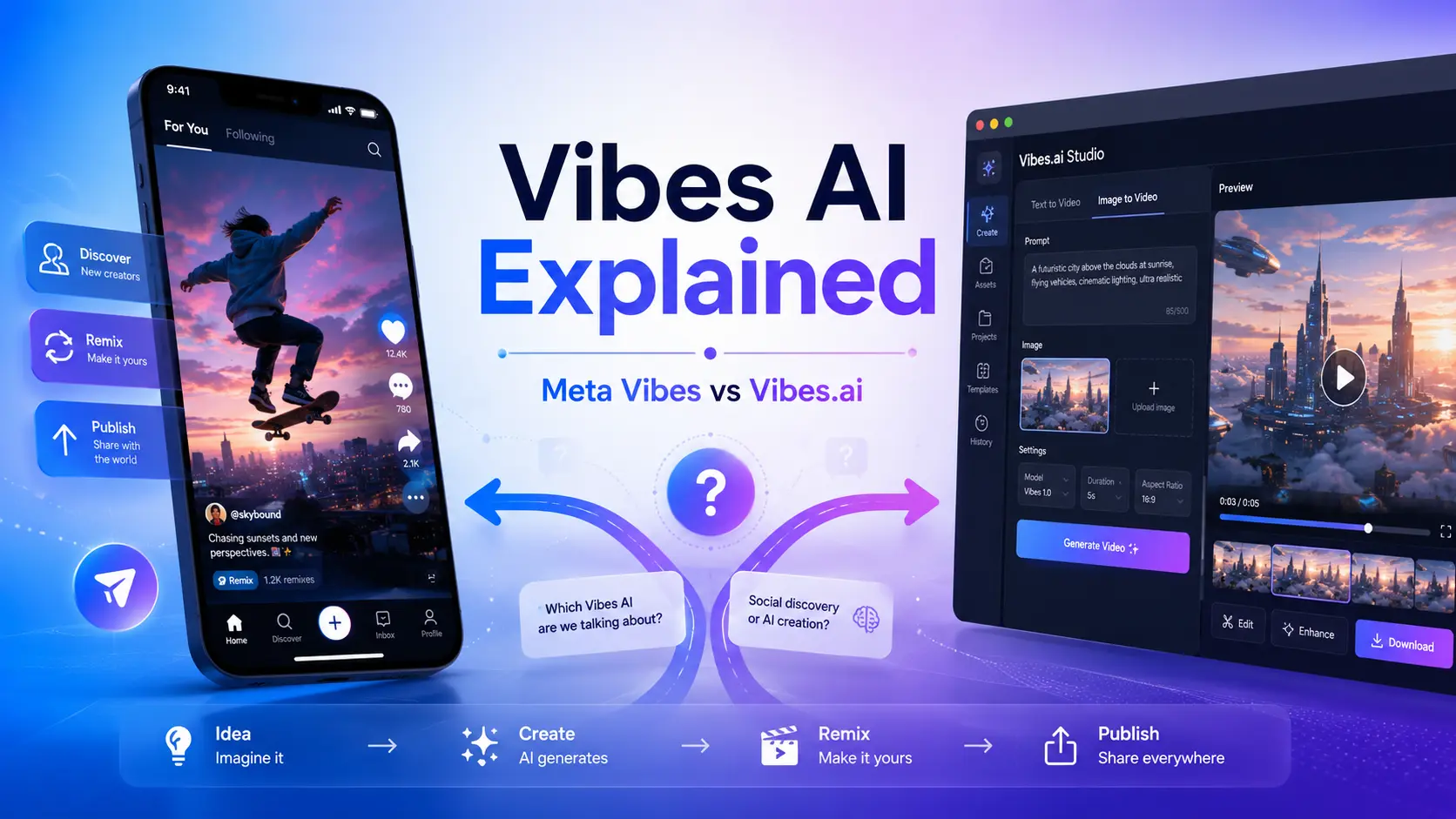
Vibes AI usually refers to Meta Vibes, Meta AI’s short-form feed of AI-generated videos you can create, remix, and share. The actual generation now lives on Vibes.ai. It’s currently free during rollout, though aspect ratio, audio, and regional access are still uneven.
Meta introduced Vibes in September 2025 as a “discover → create → remix → publish” loop, powered early on by Midjourney and Black Forest Labs models. If you’re here for Meta’s video tool, you’re in the right place — the rest of this section clears up the lookalikes.
Meta Vibes vs. Vibes.ai — what’s the difference?
Think of them as feed versus factory. Meta Vibes is the social layer — the scrollable feed of AI videos inside the Meta ecosystem, where you browse, remix, and cross-post. Vibes.ai is where the real work happens: generating images and videos, restyling, adding music, and lip-sync.
| Meta Vibes | Vibes.ai | |
| What it is | AI video feed (discover + remix) | Full generation studio |
| Main use | Browse, remix, share to Reels/Stories | Create from text or image, edit |
| Where | Meta AI ecosystem | Standalone web property |
Why Meta moved video generation out of the Meta AI app (2026 update)
This is the migration behind the “Meta Ai Vibes WTF” threads on Reddit — one user admitted they “legit thought I was going crazy” looking for the missing generator. Meta pivoted the Meta AI app toward chat and canvas, and shifted full video/image generation to the standalone Vibes.ai property.
That split is exactly what most competitor articles miss, because they’re still frozen in the launch-day framing. If your video button disappeared, it didn’t break — it just moved.
Other “vibe” tools you might actually mean (quick disambiguation table)
Plenty of unrelated products share the “vibe” name. Here’s a one-glance map so you can rule them out fast:
| Tool | What it actually is |
| VIBE app (vibeaiapp.com) | Multi-model video generator (Sora, Kling, Veo) |
| VibeMe AI | Photo + song → music videos |
| Vibemotion | Human + AI timeline editor (MCP-based) |
| vibesai.io | Viral short-form content generator |
| Vibe.us | Enterprise “contextual workspace” (not video) |
| Landbase “Vibe AI” | A B2B go-to-market concept, not a tool |
How to Use Vibes AI: Step-by-Step (Text-to-Video, Image-to-Video & Remix)
Using Vibes AI follows the same simple loop whether you start from words or a picture. Below is the actionable core.
Create a video from a text prompt
- Open Vibes.ai and start a new project.
- Type your prompt describing the scene, subject, and mood.
- Choose a style or aspect ratio, then generate.
- Review the result, then remix or publish.
That’s the full discover → create → remix → publish loop in four steps.
Image-to-video with start & end frames
Image-to-video (I2V) is the feature creators get most excited about. Upload a starting image, and Vibes animates it into motion. Setting both a start and end frame gives you far more predictable movement — you’re telling the model where the shot begins and where it lands, instead of hoping it guesses right.
Remix an existing vibe (add music, change image, change animation)
Remixing is the social heart of Vibes. On any existing vibe you can Add Music, Change Image, or Change Animation, then republish your version. Finished clips cross-post to Instagram Reels and Facebook Stories, or download for use elsewhere.
Key Takeaway: Prefer image-to-video over text-to-video when motion matters — start/end frames give you control that a raw text prompt can’t.
How to write a great Vibes prompt (with copy-paste examples)
A strong prompt names five things: subject, style, motion, lighting, and camera. Stack them in that order and you’ll get cleaner results.
- Cinematic: “A lone astronaut walking across red dunes, cinematic wide shot, golden-hour lighting, slow dolly push-in.”
- Product: “A glass perfume bottle rotating on marble, clean studio light, soft reflections, macro camera.”
- Nature: “Rain falling on a green forest floor, moody overcast light, gentle drifting motion, close-up.”
- Music energy: “Neon city street at night, fast rhythmic cuts, saturated colors, handheld motion.”
- Surreal: “A whale floating through clouds above a city, dreamlike soft light, slow rising camera.”
Is Vibes AI Really Free, Unlimited & Watermark-Free?
This is the highest-demand question — and the biggest gap between YouTube hype and honest, indexed answers. Here’s the tested reality.
The truth about “free and unlimited” (current limits)
Vibes is free during Meta’s rollout, and no public price has been announced. But “free” isn’t the same as “unlimited forever” — generation is subject to credit and rate limits, queue times, and beta-stage caps that shift as Meta scales. Treat the “100% free unlimited” clickbait with caution; plan around real limits, especially for longer projects.
How to download Vibes videos without a watermark
Vibes videos can carry Meta branding, and it’s worth knowing two honest facts. First, posts on Vibes are public and can be used to train Meta AI — factor that into anything sensitive. Second, most “remove the watermark” tricks circulating on YouTube are crops or third-party re-encodes that degrade quality. For genuinely clean exports, the reliable path is generating watermark-free from the start.
Want guaranteed watermark-free, 4K video? Use a dedicated image-to-video tool
If clean output is non-negotiable, a purpose-built generator avoids the guesswork. AI Image to Video produces watermark-free video up to 4K, with TikTok-optimized presets and multi-model generation (Kling, Veo, Wan) — so you skip Vibes’ watermark and resolution limits entirely while keeping the same image-to-video workflow.
Fixing Common Vibes AI Problems (Aspect Ratio, Audio, Region Locks)
These are the exact failures people voice in comment sections — and the section most guides skip.
Stuck in 9:16? How to get 16:9 for YouTube
Vibes leans vertical, which frustrates anyone making horizontal YouTube content. If the interface won’t give you 16:9, your options are to reframe in an editor afterward or generate in a tool with full aspect-ratio control from the outset — the cleaner fix if horizontal is your default.
No sound on your clip? What to check
Missing audio is common because many generations produce video only. Check whether the clip was made with sound enabled, and if not, use the Add Music remix action to layer audio after generation rather than expecting it automatically.
“Not available in your country” — access options
Vibes is rolling out region by region, so users in places like India, Pakistan, and Brazil often hit blocks — and VPNs don’t always work, since access can be tied to account region. If you’re locked out, a browser-based alternative that isn’t geo-gated is the most dependable route to keep creating.
Keeping characters consistent across scenes (fix character drift)
Character drift — a face or outfit shifting between scenes — is the top unsolved pain point for series creators. The workflow that fixes it: build a character “source of truth” (reference images), use those as first frames, and favor image-to-video over text-to-video. Budget for roughly a 5:1 generate-to-use ratio on longer projects.
Vibes AI vs. Sora 2, Veo 3 & the Best Alternatives (2026 Comparison)
There’s no single winner here — the right pick depends on what you’re making.
Vibes AI vs. Sora 2 vs. Veo 3 — comparison table
| Vibes AI | Sora 2 | Veo 3 | |
| Price | Free (rollout) | Paid / limited free | Paid / limited free |
| Strength | Remix + social distribution | High fidelity, physics | Cinematic quality, audio |
| Watermark | Often present | Often present | Often present |
| Best for | Fast social remixing | Realistic short clips | Polished cinematic shots |
Verdict by use case: choose Vibes for free, remix-native social content; Sora 2 for realism; Veo 3 for cinematic polish.
Best Vibes AI alternatives for watermark-free, multi-model video
When your priority is clean, flexible output, the VIBE app offers broad model aggregation, and VibeMe AI owns the music-video niche. For creators who specifically need 4K, no watermark, batch processing, and multiple models (Kling, Veo, Wan) for TikTok, Reels, and Shorts, AI Image to Video covers those gaps in one place.
FAQs About Vibes AI
Is Meta Vibes the same as Vibes.ai?
Not quite. Meta Vibes is the AI video feed for browsing and remixing; Vibes.ai is the standalone studio where the actual generation now happens.
Is Vibes AI free to use?
Yes, it’s free during Meta’s rollout, but expect credit and rate limits rather than truly unlimited generation, and no long-term pricing has been confirmed.
How do I remove the watermark from Vibes AI videos?
Most watermark “tricks” just crop or re-encode and hurt quality. For genuinely clean video, generate watermark-free from the start with a dedicated tool like AI Image to Video.
Why did the video generator disappear from the Meta AI app?
Meta moved full video and image generation to Vibes.ai and refocused the Meta AI app on chat and canvas — the tool didn’t disappear, it relocated.
Can I use Vibes AI on mobile and in any country?
It’s available across Meta’s platforms, but rollout is regional — some countries are still blocked, and VPNs don’t reliably bypass account-region checks.
Is Vibes AI better than Sora 2 or Veo 3?
It depends on your goal. Vibes wins on free access and social remixing; Sora 2 and Veo 3 lead on raw fidelity and cinematic quality.
Conclusion
“Vibes AI” mostly means Meta Vibes, with the real generation now living on Vibes.ai — that single fact clears up most of the confusion. From there, the loop is simple: create from a prompt or image, use start/end frames for control, remix, and publish. Just go in clear-eyed about the free-during-rollout limits, the watermark reality, and the region and aspect-ratio quirks.
If you keep bumping into those limits, a dedicated generator picks up the slack.
Try it out: For guaranteed watermark-free, 4K, TikTok-ready video with full aspect-ratio control and multi-model generation, give AI Image to Video a try — a clean next step when Vibes’ limits get in your way.