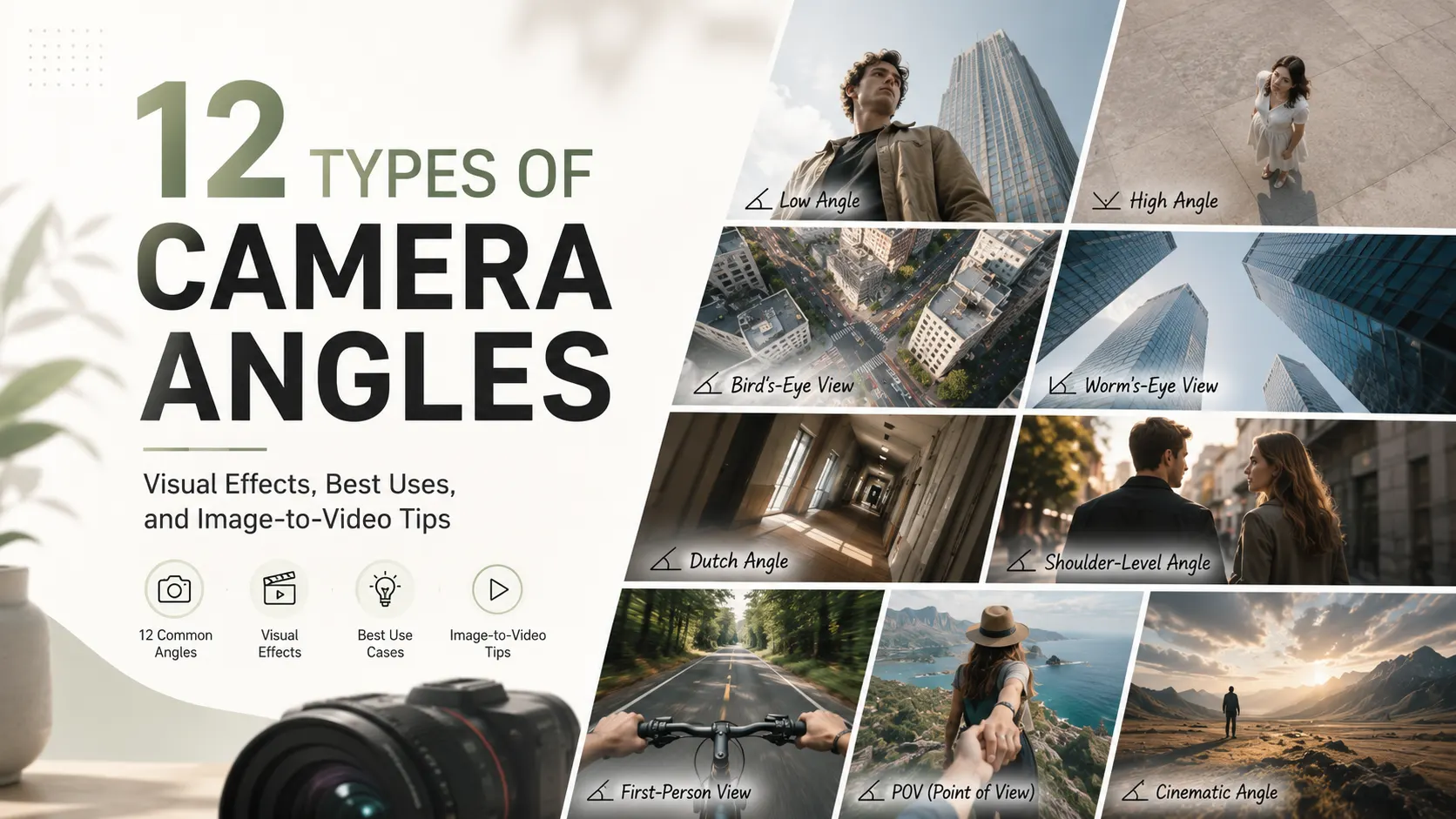
A camera angle shapes how viewers interpret a subject. An eye-level shot can make a character feel natural and approachable, while a low-angle shot may suggest power and a high-angle shot can create vulnerability.
These choices matter in filmmaking, photography, and AI-generated video. When creating video from a still image, the original perspective influences the subject’s proportions, movement, and overall visual consistency. Choosing the right angle before generation can therefore make the final animation feel more intentional and realistic.
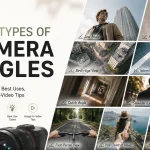
This guide covers 12 common types of camera angles, what each angle communicates, and when to use them in visual storytelling and image-to-video creation.
What Is a Camera Angle?
A camera angle is the position from which the camera views a subject. The camera may face the subject directly, look down from above, point upward from below, or use a tilted or first-person perspective.
Camera angle is different from shot size and camera movement:
- Camera angle controls the viewing perspective.
- Shot size controls how much of the subject appears in the frame.
- Camera movement controls how the viewpoint changes during the shot.
For example, a low-angle close-up with a slow camera push combines all three. The camera looks upward, the face fills most of the frame, and the viewpoint gradually moves closer.
Separating these elements makes it easier to plan clear compositions and create more consistent image-to-video results.
12 Types of Camera Angles and Their Visual Effects
Different camera angles communicate different emotions. Some feel neutral and realistic, while others make a scene feel powerful, unstable, immersive, or dramatic.
Eye-Level Camera Angle
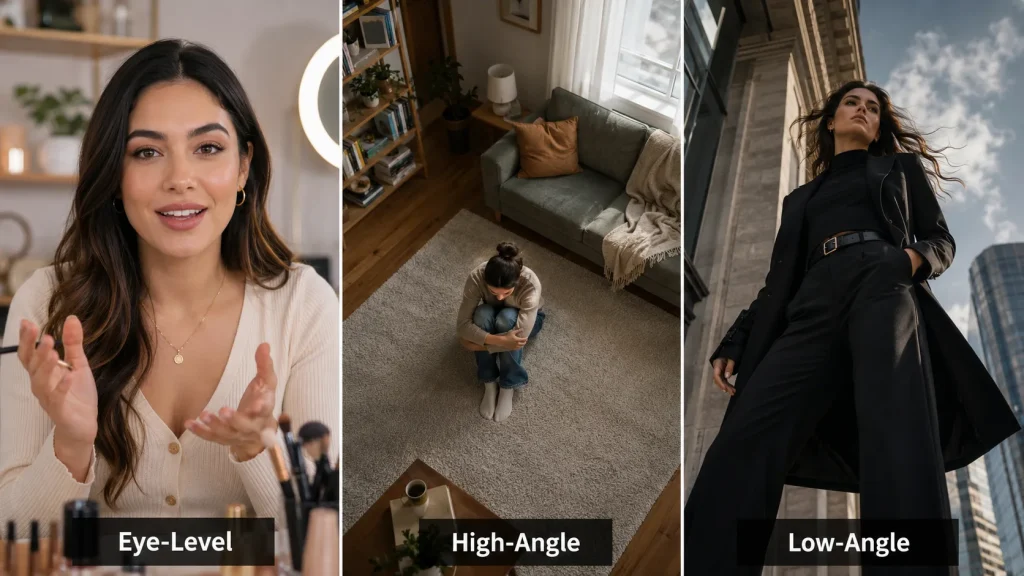
An eye-level angle places the camera at roughly the same height as the subject’s eyes. It feels natural, balanced, and direct because the viewer and subject appear equal.
This angle often creates trust, realism, and emotional connection. It is common in interviews, conversations, beauty videos, product demonstrations, and social media content. For example, a creator speaking at eye level can feel more approachable, while two characters filmed at the same height may appear to have equal status.
In image-to-video generation, eye-level images usually produce stable results because facial and body proportions remain natural, making them suitable for talking portraits and subtle movements.
High-Angle Shot
A high-angle shot places the camera above the subject and looks downward. It often makes a person appear smaller, more vulnerable, isolated, or less in control, while also revealing more of the surrounding environment.
This angle is commonly used in emotional scenes, food videos, interior design content, group shots, and tabletop demonstrations. For example, filming a character alone in a large room can strengthen the feeling of loneliness.
In image-to-video generation, high-angle images work well for seated characters, room transformations, and subtle environmental motion. Avoid extreme head turns or large body movements, as the downward perspective can make facial and body distortion more noticeable.
Low-Angle Shot
A low-angle shot places the camera below the subject and points upward. It makes people, buildings, vehicles, or objects appear larger, stronger, and more dominant.
This angle is often used for superheroes, fashion campaigns, cars, architecture, and dramatic entrances. Even a simple action, such as standing still or looking forward, can feel more powerful from below.
In image-to-video generation, low-angle images work well with slow posture changes, wind, and fabric movement. Large limb movements may cause distortion because the perspective exaggerates body proportions.
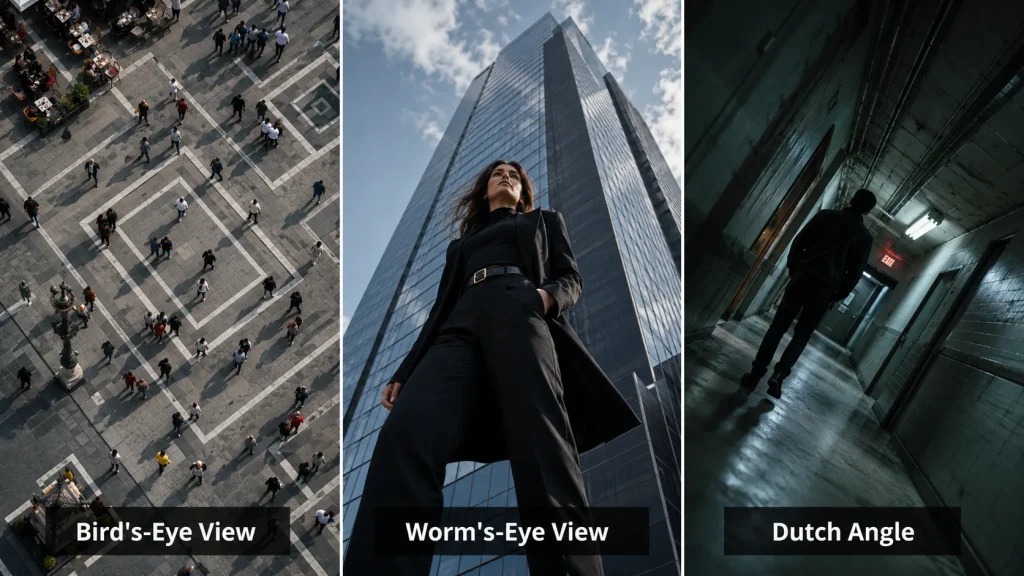
Bird’s-Eye View
A bird’s-eye view looks almost directly down at a scene. Unlike a normal high-angle shot, it focuses less on individual subjects and more on patterns, layouts, and movement across the frame.
It is commonly used for city streets, room layouts, food arrangements, crowds, sports formations, and dance choreography. For example, people moving through a square can create a strong visual pattern from above.
In AI video, this angle works best for walking, moving vehicles, changing shadows, or rearranging objects. It is less effective when facial detail is important.
Worm’s-Eye View
A worm’s-eye view places the camera extremely close to the ground and points sharply upward. It is more dramatic than a standard low-angle shot and creates an exaggerated sense of height and scale.
This angle is often used for skyscrapers, monsters, robots, statues, fantasy characters, and bold advertising. A character viewed from this position can feel heroic, threatening, or larger than life.
For image-to-video generation, keep movement slow and controlled. Complex actions may require the model to reconstruct partially hidden body parts, clothing, or background details.
Dutch Angle
A Dutch angle tilts the camera so the horizon is no longer level. The imbalance creates tension and makes the scene feel unstable, chaotic, surreal, or psychologically uncomfortable.
It is common in horror, thrillers, action sequences, music videos, and scenes where a character feels confused or loses control. A slightly tilted hallway, for example, can make an otherwise normal location feel unsettling.
In AI video, avoid combining a strong tilt with heavy rotation or shaking. Too much movement can look like accidental distortion rather than a deliberate cinematic effect.
Shoulder-Level Angle
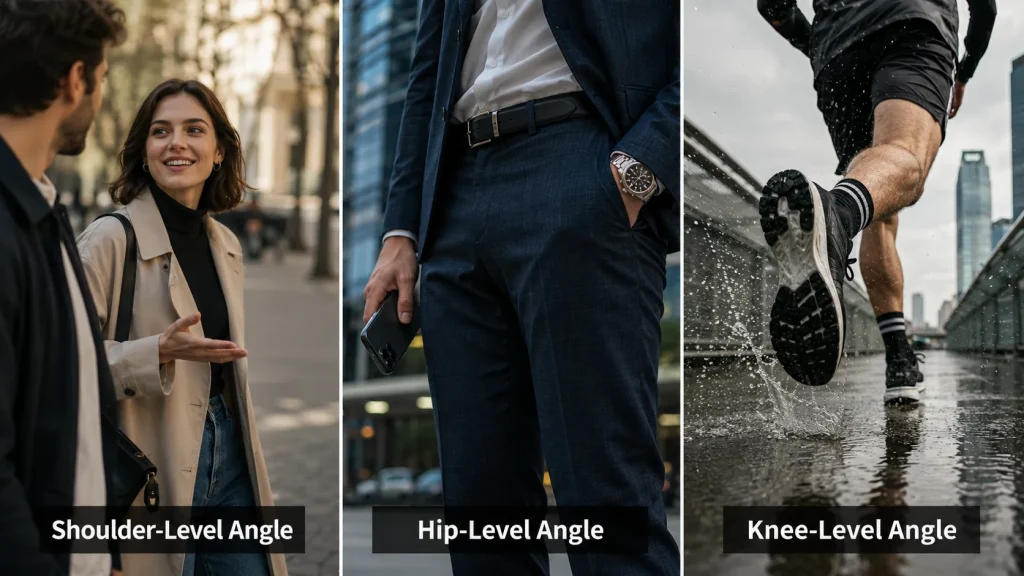
A shoulder-level angle places the camera around the subject’s shoulders. It sits slightly below eye level, creating a natural composition with more depth and body language.
This angle works well for conversations, walking scenes, fashion videos, and medium shots. It can show facial expressions while keeping clothing, posture, and gestures visible.
For image-to-video generation, shoulder-level images are relatively flexible. They usually support head turns, upper-body movement, and slow walking without creating the strong distortion seen in more extreme angles.
Hip-Level Angle
A hip-level angle positions the camera around the subject’s waist. It shifts attention from the face to the hands, clothing, accessories, posture, or objects carried near the body.
The angle is closely associated with Western films, but it is also common in fashion, lifestyle advertising, street photography, and product demonstrations. A close view of a hand reaching for an object can create anticipation.
In AI video, hip-level shots work well for fabric movement, walking, hand gestures, and product interaction. They are less suitable when facial emotion is the main focus.
Knee-Level Angle
A knee-level angle places the camera near the subject’s knees. It emphasizes the legs, feet, speed, and direction of movement while making the subject appear more energetic or imposing.
This angle is often used in running scenes, sports videos, shoe advertisements, dance, parkour, and chase sequences. Showing footsteps from this height can make movement feel faster and more dynamic.
In AI-generated video, use controlled leg motion. Jumping, spinning, crossing legs, or sudden direction changes may cause unstable joints and inconsistent foot placement.
Ground-Level Angle
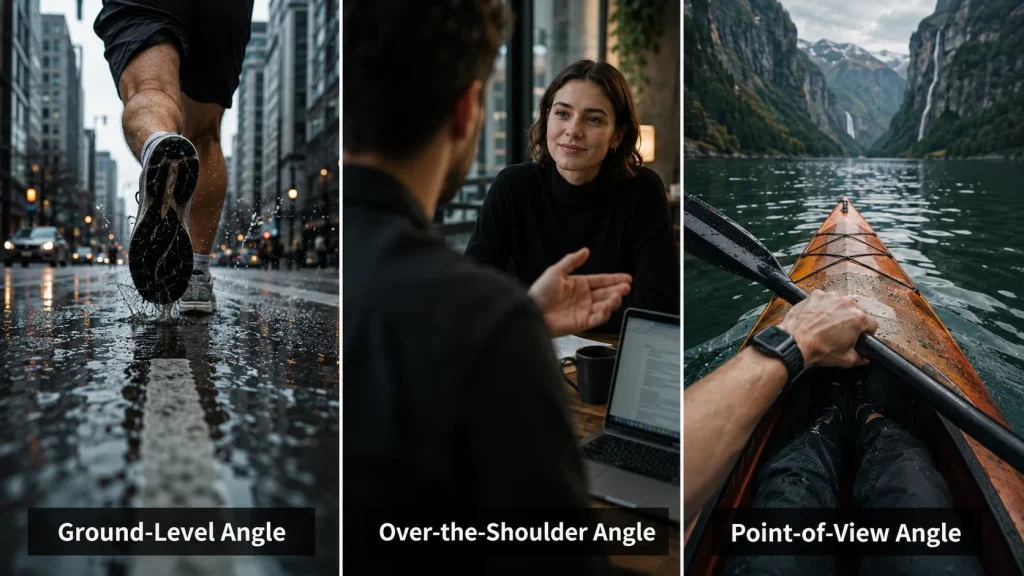
A ground-level angle places the camera directly on or close to the ground. The lens may point upward, but it can also remain horizontal to focus on feet, wheels, reflections, or foreground textures.
This angle is useful for car videos, footwear ads, animals running, action scenes, and dramatic entrances. A vehicle passing close to the lens, for example, can feel faster and more immersive.
In AI video, keep floor lines and vanishing points consistent. Changes in the road, floor, or surface perspective can quickly make the scene look artificial.
Over-the-Shoulder Angle
An over-the-shoulder shot frames a person, object, or screen from behind another character’s shoulder. It helps viewers understand who is looking at whom and how subjects relate within the scene.
This angle is common in conversations, phone interactions, tutorials, gaming videos, and narrative scenes. It can create intimacy, tension, or the feeling of observing a private exchange.
For image-to-video generation, keep movement subtle. Foreground shoulders, hair, and hands may become unstable when characters turn too far or interact too closely.
Point-of-View Angle
A point-of-view, or POV, angle shows the scene through a character’s eyes. It places the viewer inside the action instead of showing it from an outside perspective.
POV shots are widely used in travel, gaming, driving, sports, cooking, unboxing, parkour, and immersive storytelling. Reaching toward an object or moving through a location can make the viewer feel directly involved.
In AI video, camera motion should remain smooth and believable. Fast turns, heavy shaking, and rapidly changing backgrounds may cause objects and environments to lose their structure.
Camera Angle vs. Shot Size vs. Camera Movement
Camera angles are only one part of visual composition. A complete shot also depends on framing, subject size, and movement.
| Term | What It Controls | Common Examples |
| Camera angle | Where the camera views the subject from | Eye-level, high angle, low angle |
| Shot size | How much of the subject appears | Close-up, medium shot, wide shot |
| Camera movement | How the camera moves during the shot | Pan, tilt, tracking, zoom |
| Framing | How subjects are arranged in the image | Over-the-shoulder, two-shot, centered framing |
A close-up is not a camera angle because it describes the amount of the subject shown. A pan is not a camera angle because it describes horizontal camera movement.
These elements can be combined. A scene might use a high-angle wide shot with a slow forward movement, or an eye-level close-up with a completely fixed camera.
How Camera Angles Affect Image-to-Video Results
The source image establishes the basic perspective of an AI-generated video. Its camera height, lens direction, subject proportions, and visible background all influence what the model can animate successfully.
A model can add motion, but it cannot always change the entire viewpoint without rebuilding parts of the scene that were never visible.
For example, converting a front-facing portrait into a side view may require the model to invent the side of the face, hairstyle, ears, clothing, and background. The larger the perspective change, the greater the chance of inconsistency.
Natural Angles Usually Produce More Stable Motion
Eye-level and shoulder-level images tend to be easier to animate because the face and body appear in familiar proportions. They are suitable for blinking, smiling, speaking, turning slightly, and moving the upper body.
Extreme low angles, top-down views, and tilted compositions can still create strong videos, but they are generally more sensitive to movement.
The Angle Should Match the Intended Action
The best source angle depends on what needs to move.
An eye-level portrait is suitable for facial expression. A hip-level image works better for clothing and hand movement. A knee-level image emphasizes walking or running. A bird’s-eye view is better for movement across a larger space.
Choosing the angle before generating the source image can reduce distortion and make the final video feel more intentional.
Extreme Perspective Increases Generation Difficulty
Unusual angles contain more foreshortening, hidden areas, and distorted proportions. These effects may look correct in a still image but become unstable once the subject starts moving.
When using an extreme angle, simple motion is often more effective than complex action. Subtle movement allows the composition to remain recognizable while preserving the dramatic viewpoint.
Frequently Asked Questions
What are the main types of camera angles?
The most common camera angles include eye-level, high angle, low angle, bird’s-eye view, worm’s-eye view, Dutch angle, shoulder-level, hip-level, knee-level, ground-level, over-the-shoulder, and point-of-view.
What is the most natural camera angle?
The eye-level angle is usually the most natural because the camera is positioned close to normal human eye height. It creates a balanced and realistic relationship between the viewer and the subject.
Which camera angle makes a person look powerful?
A low-angle shot usually makes a person look taller, stronger, and more authoritative. A worm’s-eye view creates an even more exaggerated sense of scale and power.
Which camera angle is best for AI video?
Eye-level and shoulder-level images are generally the most stable for AI video, especially for portraits, beauty content, interviews, and natural character movement. More extreme angles can produce cinematic results but usually work better with simpler motion.
Final Thoughts
The best camera angle is not always the most dramatic one. It is the angle that matches both the intended emotion and the movement the scene needs.
For dialogue, portraits, and facial animation, eye-level and shoulder-level images usually offer more flexibility. For scale, tension, or stronger visual impact, low angles, bird’s-eye views, and Dutch angles can be more effective, but they work best with slower, more controlled motion.
Before creating a video, decide what viewers should feel, where their attention should go, and how much movement the scene requires. Once the angle is clear, you can upload the image to an AI image-to-video generator and test subtle motion first. A well-chosen source image often does more for the final result than adding complex camera movement later.