
What Is an AI Clone Video Maker and Why Does Cost Matter?
Understanding AI clone video technology helps you make smarter purchasing decisions and avoid overpaying for features you don’t need.
How AI Clone Video Technology Works
AI clone video makers use machine learning to create digital avatars that look and sound like real people. The process typically involves three components: visual generation (creating the avatar from photos or video samples), voice cloning (replicating speech patterns and tone), and lip-sync technology (matching mouth movements to audio).
You upload a photo or short video of yourself, the AI analyzes facial features and movements, and generates new video content where your digital clone speaks whatever script you provide. Some tools handle all three components, while others specialize in one area.
Why “Cheap” Doesn’t Have to Mean Low Quality
The quality vs. price trade-off isn’t as dramatic as you might expect. Many affordable tools now produce results that most viewers can’t distinguish from expensive alternatives.
The real differences between budget and premium tools often come down to usage limits (how many videos you can create), features (custom backgrounds, multiple avatars), and convenience (rendering speed, export options). A $8/month tool and a $50/month tool might produce visually similar results—the premium price typically buys you higher volume limits and advanced features rather than better base quality.
Understanding AI Video Pricing Models
Before comparing specific tools, you need to understand how AI video services charge. This knowledge prevents surprise bills and helps you calculate true monthly costs.
Subscription vs. Pay-Per-Use: Which Saves More Money?
Subscription models ($8-50/month) charge a flat monthly fee for a set number of credits or minutes. This works best if you create videos consistently—say, 10-20 videos monthly for social media content.
Pay-per-use models charge only when you generate content. No monthly commitment means no wasted money during slow periods. This suits creators who need occasional videos—perhaps 2-5 per month for client projects or specific campaigns.
Here’s the math: If you create 5 videos/month, a pay-per-use model at $1-2 per video costs $5-10 total. A $29/month subscription wastes $19+ on unused capacity. But if you create 25 videos/month, that same subscription becomes excellent value at roughly $1.16 per video.
Hidden Costs to Watch For
Credit-based pricing creates confusion by design. Watch for these common traps:
-
Credit expiration: Many plans reset unused credits monthly—you lose what you don’t use
-
Rendering fees: Some tools charge extra for HD or 4K exports
-
Watermark removal: “Free” plans often require paid upgrades to remove branding
-
Multi-tool stacking: Needing separate subscriptions for voice cloning, avatar generation, and video editing
Key Takeaway: Always calculate your actual cost-per-video based on realistic usage, not the marketed monthly price.
Cloud-Based vs. Local Processing
Cloud-based tools run in your browser with no hardware requirements. You pay for processing time, but there’s no upfront investment. This is where most budget creators start.
Local AI tools require a capable GPU (usually $500+ investment) but offer free processing afterward. Unless you’re creating hundreds of videos monthly, cloud-based tools provide better value for budget creators due to lower entry barriers.
Best Cheap AI Clone Video Makers Compared (2026)
Now for the practical comparison. We focus on tools that deliver real value for budget-conscious creators.
Budget-Friendly Paid Options ($5-15/Month)
These tools offer the sweet spot between free limitations and enterprise pricing:
| Tool | Price | Output Limits | Best For | Key Limitation |
| D-ID | $5.99/mo | Limited minutes | Photo-to-video avatars | Strict minute caps |
| Pika | $8/mo | Fast generation | Experimental clips, creative styles | Watermarks |
| Kling AI | $10/mo | 33 standard videos | Good qaulity generation | Learning curve |
| AI Image to Video | $5.99/mo | 32 standard videos | Limited budget | No audio with basic model |
D-ID offers the lowest entry point at $5.99/month for basic avatar creation from photos. It’s ideal for creators who need occasional talking-head videos without extensive customization.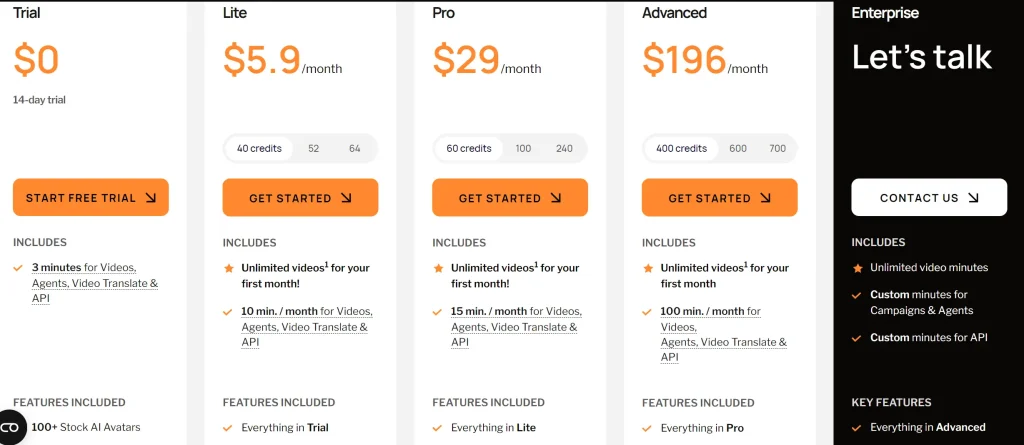
Pika plan at $8/month provides solid value with 700 credits monthly and creative styles. But the standard plan do not include watermarks removal.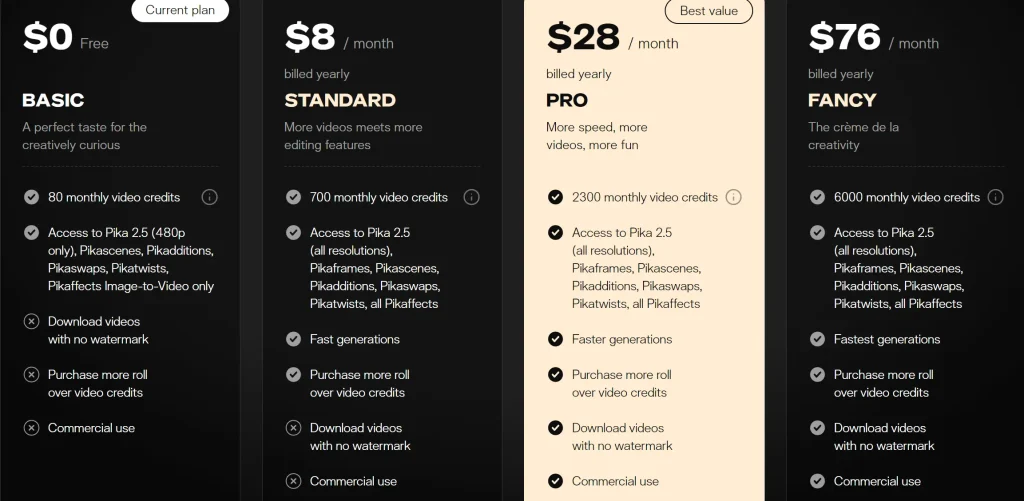
Kling AI at $10/month($6.99 first month with 30% off) delivers strong video generation capabilities with competitive pricing, though the interface requires some learning time.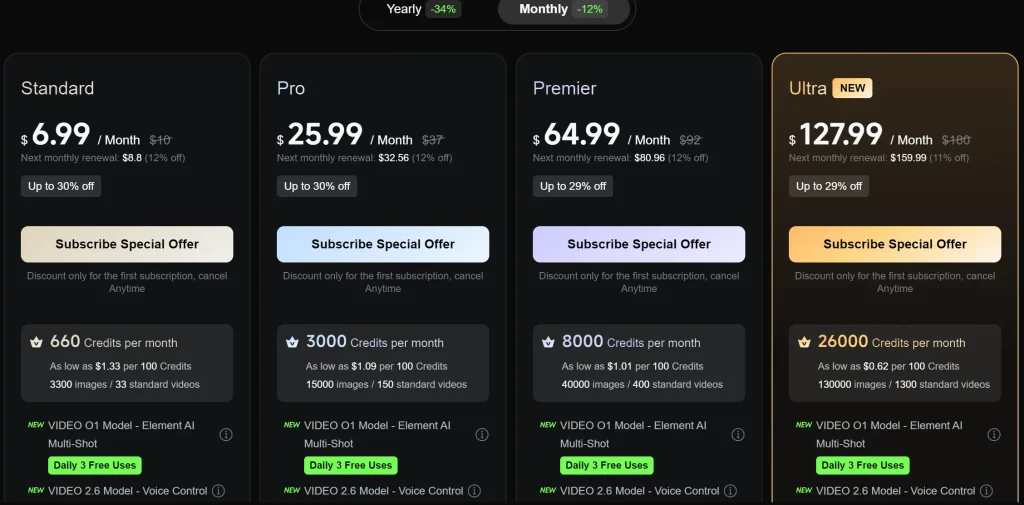
AI Image to Video at $5.99/month is built for limited budgets, offering up to 32 standard image-to-video generations, though the basic model does not include audio support.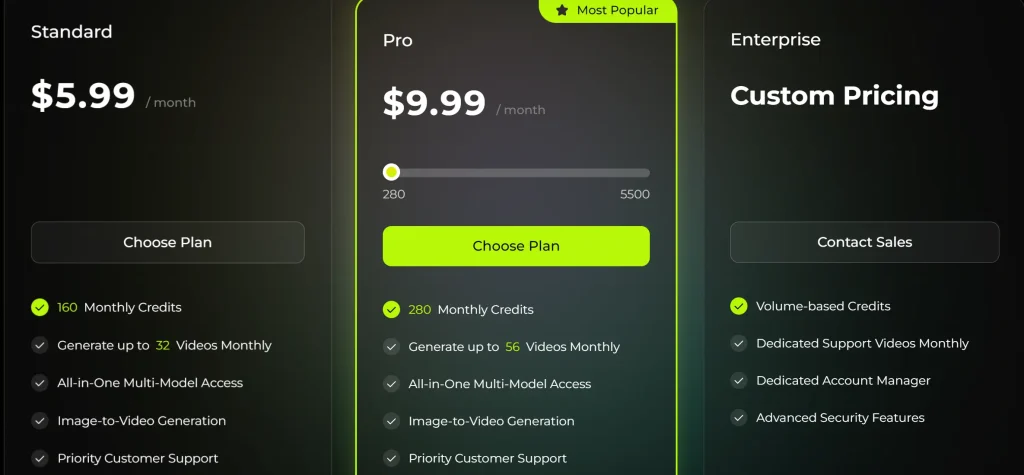
Free Tiers Worth Using
Free options exist, but you need realistic expectations about what they deliver:
-
Qwen: Unlimited free video generation—genuinely useful for experimentation and drafts
-
Meta AI: Free through the mobile app, produces 8-20 second videos (mobile-only limitation)
-
DomoAI: Free tier includes commercial rights—rare for free tools
-
HeyGen Free: Limited daily creations with watermark, good for testing before subscribing
The watermark issue affects most free tiers. If you need watermark-free exports without paying monthly, look for pay-per-use alternatives like GStory Video Enhancer, which offers credit-based pricing without subscription commitment.
Tools to Avoid on a Budget
Save yourself time by skipping tools where free tiers are essentially demo-only:
Synthesia starts at $29/month minimum—excellent for enterprise training videos but oversized for individual creators or small businesses.
Creatify pricing begins at $39/month with complaints about credit limitations. One G2 reviewer noted they dislike “how little credits you get for a steep monthly subscription.”
These tools target business accounts with higher video volumes. Budget creators get better value elsewhere.
Smart Workflow: Combining Free Tools for $0 Videos
Here’s where you can genuinely create AI clone videos without spending money—by strategically combining free tiers from different tools.
The $0 Video Creation Stack
This workflow uses multiple free tools to produce complete videos:
-
Qwen – Generate base video content (free, unlimited generation)
-
ElevenLabs free tier – Clone voice or use stock voices (limited free minutes monthly)
-
D-ID trial or HeyGen free – Add lip-sync and avatar (limited creations)
-
GStory Video Enhancer – Upscale to 4K quality (50 free credits on signup, then pay-per-use)
Practical tips for maximizing free limits:
-
Create all your video scripts first, then batch your free tier usage
-
Use stock avatars instead of custom clones to conserve D-ID/HeyGen limits
-
Save custom voice cloning for your most important projects
-
Export at standard quality from free tools, then enhance only final versions
When to Upgrade: Signs You’ve Outgrown Free Tools
Free tools work for testing and occasional projects. Consider upgrading to the $8-15/month tier when:
-
You need watermark-free exports for professional or commercial use
-
Rendering times on free tools slow your workflow
-
You’re creating 5+ videos weekly consistently
-
Client projects require commercial licensing clarity
The $8-15/month tier hits the value sweet spot for most side hustlers and small businesses who’ve validated their video content strategy with free tools first.
Real Cost Scenarios for Different Creator Types
Abstract pricing doesn’t help you plan your budget. Here are concrete recommendations for specific situations.
Small Business Owner (5-10 Videos/Month)
Recommended stack: HeyGen Explorer ($8/mo) or D-ID ($5.99/mo) + occasional GStory credits for enhancement
Total monthly cost: Under $15
This covers sporadic needs like product demos, training videos, and social media content without subscription bloat. The pay-per-use model for video enhancement means you only pay when you actually need higher quality output.
Side Hustle Creator (YouTube/TikTok)
Recommended approach: Start with free tools (Qwen + free tiers) while testing content ideas. Upgrade to Kling AI ($9/mo) or Pika ($8/mo) once you’re monetized or have validated your content format.
Total monthly cost: $0-20 depending on volume
First-Time User Testing AI Video
Recommended path: Use free tools exclusively for your first month.
-
Week 1-2: Experiment with Qwen and Meta AI to understand AI video capabilities
-
Week 3-4: Test HeyGen’s free tier for avatar-based content
-
Create 3-5 test videos before committing any money
Several tools offer trials without credit card requirements—take advantage of these to evaluate quality risk-free.
FAQs About Cheap AI Clone Video Makers
Can I Make AI Clone Videos for Free Without Watermarks?
Yes, but options are limited. Qwen and DomoAI offer watermark-free exports on their free tiers. Most other “free” tools add watermarks that require paid plans to remove. For occasional watermark-free needs without subscriptions, pay-per-use tools like GStory let you pay only for the exports you need.
What’s the Cheapest Way to Clone My Own Voice and Face?
Combine ElevenLabs ($5/mo) for voice cloning with D-ID ($5.99/mo) or HeyGen ($8/mo) for avatar creation. Total: $11-13/month for full clone capability with both your voice and face.
Free alternative: Use stock avatars with ElevenLabs’ free tier voices—you lose personalization but pay nothing.
Are Cheap AI Clone Videos Good Enough for Professional Use?
Budget tools in the $5-15/month range produce results suitable for social media, YouTube content, and small business marketing. Most viewers genuinely cannot distinguish $8/month tool output from $50/month output.
Enterprise-level quality for corporate training or broadcast typically requires Synthesia ($29+) or custom solutions—but that’s overkill for most independent creators.
Which Tool Has the Best Pay-Per-Use Model?
For creators who want to avoid subscription lock-in entirely:
-
AI Image to Video: Credit-based video creation, no subscription required
-
RecCloud: Flexible pricing from $1-9/week options
-
API access from various providers for developers comfortable with technical setup
Pay-per-use works best for occasional creators who’d waste money on monthly subscriptions they don’t fully use.
Conclusion
Creating AI clone videos doesn’t require expensive subscriptions. Free tools like Qwen and HeyGen’s free tier cover experimentation and basic needs. Budget paid options from D-ID ($5.99/mo), and Kling AI ($9/mo) deliver professional results without premium pricing.
For creators who hate subscription fatigue, pay-per-use platforms eliminate monthly commitments entirely. The key is matching your tool choice to your actual usage patterns—not paying for capacity you won’t use.
Next Step: Start with the free tools in this guide to test AI clone video creation risk-free. Once you know your actual video volume, choose the budget tier that matches your real needs. Bookmark this guide for updated pricing as the AI video market continues evolving through 2026.






