
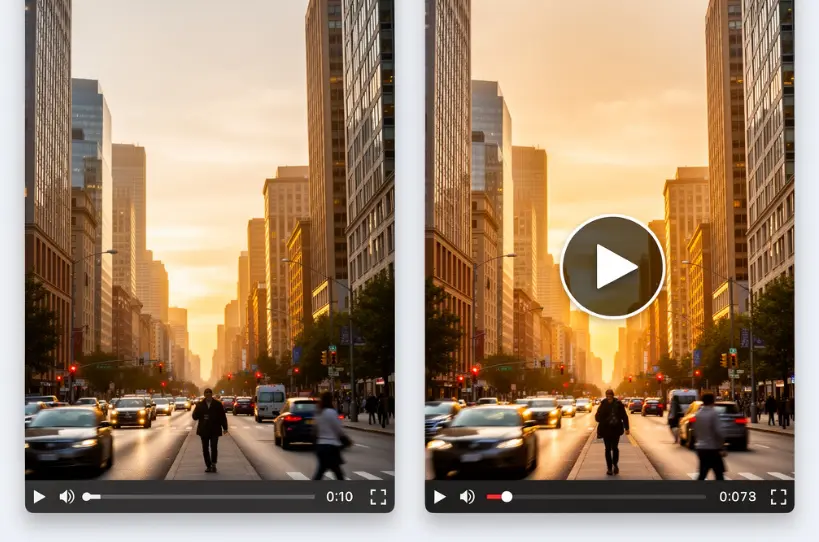
Videos generate 1200% more shares than text and images combined. Yet creating them traditionally requires expensive equipment, complex software, and hours of editing. For content creators racing to post daily across TikTok, Instagram, and YouTube, this gap between demand and production capacity feels impossible to bridge.
AI image-to-video technology changes everything. Tools like Yeschat AI image to video transform static photographs into dynamic, engaging videos in seconds—without requiring technical expertise or expensive subscriptions. Whether you’re showcasing products, building a personal brand, or creating viral social content, AI-powered video generation puts professional results within reach.
This guide explores how Yeschat AI image to video technology works, examines real-world use cases across industries, and walks you through creating your first AI-generated video. By the end, you’ll understand exactly how to leverage this technology for your content strategy.
What is Yeschat AI Image to Video and How Does It Work?
Yeschat AI image to video technology uses machine learning models to analyze static images and generate motion, essentially “imagining” how elements in a photograph would naturally move. The technology has evolved rapidly, with platforms now offering realistic motion, consistent character preservation, and high-definition output.
Understanding AI-Powered Image Animation
At its core, Yeschat AI image to video works through several processes. Motion prediction algorithms analyze the image to understand depth, subject positioning, and natural movement patterns. Frame interpolation generates the frames between the starting image and predicted motion states. Temporal consistency ensures smooth transitions without visual artifacts.
Modern AI models like Kling, Veo, and Wan have solved many early limitations. These models understand real-world physics—how fabric drapes, how hair moves in wind, how water ripples. The result is motion that feels natural rather than artificial.
Types of AI Video Generation: Image-to-Video vs Text-to-Video
Content creators have two primary AI video generation approaches:
Image-to-Video: You provide a starting image, and AI generates motion from it. This offers maximum control over visual style and composition. Perfect for product photos, personal branding shots, or any scenario where you need specific visual elements.
Text-to-Video: You describe what you want, and AI generates both the visuals and motion. Faster for conceptual content but less control over exact appearance.
Many creators combine both—using text-to-video for initial concepts, then image-to-video for polished final content with specific visual requirements.
Why Content Creators Are Adopting Yeschat AI Image to Video
The shift toward AI video creation isn’t a trend—it’s a response to platform algorithms that increasingly prioritize video content. Instagram’s algorithm favors Reels. TikTok is entirely video-native. Even LinkedIn now pushes video content to the top of feeds.
Traditional video production creates significant barriers. Professional cameras, lighting equipment, and editing software subscriptions add up quickly. Learning curve alone can take months. For solo creators competing against well-funded production teams, the economics simply don’t work.
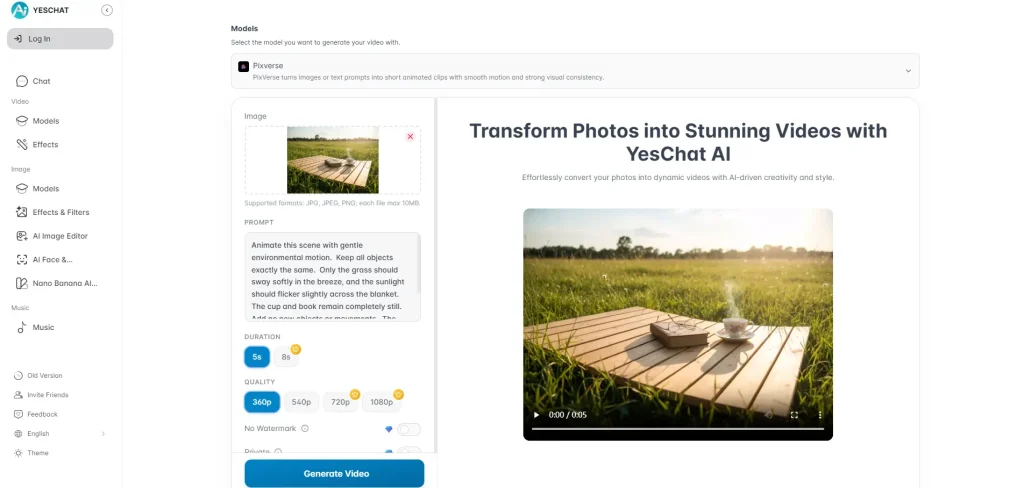
Yeschat AI image to video levels this playing field. A single creator with a smartphone and an AI video tool can now produce content that rivals studio productions. No editing software required. No hours of post-production. Upload an image, add a prompt describing the desired motion, and receive a finished video in under a minute.
Real-World Use Cases for Yeschat AI Image to Video
Understanding the technology matters less than knowing how to apply it. Here are proven use cases that content creators are leveraging today.
Social Media Content Creation
Short-form video platforms reward consistent posting. Yeschat AI image to video transforms your existing photo library into fresh video content.
Practical applications:
- Convert product flat-lays into rotating showcase videos
- Transform behind-the-scenes photos into engaging story content
- Animate lifestyle imagery for aesthetic feed posts
- Create eye-catching transitions from static portraits
One photographer on Reddit reported transforming a single product shoot into a week’s worth of video content using AI animation. The time savings alone justified the tool investment.
E-commerce and Product Marketing
Static product images convert. Animated product videos convert better. Studies show video content on product pages increases purchase likelihood by up to 85%.
E-commerce applications include:
- 360-degree style animations from multiple product photos
- Feature highlight videos zooming into product details
- Lifestyle context videos showing products in use
- Social ad content that stops the scroll
For creators seeking professional results with 4K resolution and no watermarks, platforms like AI Image to Video offer batch processing capabilities—essential when producing content across multiple product SKUs.
Personal Branding and Storytelling
Personal brands thrive on connection. Static headshots feel distant. Animated portraits feel alive.
Content creators use Yeschat AI image to video generation to:
- Transform professional headshots into dynamic LinkedIn content
- Create animated “about me” sections for websites
- Develop narrative sequences from event photography
- Build emotional resonance through animated memories and milestones
The key is subtlety—slight movements, gentle camera effects, and natural motion that enhances rather than distracts from your message.
Educational and Tutorial Content
Educational content benefits enormously from visual motion. Complex diagrams become clearer when elements animate in sequence. Step-by-step processes gain clarity when visuals demonstrate rather than just describe.
Use cases include:
- Animating infographics to emphasize key data points
- Creating motion graphics from static presentation slides
- Bringing process flowcharts to life with directional movement
- Developing engaging thumbnail animations for course content
Step-by-Step: How to Create Videos from Images with Yeschat AI Image to Video
Theory becomes valuable only through application. Here’s your practical workflow for generating AI videos from images.
Choosing the Right Image for AI Video
Not all images animate equally well. For best results:
Do choose:
- High-resolution images (1080p minimum, 4K preferred)
- Clear subject focus with defined depth
- Images with natural movement potential (flowing fabric, dynamic poses)
- Well-lit photographs with balanced exposure
Avoid:
- Complex scenes with many competing elements
- Images with prominent hands in detailed poses (AI still struggles here)
- Heavily compressed or low-quality source files
- Static objects with no logical motion potential
Writing Effective Prompts for Better Results
Your prompt guides the AI’s motion decisions. Be specific about:
Action words: “gently sway,” “slowly rotate,” “subtle breathing motion”
Camera movement: “slow zoom in,” “pan left to right,” “static camera with subject motion”
Mood descriptors: “cinematic,” “dreamy,” “energetic,” “peaceful”
Example prompt: “Gentle breeze moves the subject’s hair, subtle breathing motion visible, camera slowly zooms in on face, cinematic mood with soft background blur.”
Generating, Reviewing, and Iterating
The generation process typically follows these steps:
- Upload your selected image (JPG, PNG, typically under 10MB)
- Select settings: aspect ratio, duration (usually 4-10 seconds), motion intensity
- Enter your prompt describing desired motion
- Generate and wait (typically 30-90 seconds)
- Review the output for quality and alignment with intent
- Iterate if needed by adjusting prompt or settings
Most experienced creators generate 2-3 versions before selecting their final output. Don’t expect perfection on the first try—refinement is part of the process.
Tips for Better Yeschat AI Image to Video Results
Veterans in the AI video space have developed reliable strategies for consistent quality.
Image Preparation Best Practices
Before uploading, consider light enhancement in standard photo editors. Balanced exposure and proper contrast give AI models more visual information to work with. Some creators apply subtle sharpening to ensure details translate clearly into motion.
Prompting Strategies That Work
Layer your instructions from broad to specific. Start with overall mood, then add subject action, then camera movement. This hierarchy helps AI prioritize correctly.
Avoid conflicting instructions—”fast zoom” and “subtle movement” work against each other. Be consistent in your directional vision.
Post-Production Enhancement
AI-generated videos often benefit from minimal post-processing:
- Audio addition: Music or ambient sound dramatically increases engagement
- Color grading: Minor adjustments for brand consistency
- Text overlays: Captions, titles, or call-to-action elements
- Clip combination: Joining multiple short generations into longer sequences
FAQs of Yeschat AI Image to Video
Is Yeschat AI image to video really free?
Most platforms offer free tiers with limitations—watermarks, lower resolution, or daily generation caps. “Unlimited free” claims often have catches. Premium tiers (typically $10-30/month) remove restrictions and add features like 4K output and batch processing. Evaluate based on your actual usage needs.
How long can AI-generated videos be?
Current technology typically generates 4-10 second clips per generation. Longer videos require either premium tools with extended generation or manually combining multiple clips with transition effects. Tools like Kling AI push toward 2-minute generations, but these require higher-tier subscriptions.
Why do hands and faces sometimes look distorted?
AI models struggle with anatomically complex elements because training data may lack sufficient examples of varied hand positions and expressions. Workarounds include choosing source images where hands are partially hidden or naturally positioned, and avoiding prompts that request complex hand movements.
Can I use AI-generated videos commercially?
Most platforms permit commercial use under their standard terms. However, verify each platform’s specific licensing. Rights may vary based on subscription tier. When in doubt, check terms of service or contact platform support directly.
Conclusion
Yeschat AI image to video technology has fundamentally shifted what’s possible for content creators. The barriers that once separated amateur content from professional production—expensive equipment, technical expertise, production time—have largely dissolved.
From social media engagement to e-commerce conversion, the use cases are proven and expanding. Content creators who integrate Yeschat AI image to video tools into their workflow gain significant competitive advantages: faster production, consistent output, and the ability to transform existing image libraries into fresh video content.
Start experimenting today. Begin with your best-performing static images. Apply the prompting techniques from this guide. Test different motion styles and settings. The learning curve is minimal, and the potential return—in engagement, conversions, and creative capability—is substantial.
For creators ready for professional-grade output, platforms offering 4K resolution, no watermarks, and batch processing capabilities provide the tools needed to scale content production without sacrificing quality.






