
If you’re getting wildly different results from the same prompt, it’s not “bad luck.” It’s usually missing structure.
After generating a lot of AI clips, here’s what consistently separates videos that flop from videos that get replayed: a clear hook + one visible action + tight timing. Most creators overstuff prompts, don’t control the camera, and accidentally ask the model to do three things at once. That’s how you get flicker, drift, weird hands, and a “plastic” look.
This guide gives you a reliable system and 12 copy-paste templates you can adapt fast—plus a shot-by-shot timing blueprint made for YouTube Shorts.
The 6-Part Prompt Formula Behind Viral Shorts
Every strong AI prompt for creating viral videos on YouTube can be reduced to six parts. This matters because models “obey” prompts best when you make the goal unambiguous.
AI video generator prompt examples: Subject + Conflict + Visible Action + Payoff + Constraints + 9:16 Specs
Use this as your base structure:
- Subject: exactly what’s on screen (be specific)
- Conflict: what’s wrong / what’s surprising / what’s at risk
- Visible Action: one clear movement the model can render
- Payoff: the reveal or satisfying end state
- Constraints: what must NOT happen (hands, text, extra characters, chaotic physics)
- 9:16 Specs: vertical format for Shorts
Template (copy-paste):
[SHOT TYPE], [SUBJECT], [CONFLICT], [ONE VISIBLE ACTION], [PAYOFF],
[STYLE/LOOK], [CAMERA], [LIGHTING], [AUDIO], [CONSTRAINTS], 9:16, 10s
Quick example (works as a baseline):
Medium shot, golden retriever puppy staring at a locked treat jar, frustrated but cute,
jar lid twists open by itself, puppy reacts in shock, cozy home lighting,
locked camera, stable exposure, subtle whoosh + soft room tone,
no text, no extra hands, single subject, 9:16, 10s
Why Front-Loading Beats Long Prompts
In most AI video generator prompts, the model pays the most attention to the first line. So don’t bury the important stuff.
Bad (too long, too many actions):
Create a cinematic video where a person walks through a forest, birds fly, the camera pans,
then reveal a waterfall, then zoom into the face, then...
Better (front-loaded and clear):
Wide shot, woman walking through forest, golden hour, slow pan reveals waterfall,
cinematic look, ambient nature sounds, stable exposure, 9:16, 10s
Rule of thumb: keep it tight, and only ask for one visible action per shot.
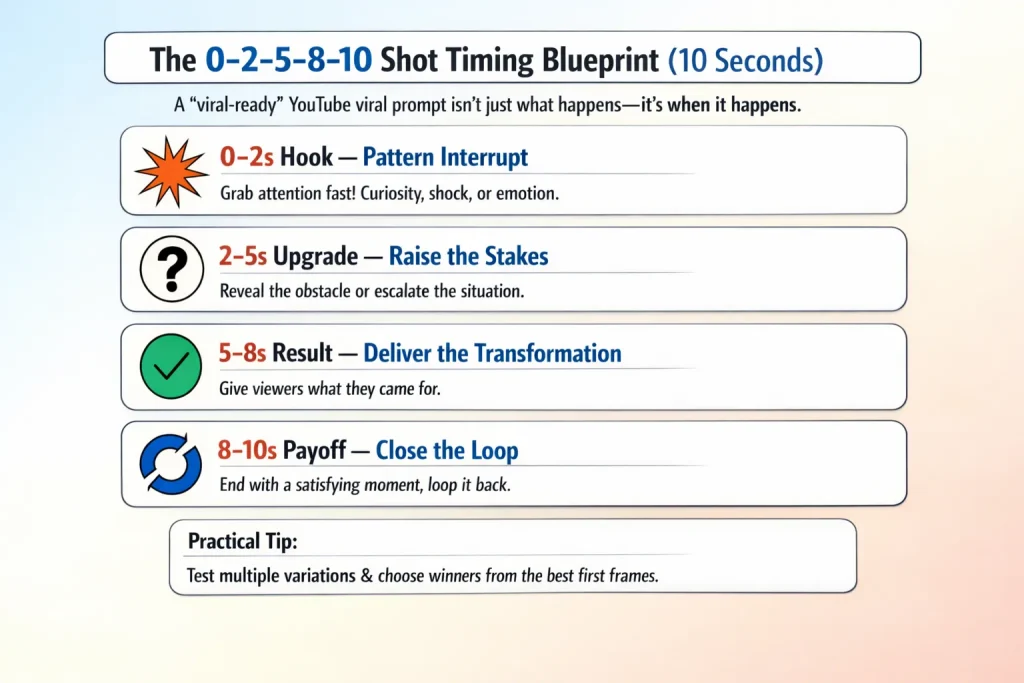
The 0–2–5–8–10 Shot Timing Blueprint (10 Seconds)
A “viral-ready” YouTube viral prompt isn’t just what happens—it’s when it happens.
0–2s Hook — Pattern Interrupt
Show the strongest visual immediately. Curiosity, shock, or emotion.
2–5s Upgrade — Raise the Stakes
Reveal the obstacle or make the situation weirder.
5–8s Result — Deliver the Transformation
Give viewers the thing they came for.
8–10s Payoff — Close the Loop
End with a satisfying beat that encourages replay (loop back to the opening if you can).
Practical tip: when testing, generate multiple variations and choose winners based on first frame quality.
Model-Ready Prompt Format (Use This For Any Template)
This format helps your prompts work across tools. Use it under every template as the “final prompt.”
[0-2s HOOK]: [shot + subject + conflict], [style], [camera], [lighting], [constraints], 9:16
[2-5s UPGRADE]: [shot + escalation], [camera], [constraints]
[5-8s RESULT]: [shot + single visible action + transformation], [lighting], [constraints]
[8-10s PAYOFF]: [shot + satisfying end/loop], [audio cue], [constraints], 10s total
Global constraints: locked or defined camera, consistent lighting/stable exposure, no text/logos,
avoid hands/extra fingers, single subject unless stated.
You can paste this into tools that support multi-shot prompting. If your tool only takes one prompt, combine the four lines into one paragraph and keep each segment short.
12 Copy-Paste Templates (With Shot-by-Shot Timing)
Below are best AI prompts for YouTube in template form. Each includes the 0–2–5–8–10 mapping so you can publish faster.
Shorts Reversal Templates (3)
Template 1 — Before/After Reversal
Use when: satisfying transformation, restoration, glow-ups.
Copy-paste:
0-2s: Close-up, [damaged/worn subject], looks hopeless, crisp detail, 9:16.
2-5s: Medium, tension builds as [problem detail] becomes obvious, locked camera.
5-8s: The subject [single transformation action] (repair/clean/rebuild), stable exposure.
8-10s: Reveal pristine result, satisfying finish, subtle loop back to first frame, 10s.
Style: [cinematic/clean/ASMR], Audio: [whoosh/click/soft hum]
Constraints: no text, no extra hands, no morphing objects, single subject.
Example:
0-2s: Close-up, rusted vintage watch face, scratched and dull, 9:16.
2-5s: Medium, reveal cracked glass and frozen hands, locked camera.
5-8s: Watch repairs itself—glass seals, hands start moving, stable exposure.
8-10s: Reveal showroom shine, satisfying click, ends on same angle as opening, 10s.
Style: clean cinematic, Audio: soft whoosh + click
Constraints: no text, no hands, single subject.
Template 2 — Expectation Subversion
Use when: cute + weird = replay.
Copy-paste:
0-2s: Normal scene: [familiar setting], medium shot, calm.
2-5s: Unexpected element enters: [tiny/absurd subject] appears, eye-level.
5-8s: One clear interaction: [single action], reaction beat.
8-10s: Payoff reveal: [twist/reveal], end on a loopable frame.
Style: warm/comedy, Audio: cafe room tone + tiny "pop"
Constraints: no text, avoid crowds, keep action simple.
Template 3 — Time Reversal
Use when: “how did that happen?” effect.
Copy-paste:
0-2s: End state shown: [broken/messy result], dramatic close-up.
2-5s: Camera tracks backward, pieces begin moving in reverse, stable exposure.
5-8s: One reversal action completes: [reassemble/undo], clean.
8-10s: Returns to perfect origin state, ends on the opening frame match.
Style: cinematic, Audio: reversed sound cue
Constraints: no text, no extra objects appearing.
Resonance Templates (3)
Template 4 — Emotional Echo
Use when: relatable struggle → micro win.
Copy-paste:
0-2s: Close-up, [relatable subject] looks defeated, small detail (tears/yawn/shake).
2-5s: Problem escalates: [tiny failure], tension.
5-8s: One visible win: [simple success action], expression changes.
8-10s: Quiet payoff: [satisfying calm moment], loopable ending.
Style: warm, Audio: soft room tone
Constraints: no text overlays, keep background simple.
Template 5 — Nostalgia Trigger
Use when: childhood objects + tactile detail.
Copy-paste:
0-2s: Macro close-up, [nostalgia object], instant recognition.
2-5s: Slow push-in, finger/interaction begins (avoid showing full hands if possible).
5-8s: Object activates: [single action], satisfying movement.
8-10s: Payoff: [memory-evoking detail], end on a clean loop.
Style: soft grain/VHS, Audio: click + whirr
Constraints: no text, hands obscured or out of frame.
Template 6 — Satisfaction Loop (ASMR)
Use when: organization, cleaning, symmetry.
Copy-paste:
0-2s: Overhead shot, messy chaos: [scattered items], high contrast.
2-5s: Items begin aligning, tension builds, locked camera.
5-8s: One organizing action completes: [sorting/stacking], perfect symmetry.
8-10s: Final grid revealed, satisfying tap sound, loop to chaos frame.
Style: clean, Audio: ASMR taps
Constraints: no text, avoid visible fingers, single surface.
Warning/Contrast Templates (3)
Template 7 — “Don’t Do This”
Use when: teaching via failure.
Copy-paste:
0-2s: Hook: [wrong approach] looks tempting, bold visual.
2-5s: Failure consequence hits: [mess/break/ruin], tension audio.
5-8s: Correct method appears: [simple alternative], clear action.
8-10s: Split-screen before/after payoff, loopable ending.
Style: instructional, Audio: alert + calm resolve
Constraints: no text on screen (use voiceover later).
Template 8 — “What They Don’t Tell You”
Use when: myth → reality reveal.
Copy-paste:
0-2s: Common belief visual: [normal expectation], eye-level.
2-5s: Reality cracks: [hidden problem appears], push-in.
5-8s: Reveal: [truth shown clearly], documentary feel.
8-10s: Payoff: "now you see it" final frame, replay loop.
Style: documentary, Audio: dramatic pause + room tone
Constraints: no text, keep scene minimal.
Template 9 — Hidden Danger
Use when: macro reveal, shock factor.
Copy-paste:
0-2s: Macro close-up, innocent-looking [subject], calm lighting.
2-5s: Danger reveals: [detail transforms/appears], tension audio.
5-8s: Consequence visualized: [simple impact], stable exposure.
8-10s: Freeze on the "oh no" frame, loop back to innocence.
Style: high contrast, Audio: low rumble
Constraints: no gore, no text, single subject.
Tutorial Template (1)
Template 10 — 3-Step Quick How-To (10 seconds)
Use when: “show me fast” tutorials.
Copy-paste:
0-2s Step 1 (Hook): Close-up, [setup action], instantly clear.
2-5s Step 2: Medium shot, [core technique], one visible action.
5-8s Step 3: Reveal shot, [final result], satisfying transformation.
8-10s Payoff: Before/after comparison frame, loopable ending.
Style: clean bright, Audio: light instructional pacing
Constraints: no text, no messy backgrounds.
E-commerce Templates (2)
Template 11 — Product Hero
Use when: premium product feel.
Copy-paste:
0-2s: Rotating hero shot of [product], premium lighting, 9:16.
2-5s: Feature highlight: [single feature action], close-up detail.
5-8s: Lifestyle context: product used in [simple scene], calm camera.
8-10s: Satisfying end frame: product centered, loopable rotation.
Style: commercial, Audio: soft swoosh
Constraints: no text/logos unless added later in edit.
Template 12 — Problem-Solution Sell
Use when: pain point → fix.
Copy-paste:
0-2s: Tight shot, pain point: [problem happens], instant frustration.
2-5s: Product enters: [product appears], clear framing.
5-8s: Solution in action: [single visible fix], stable exposure.
8-10s: Before/after split, satisfying payoff, loop to pain point.
Style: crisp, Audio: confident tone cue
Constraints: no text, avoid hands or hide them.
AI Prompts for YouTube Hooks: 8 Hook Starters You Can Reuse
Use these to generate your first 0–2s variation. They work great as AI prompts for YouTube hooks because they force a single, scroll-stopping visual.
- “Close-up: something impossible is already happening…”
- “A normal scene—but one detail is wrong…”
- “Macro shot: the tiniest movement reveals a big secret…”
- “The result is shown first—how did it get here?”
- “A satisfying mess—seconds from becoming perfect…”
- “A cute character panics—because the object won’t cooperate…”
- “A ‘safe’ object suddenly behaves dangerously (no gore)…”
- “A reveal is hidden in plain sight—zoom in…”
Common AI Video Failures (And the One-Line Fix Token)
These are the fastest “patches” to add to any AI video generator prompts.
Flickering
Add:
consistent lighting, stable exposure
Drifting / Random camera movement
Add either:
locked camera, static frame
or specify:slow 15-degree pan left/gentle push-in
Hand/Finger failure
Add:
hands out of frame
orhands obscured by object
Plastic / uncanny look
Add:
natural texture, organic materials, subtle imperfections, micro-detail
Your 5-Minute Workflow (Idea → Post)
- Pick a template (reversal / resonance / warning / tutorial / ecommerce)
- Fill the 6-part structure (subject, conflict, one action, payoff, constraints, 9:16)
- Map to 0–2–5–8–10 using the shot lines
- Generate 10 variations focusing on the hook frame
- Choose the winner by: first frame + stability + clarity (then edit, add text/VO in post)
If you want speed, use a platform that supports batch generation and multiple models—so one prompt can be tested across outputs fast. AI Image to Video is built for that multi-model, volume-based workflow and fits the “generate 10, pick 1” approach. AI Image to Video
FAQ: AI Prompt for Viral YouTube Videos
How long should my AI prompt be?
Short enough to stay clear. Focus on the first line: shot type + subject + conflict + one visible action.
Why does the same prompt look different every time?
Randomness and subtle model interpretation changes. If your tool supports seed control, lock seeds and test a small range to find stable winners.
Can AI videos be monetized on YouTube?
Potentially, but don’t publish raw generations. Add human creative input: editing, structure, voiceover, original narrative, and meaningful transformation.
