

With over 6.5 million YouTube views on a single Seedance 2.0 tutorial and daily Reddit threads debating whether Dreamina is “a scam” or “the best AI video tool of 2026,” ByteDance’s creative platform has become the most divisive name in AI video generation.
The trouble is finding trustworthy information. Most existing coverage reads like promotional material or angry forum rants. This guide synthesizes professional reviews, Reddit communities, YouTube creators, and official documentation to give you a balanced picture of what Dreamina actually offers, what it costs, and whether it fits your workflow.
What Is Dreamina AI?
ByteDance’s All-in-One AI Creative Suite
Dreamina AI is ByteDance’s free creative platform — formerly CapCut Dream Studio — that bundles text-to-image, text-to-video, image-to-video, audio generation, avatar creation, and canvas editing into a single tool. It houses flagship models like Seedance 2.0 for video and Seedream 4.5/5.0 for images, alongside third-party options like Sora 2 and Veo 3.1.
Dreamina vs. Jimeng AI — What’s the Difference?
Dreamina is the international edition of Jimeng AI, ByteDance’s Chinese domestic platform running on the Volceengine backend. The distinction matters: Jimeng typically offers lower pricing (roughly $9.60/month versus $18–$84 internationally), fewer content restrictions, and earlier access to newer models. References to “Jimeng” or “Jianying” in online discussions point to the same underlying technology in a different regional package.
How Dreamina Fits Into the CapCut & TikTok Ecosystem
ByteDance built a deliberate content pipeline: Dreamina generates, CapCut edits, and TikTok distributes. This native integration is Dreamina’s strongest structural advantage — no competing AI video tool offers a seamless path from generation to polished short-form content on a billion-user social platform.
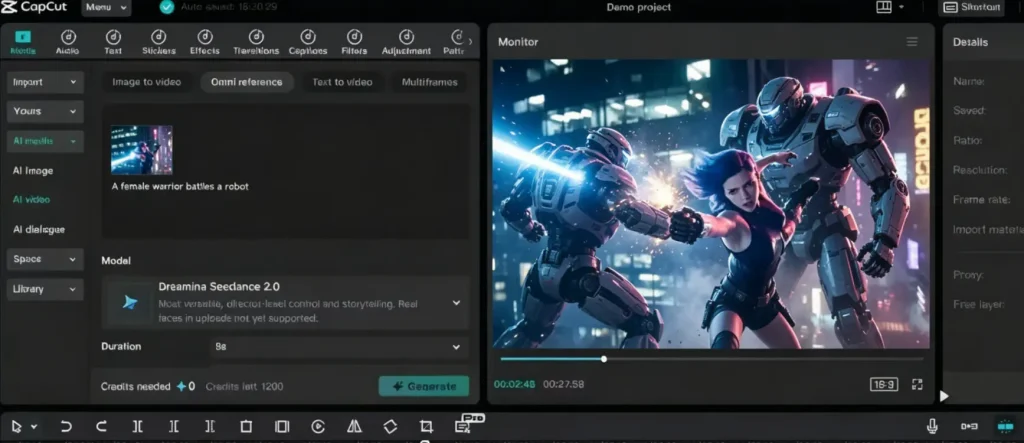
Key Features of Dreamina AI Video Generator
Text-to-Video Generation (Seedance 2.0 & Video 3.0 Pro)
Type a prompt and generate video up to 15 seconds at 720p. Seedance 2.0 delivers the strongest motion physics and lip sync. However, based on user reports, Dreamina may only offer the Seedance 2.0 Fast (distilled) variant rather than the full Pro version.
Image-to-Video Conversion (Make Any Photo Move)
Upload a still image and Dreamina animates it with AI-driven motion — useful for product photos, portraits, and artistic transformation. Features include BGM rhythmization and a 3-second extension option. Images containing human faces may trigger the content filter.
Omni Reference — Character & Scene Consistency
Dreamina’s standout differentiator. Omni Reference lets you upload reference images, videos, or audio to maintain character appearance and visual style across multiple clips. For creators building multi-scene narratives or maintaining brand consistency, this feature is genuinely unique in the free tier space.
Multi-Frame & Multi-Shot Storytelling
Multi-Frame supports up to 10–20 keyframes for coherent narratives across scenes, while Multi-Shot enables different camera angles of the same scene. Popular tutorials demonstrate using reference image grids (4×4, 3×3) to guide this workflow.
Native Audio Generation & Lip Sync
Recent updates added voice dialogue in multiple languages, background music, and sound effects. Lip sync earns consistent praise, but audio quality remains weak — voices sound artificial, characters share identical tones, and context matching is unreliable.
Canvas Editor (Inpaint, Upscale, Expand)
Dreamina also includes Inpaint (edit areas), Upscale (up to 4K), Expand (extend boundaries), and Remove (erase objects), plus frame interpolation (24fps → 30/60fps) and selective clip editing.
AI Avatar Generator
The Cast/Avatar feature creates digital humans and AI presenters via Seedance 2.0 — useful for faceless channels and product demos, though users report declining reliability after silent platform updates.
How to Use Dreamina AI — Step-by-Step
Creating an Account & Getting Free Credits
Visit dreamina.capcut.com and sign up with Google, email, or TikTok. Accounts historically received 120 free credits daily, but as of mid-2026, many users report reduced or eliminated allotments. Availability varies by region.
Generating Your First AI Video (Text-to-Video)
Select the video tool, choose Seedance 2.0 for top quality, write a descriptive prompt, set your aspect ratio and duration, then generate. One generation typically costs 75–825 credits depending on the model, resolution, and clip length.
Image-to-Video Workflow
Upload a high-resolution image with a clear subject, add a motion prompt, choose your duration, and generate. Use images without human faces to avoid triggering the content filter.
Prompt Tips for Better Dreamina Results
No guide covers Dreamina-specific prompt engineering yet. Here are tested principles:
- Specify camera movement explicitly (“slow tracking shot,” “orbital pan”)
- Describe atmosphere and lighting rather than just subjects
- Use style descriptors like “cinematic,” “documentary,” or “anime”
- Keep prompts concise — under 200 words produces more predictable results
- Save successful prompts — silent model updates can break previously working ones
Dreamina Pricing: Free Plan vs. Paid Plans
Pricing is the most confusing and contentious aspect of the platform.
Free Tier — What You Actually Get
The free plan provides a fluctuating daily credit allocation with a watermark on all downloads. At 75+ credits per standard generation, expect roughly 1–2 short videos per day. Some users report receiving zero credits since April 2026, while others still get a modest daily allowance.
Standard Plan vs. Pro Plan
Paid tiers include Standard (~$9.99/month) and Pro (~$19.99/month), both promising increased credits and watermark removal. However, according to multiple user accounts, watermarks persist on certain outputs — particularly lip sync — even on paid plans.
How the Credit System Really Works (Cost Per Video)
Community-reported data reveals that a 10-second Seedance 2.0 clip costs approximately $0.86, while a 15-second clip runs about $1.33. In one documented case, credit costs jumped from 255 to 825 per generation overnight — a 3.24× increase without any advance notice.
For comparison, transparent alternatives charge less: Fal.ai at $0.30/sec, PiAPI at $0.15/sec (Preview), and ArtCraft at $0.16/sec for the full Pro model.
Is the Paid Plan Worth It?
For high-volume creators already in the CapCut ecosystem, paid plans can deliver value — with caution. Documented risks include mid-subscription price hikes, credit expiration on cancellation, and billing that continues after plan termination. Community advice: start monthly, use a virtual card, and test thoroughly before any annual commitment.
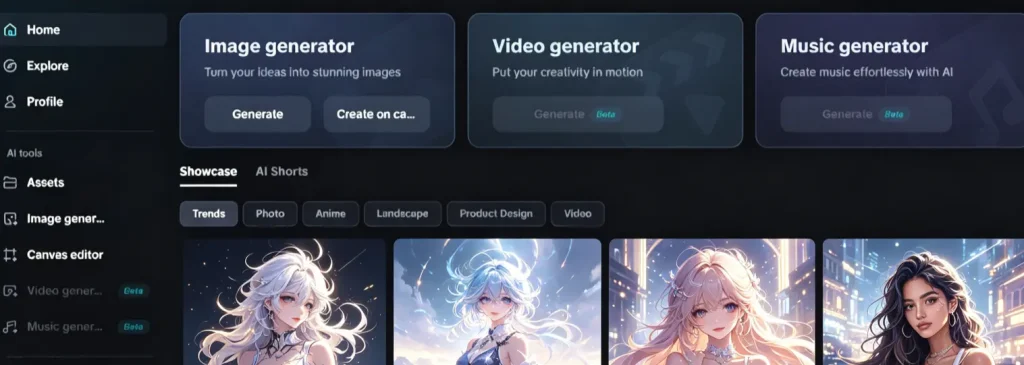
Dreamina Pros and Cons — What Users Really Say
What Users Love
- Outstanding motion physics — human movement and object dynamics rank among the best available
- CapCut/TikTok pipeline — fastest path from generation to published short-form content
- Omni Reference — genuine differentiator for character consistency across clips
- Feature breadth — image, video, audio, and editing tools in one free platform
- Style coherence — the Seedream + Seedance integration keeps visuals consistent across formats
Common Complaints and Known Issues
- Face censorship — blocks nearly all human-face content, including AI-generated and animated characters
- Pricing instability — credit costs have tripled overnight; “unlimited” plans carry undisclosed caps (~6,000 images/day)
- Persistent watermarks — paid plans still show watermarks on some features despite marketing claims
- Account and billing risks — post-cancellation charges, deleted credits, accounts banned for benign content
- Absent support — consistently described as non-responsive; chargebacks become the only recourse
- “Dreamina Drift” — silent model updates break working prompts with no changelog or version pinning
- Technical ceilings — 720p maximum resolution, 15-second video cap, no native clip extension
Dreamina vs. Competitors — How It Compares
Dreamina vs. Kling AI
Kling offers more consistent pricing, fewer content restrictions, and superior face handling — making it the top community-recommended alternative for censorship-frustrated users. Dreamina counters with broader features and CapCut integration.
Dreamina vs. Runway (Gen 4)
Runway leads in professional tooling with motion brush and advanced camera controls that Dreamina lacks. It excels at cinematic work but costs significantly more — users report $50+ for a single 15-second product video.
Dreamina vs. Google Veo 3
Veo 3 delivers more mature native audio and offers $300 in free Google Cloud credits for new accounts. Dreamina is more accessible (no cloud setup) and provides a broader creative toolkit beyond pure video generation.
Dreamina vs. Midjourney
Midjourney remains the standard-bearer for AI image quality but is primarily an image tool (V1 Video is still emerging). Dreamina’s advantage lies in its combined image-and-video pipeline and free access.
Quick Comparison Table
| Feature | Dreamina | Kling AI | Runway Gen 4 | Veo 3 | Midjourney |
| Best For | Short-form social | Product motion | Cinematic work | Audio + video | Artistic images |
| ~Cost/10s | ~$0.86 | Comparable | Higher | Varies | N/A |
| Max Length | 15s | 10–15s | 40s+ | Variable | Emerging |
| Face Limits | Heavy | Minimal | Moderate | Low | N/A |
| Audio | Native (basic) | Limited | Limited | Native (strong) | None |
| Free Watermark | Yes | Yes | Yes | No | Yes |
Who Should Use Dreamina AI?
Best For
- Short-form social creators wanting fast TikTok/Reels/Shorts content within the CapCut pipeline
- Budget-conscious beginners exploring AI video generation for the first time
- E-commerce sellers creating quick product animations and B-roll
- Creators needing visual consistency across image and video outputs
Not Ideal For
- Professional human-face content — censorship makes this unreliable
- Long-form video projects — the 15-second ceiling is a hard limitation
- Teams requiring dependable support — current infrastructure is widely criticized
- Users needing predictable costs — pricing volatility is a documented concern
FAQs of Dreamina AI Video Generator
Is Dreamina AI really free?
Partially. The free tier provides daily credits (amounts have decreased for many users in 2026), and all free downloads carry a watermark. Realistically, expect 1–2 short videos per day before needing a paid plan starting at ~$9.99/month.
Does Dreamina add watermarks to videos?
Free-tier downloads always include a watermark. Paid plans are marketed as watermark-free, but user reports indicate watermarks still appear on certain features. Editing in CapCut is a common workaround.
Can I use Dreamina videos commercially?
Dreamina’s commercial licensing terms remain vague with no published indemnification policy. If commercial use is critical, verify current terms of service directly before relying on Dreamina for client work.
Why does Dreamina block my videos with “face detected”?
The platform’s content filter aggressively flags human faces — including AI-generated characters, animated figures, and even people wearing sunglasses or helmets. This is the most criticized restriction and currently lacks a reliable workaround.
What are the best alternatives to Dreamina?
Top community-recommended options include Kling AI (consistent quality, better face handling), Luno (cheapest Seedance 2.0 access with responsive support), Runway Gen 4 (polished cinematic output), and Fal.ai (transparent per-second pricing). For a platform that aggregates multiple AI models including Kling and Veo with watermark-free 4K output, AI Image to Video is also worth considering. The best choice depends on whether you prioritize cost, quality, face content support, or workflow integration.
Conclusion
Dreamina AI pairs genuinely impressive technology with questionable business practices. Seedance 2.0 delivers some of the best motion physics in 2026, and the CapCut pipeline is unmatched for short-form workflows. But opaque pricing, unannounced changes, and near-absent support create real risks.
Start smart: Try the free tier with realistic expectations. For paid plans, go monthly with a virtual card. If human-face content or predictable costs are non-negotiable, consider Kling or Luno as primary tools and use Dreamina as a supplement.






