

Flashloop has a 4.7-star rating from more than 12,000 users, yet one reviewer claims they burned through 75% of their credits in just four days. So which version is true?
That gap is why the app is so hard to figure out. Search “flashloop” and you’ll find affiliate links pushing referral codes, a couple of angry YouTube exposés, and a Reddit reviews thread someone already deleted. Nobody publishes the part you actually want: what it costs, how fast the credits vanish, and whether the output is worth paying for.
This review fixes that — real pricing, the credit math competitors keep vague, the complaints that come up again and again, and the alternatives worth a look before you subscribe.
What Is Flashloop and How Does It Work?
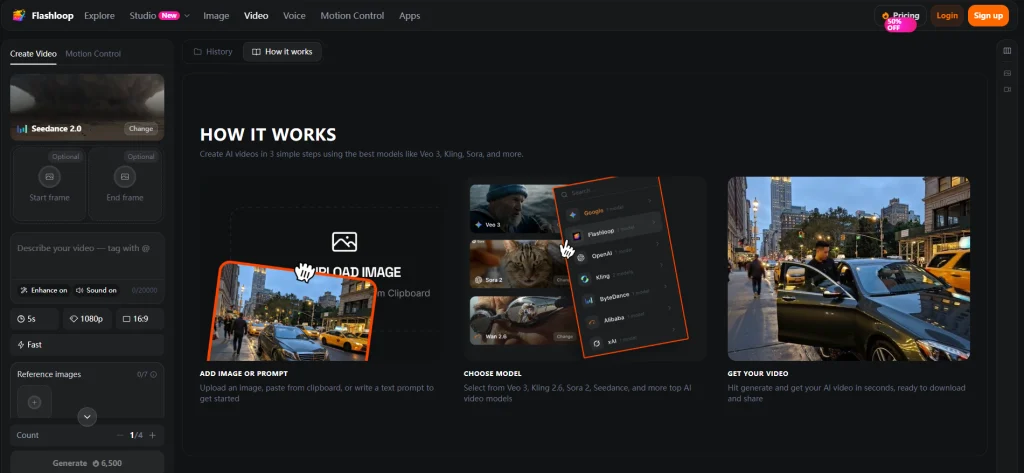
Flashloop is a mobile AI video generator that turns text prompts or still images into short clips using premium models like Veo 3, Kling, and Sora 2. It also generates AI images. The pitch is simple: studio-style video on your phone, no editing skills required, with several top models bundled behind one subscription instead of five separate logins.
In practice, you pick a model, describe what you want (or upload a photo as a starting frame), and let it render. Templated “Apps” handle viral effects in one tap, which is how most people first find it.
Who Makes Flashloop? (Developer & Background)
The App Store lists the developer as Buy Beaver Technologies (15557640 Canada Inc.), based in Montréal, with the first release dated June 2025. Third-party aggregator Pollo.ai credits the founding to “La Viral Studio” and repeats a striking claim: zero to $1 million in annual recurring revenue in 20 days.
Treat that figure as marketing, not a verified stat. It’s a self-reported number with no public filing behind it, so it tells you more about the brand’s messaging than its real traction.

Which AI Models Does Flashloop Support?
The model lineup is genuinely the strongest part of the app. For video you get Veo 3 (best for photoreal realism), Kling 3.0 and 2.6 (known for keeping characters consistent across shots), plus Sora 2, Seedance 1.5 and 2.0, Wan 2.6, and Grok Imagine. For images, it runs Nano Banana Pro and 2, FLUX 2, and GPT Image 2.
The practical takeaway: reach for Veo 3 when you want lifelike footage, Kling when a character has to look the same in every scene, and Seedance or Sora for stylized motion. Having all of them in one place is the real selling point.
Text-to-Video vs Image-to-Video: What You Can Actually Make
There are two main paths. Text-to-video builds a clip straight from a written prompt; image-to-video animates a photo you supply, giving you far more control over the result.
Layered on top are pre-made characters, infinite looping (handy for Spotify Canvas-style backgrounds), the Recast tool for restyling footage, music sync, and one-tap stylization. Creators use them for everything from faceless TikTok channels to product clips for Shopify stores.
How Much Does Flashloop Cost? Pricing & Credits Explained
Here’s where Flashloop gets slippery, and where most write-ups stop short. The pricing page shows annual totals with a site-wide “50% off” banner, so monthly figures have to be worked out by hand. Below is the math nobody else lays out plainly.
Flashloop Plans Compared (Starter, Creator, Pro, Ultra)
| Plan | Annual price | ~Monthly | What you get | Video models? |
| Starter | $113.88/yr | ~$18.99 | ≈80 images, 2 concurrent | No (image only) |
| Creator | $179.88/yr | ~$29.99 | ≈120 videos + ≈160 images, all models, 3 concurrent | Yes |
| Pro | $479.88/yr | ~$79.99 | ≈350 videos + ≈466 images, 5 concurrent, priority queue | Yes |
| Ultra | $599.88/yr | ~$99.99 | ≈500 videos + ≈666 images, 8 concurrent | Yes |
The catch most people miss: Starter doesn’t make videos at all. If you came for AI video, the real entry point is Creator at roughly $30 a month.
How Flashloop Credits Actually Work
You don’t buy “videos,” you buy credits, and the cost of each generation shifts with the model, length, and resolution you choose. A short Veo 3 clip at high resolution eats far more than a quick image.
Two rules matter most. First, monthly credits do not roll over when your cycle resets, so anything unused simply disappears. Second, one-time top-up packs you buy separately never expire. Video models are locked to Creator and above.
How Many Credits Does One Video Cost?
This is the single biggest gap in every other Flashloop write-up, so let’s be specific. According to reviewers who counted, roughly 1,000 credits buys about 8 seconds of video. One YouTube commenter put it bluntly: “1k credit for single video is crazy.”
That ratio matters because AI video is trial and error. Every reroll, every prompt tweak, every failed render spends credits, and a plan that looks generous on paper drains fast once you start experimenting.
Is Flashloop Free? Free Tier & Daily Credits
Yes and no. The app is free to download and hands out a small batch of daily credits, so you can test the waters without paying. What it won’t do is let you create at any real volume for free.
The exact daily amount isn’t published anywhere, which is part of the frustration. Expect enough to try a couple of short generations, then a paywall once you’re hooked.
How to Get Flashloop Free Credits & Redeem Referral Codes
Because credits are the main friction, a whole cottage industry of “1000 free credits” videos and referral-code dumps has sprung up around Flashloop. Some of it works. A lot of it doesn’t, and it’s worth knowing why before you go hunting.
How to Redeem a Flashloop Referral Code (Step by Step)
- Download and open the Flashloop app.
- Begin the sign-up or account-creation flow.
- Look for the referral or invite code field during signup.
- Paste a valid code before you finish creating the account.
- Confirm the bonus credits landed in your balance.
The key detail: the code field usually appears at signup, not later in settings. Miss that window and you’ve likely lost the bonus.
Why Your Flashloop Code Might Not Work
If you’ve seen “I got nothing” comments under redeem tutorials, you’re not alone. The most common reason is that codes appear to work once per device, not once per account, as one frustrated user discovered. Creating a fresh account on the same phone won’t unlock another bonus.
Codes also tend to be signup-only, so applying one to an existing account often does nothing. Lower your expectations and you’ll be less disappointed.
Is Flashloop Legit or a Scam? Real User Reviews
Flashloop is a real, functioning app from a registered Canadian company, not a phantom that takes your money and vanishes. That said, “legit” and “worth it” aren’t the same question, and the reviews are genuinely mixed.
What Users Praise
The upside is real. You get a stack of premium models in one cheap mobile app, ready-made viral templates that lower the barrier to entry, and an interface beginners can actually navigate. The 4.7-star average across thousands of ratings isn’t nothing, and plenty of casual creators are happy churning out trend clips.
Common Complaints (Credits, Refunds, Gibberish Text, Billing)
The complaints are consistent enough to take seriously:
- Credits drain fast. “75% gone in 4 days” was a whole review title.
- No refunds on failed generations. A broken render still costs you.
- Gibberish on-screen text. Words often render as garbled or foreign characters.
- Billing confusion. Some users report renewal charges without fresh credits.
- Trust and availability issues. Scam accusations, reports of Play Store removal in some regions, and reputational drag from the “slop” content people make with it.
The Verdict — Who Should (and Shouldn’t) Use Flashloop
Flashloop fits casual, mobile-first creators who want to ride a trend, don’t mind paying around $30 a month, and won’t lose sleep over a few wasted credits. For them, the convenience is worth it.
It’s a poor fit for high-volume creators sensitive to cost and reliability. If you generate dozens of clips a week, the credit burn and no-refund policy turn it into an expensive guessing game.
How to Use Flashloop (Quick Start & Viral Formats)
If you’ve decided to try it, here’s the short version so you waste fewer credits learning.
Creating Your First Video
Open the app, pick a model that matches your goal (Veo 3 for realism, Kling for consistent characters), then type a detailed prompt or upload a starting image. Review each result and refine the prompt before rerolling, since every attempt costs credits.
Popular Viral Formats to Try
The proven traffic-drivers include AI Fruit Love Island, AI skeleton clips, glass ASMR, and fancam edits. Each leans on a tight prompt and consistent characters, so build a reusable character first and reuse it across scenes rather than starting fresh every time.
How to Save and Export Your Video
“How do I save the video?” is a recurring question, so don’t skip this. After a clip finishes rendering, use the in-app save or export option to download it to your camera roll before you close the project. Confirm it’s in your gallery, then edit or post from there.
Best Flashloop Alternatives in 2026
If the credit math or output quality pushed you away, you have solid options. Flashloop’s own pages avoid head-to-head comparisons, so here’s the table they won’t show you.
Flashloop vs Kling vs Runway vs Sora (Comparison Table)
| Tool | Rough price | Free tier | Best for |
| Flashloop | ~$30/mo (Creator) | Limited daily credits | All-in-one mobile, viral templates |
| Kling | ~$12/mo | Yes | Character consistency, value |
| Runway | Credit-based | Free credits | Pro-level output |
| Sora 2 / Veo 3 | Flagship access | Limited | Top-tier realism |
Reviewers frustrated with Flashloop frequently steer people toward Kling for the price, Runway for quality, and CapCut for editing.
A Watermark-Free, 4K Alternative: AI Image to Video
If your real headaches are watermarks, export limits, and unpredictable cost, an online tool like AI Image to Video is worth a look. It does both image-to-video and text-to-video using Kling, Veo, and Wan, with output up to 4K and no watermarks.
It also supports batch processing and controls for aspect ratio, duration, and motion intensity, which suits anyone producing a steady stream of social clips rather than one-off experiments. Because it runs in the browser, there’s no iOS-only limitation to work around.
When It’s Worth Switching From Flashloop
Switch if any of these are dealbreakers: the credit-per-second cost, watermarks on your exports, the no-refund-on-failure policy, or resolution caps. If you mostly chase trends on your phone and the price doesn’t sting, staying put is reasonable.
FAQs About Flashloop
Is Flashloop available on Android?
It’s inconsistent. The App Store lists Flashloop as iPhone-only, while the official site and Pollo.ai claim Android and web availability. If Android matters to you, verify it works before paying rather than trusting the marketing copy.
How many credits does one Flashloop video cost?
Roughly 1,000 credits for about 8 seconds of video, based on reviewer testing. The exact cost rises with higher resolution, longer duration, and heavier models like Veo 3.
Can I get a refund for failed generations?
No. This is the single most common complaint: failed or low-quality renders still consume your credits, with no refund offered. Budget accordingly.
Does Flashloop add a watermark?
Watermark behavior isn’t clearly documented on owned pages, which is part of the frustration. If guaranteed watermark-free output is non-negotiable, a tool like AI Image to Video states that plainly.
Is Flashloop content copyright-safe?
Flashloop markets its output as usable, but responsibility ultimately sits with you. The app has been tied to misuse and “slop” content, so steer clear of likenesses, trademarks, and anything that could land you in legal trouble.
Conclusion
Flashloop is a capable multi-model AI video app wrapped in a credit system that quietly punishes experimentation. The models are genuinely good, the templates lower the barrier, and the rating is high, but the credit burn, missing refunds, gibberish text, and billing confusion are real and recurring.
For casual mobile creators chasing trends at around $30 a month, it’s a fair deal. For anyone producing at volume, the costs and reliability gaps add up fast.
Decide based on your real usage. If watermark-free 4K output, predictable pricing, and high-volume batch creation matter more to you than viral templates, try a tool built for that — like AI Image to Video — before committing to a Flashloop subscription.






