JoyFun AI pulls 3 to 4 million monthly visitors with a bold promise: free video generation, no sign-up required. But if you have ever clicked on a “free AI video generator” only to hit a paywall moments later, you know how common bait-and-switch tactics are in this space.
So what does JoyFun AI video generator actually deliver? We tested every major feature — face swap, image-to-video, text-to-video, and one-click effects — then compared results against leading competitors. This review covers real capabilities, transparent pricing, and an honest verdict on whether JoyFun deserves your time in 2026.
What Is JoyFun AI Video Generator?
JoyFun AI is a browser-based video generation platform that bundles several creative tools into a single interface. It targets casual creators and social media users who want fast results without complex editing software.
What sets it apart is immediate access — no email, no password, no verification. The platform uses a credit-based system where each generation consumes credits based on the tool, resolution, and duration selected.
How JoyFun AI Works
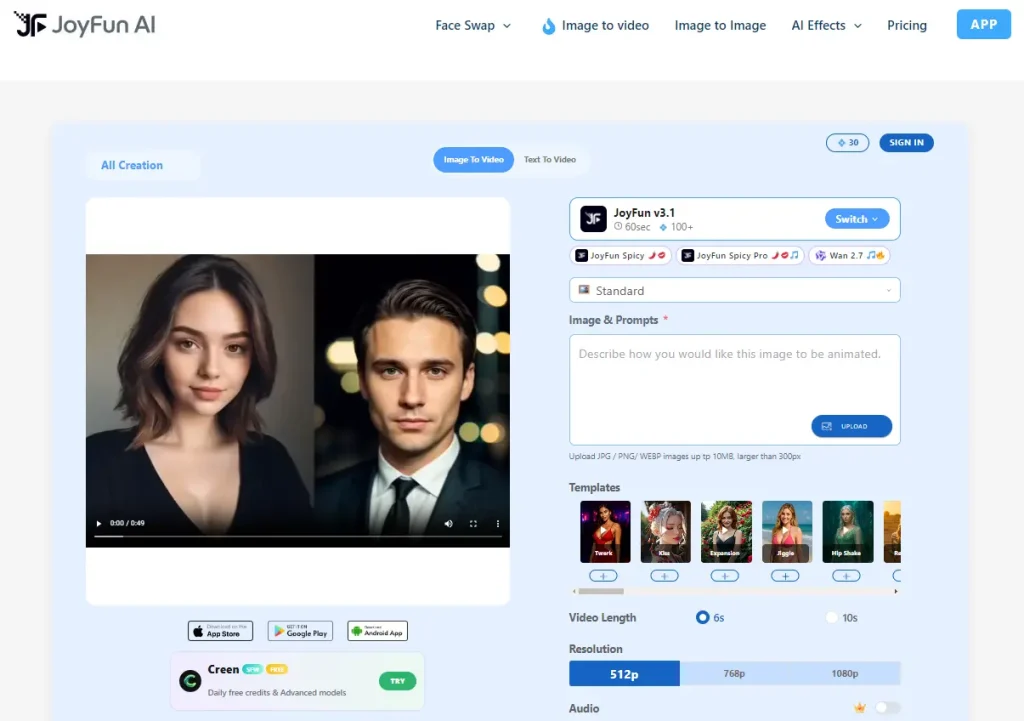
Upload an image or type a text prompt, pick your preferred AI model and output settings (resolution up to 1080p, duration of 6 or 10 seconds), and hit generate. Rendering happens server-side, so your local hardware does not matter.
Free users receive a daily credit allotment that resets every 24 hours, while paid subscribers get monthly pools or unlimited access.
AI Models Powering JoyFun AI
JoyFun integrates several third-party models: Sora Engine, Kling 2.1, Seedance 1.5 Pro, Wan 2.6, and Runway Gen-3. Each brings different strengths — Kling handles realistic motion well, while Seedance excels at cinematic quality.
Worth noting: competitors like Nereo and Pollo AI already offer Kling 3.0 and Seedance 2.0. JoyFun’s model lineup sits a generation behind the latest releases.
JoyFun AI Key Features Tested
Here is what we found testing the four core tools most users care about.
Face Swap (Photo and Video)
Face swap is JoyFun’s signature feature. Upload a source face and a target image or video clip, and the tool maps the face onto the target with reasonable accuracy. Photo swaps produce cleaner results than video swaps, where inconsistencies sometimes appear between frames.
JoyFun handles simple, front-facing swaps competently, but complex angles or fast movement can introduce artifacts — a common challenge across the industry where most tools still struggle with face consistency across consecutive frames.
Image-to-Video Generator
Upload a clear image, add a motion prompt describing how you want the scene to animate, select your resolution (512p, 768p, or 1080p) and duration (6 or 10 seconds), and generate. Output quality depends heavily on the source image — community consensus suggests the reference image drives roughly 80% of the final result.
The 10-second ceiling is the main drawback here. Every video tops out at 10 seconds regardless of your plan, which limits practical use for anything beyond short social clips.
Text-to-Video Generator
Text-to-video lets you create scenes entirely from written descriptions. Detailed, specific prompts yield significantly better results than vague ones. Describing camera angles, lighting, and movement in your prompt helps the model produce more coherent output.
Results are usable for quick social media content, but do not expect the photorealistic consistency you would get from dedicated tools like Kling 3.0 or Seedance 2.0.
One-Click Video Effects
This is where JoyFun carves out a genuine niche. Preset effects — including AI Dance Video, AI Kissing Video, and AI Hair Color Changer — let you generate share-ready clips with a single tap. No prompt engineering required.
For casual creators who want a quick TikTok or Instagram Reel without learning complex tools, these one-click presets offer real convenience that most competitors lack.
JoyFun AI Pricing and Plans Breakdown
The pricing question dominates nearly every online discussion about JoyFun AI. Here is the full breakdown.
Free Plan — What You Actually Get
The free tier provides 10 to 50 daily credits with no account required. You also get 3 image messages per day, up to 3 custom personas, and ads are displayed throughout the experience.
In practical terms, those credits translate to roughly 2 to 5 video generations per day depending on your chosen resolution and duration. That is enough for light experimentation, but not for consistent content production.
Standard Plan ($9.99/month)
The mid-tier plan unlocks 5,000 monthly credits, 20 to 100 image messages per day, unlimited text chats, short-term memory, and up to 20 custom personas. Annual billing drops the price by 10%.
Power users may still find themselves rationing credits toward the end of each billing cycle.
Premium Plan ($19.99/month)
The top tier offers unlimited credits and image messages, long-term memory, and up to 50 custom personas. Annual billing brings the effective price down to roughly $15.99 per month (a 20% discount). The unlimited ceiling removes the credit anxiety that plagues lower tiers.
Is the Free Tier Worth It?
For testing the platform and producing occasional clips, yes. For anything resembling regular content creation, the free tier falls short. The daily credit cap, ad interruptions restrictions mean most serious users will either need to upgrade or look at alternatives.
JoyFun AI vs Top Competitors
Choosing the right tool depends on what matters most to you. Here is how JoyFun stacks up against four major alternatives.
| Feature | JoyFun AI | Kling AI | Pollo AI | JoyPix AI | AI Image to Video |
| Sign-up Required | No | Yes | Yes | Yes | Yes |
| Max Resolution | 1080p | 1080p | 1080p | 1080p | 4K |
| Max Duration | 10s | 10s+ | Varies | 3-16s | Varies |
| Watermark-Free | Paid only | Paid only | Paid only | Free tier | Free tier |
| Batch Processing | No | No | No | No | Yes |
| One-Click Effects | Yes | No | Yes | Yes | No |
JoyFun AI vs Kling AI
Kling AI earns the strongest organic recommendations across Reddit for physics simulation, motion realism, and photorealistic humans. Kling 3.0 represents a clear quality leap over JoyFun’s integrated Kling 2.1. The tradeoff: Kling’s free tier has 45-minute queue times, while JoyFun offers instant access with no account.
JoyFun AI vs Pollo AI
Pollo AI positions itself as the production-ready option with over 100 AI models, an autonomous Pollo Agent, and 100+ specialized apps. It holds a 4.4 Trustpilot rating from 3,600+ reviews. JoyFun targets casual clips; Pollo aims at professional content workflows.
JoyFun AI vs JoyPix AI
Despite the confusingly similar names, these are completely separate platforms. JoyPix AI specializes in talking avatars and lip-sync through its proprietary Motion-2 model, supports over 40 languages with 100+ voice options, and offers API access. JoyFun focuses on face swap and one-click video effects. If you need talking head videos or multilingual voiceovers, JoyPix is the better fit.
JoyFun AI vs AI Image to Video
AI Image to Video targets users who need higher-fidelity output. It supports resolution up to 4K, delivers watermark-free results even on free usage, and includes batch processing for high-volume workflows. It integrates Kling, Veo, and Wan models. JoyFun wins on instant no-sign-up access and preset effects, but for professional-grade quality and volume, AI Image to Video offers meaningful advantages.
Pros and Cons of JoyFun AI
Pros
- No sign-up required for basic use — a genuine differentiator
- Multiple AI models accessible from a single interface
- One-click video effects ideal for quick social content
- Free tier available for light experimentation
- Mobile apps on both iOS and Android
- Large active user base (3-4 million monthly visitors)
Cons
- 10-second video cap applies across all plans, including Premium
- Free tier delivers only 10-50 daily credits — less generous than advertised
- Billing appears under “Joyland AI,” which confuses some users
- No end-to-end encryption; data is shared with business partners
- User-reported billing glitches (charged but still prompted to subscribe)
- AI models trail behind competitors offering Kling 3.0 and Seedance 2.0
- Platform was listed for sale on Findly.tools in March 2026, raising questions about long-term stability
Who Should Use JoyFun AI?
Best Use Cases for JoyFun AI
JoyFun AI works well for social media creators who need quick face swap or dance effect clips for TikTok and Instagram Reels. It also suits curious users who want to experiment with AI video generation without committing to an account or subscription. The one-click effects are its strongest practical feature for anyone who values speed over fine-tuned control.
When to Choose a Different Tool
If you need videos longer than 10 seconds, output above 1080p, watermark-free exports on a free plan, batch processing, or robust privacy protections, JoyFun is not the right fit. Consider Kling AI for photorealistic quality, AI Image to Video for 4K watermark-free output with batch processing, or local tools like ComfyUI for unlimited generation with complete privacy control.
FAQs About JoyFun AI Video Generator
Is JoyFun AI really free?
JoyFun AI provides a free tier with 10 to 50 daily credits and no account needed. However, the free plan shows ads and caps image messages at 3 per day. Paid plans start at $9.99 monthly for unlimited access. The free tier suits light experimentation but not regular production.
Does JoyFun AI add watermarks?
Free-tier outputs may include watermarks. Paid plans remove watermarks from generated content. Some competing platforms, such as JoyPix AI, provide watermark-free output even to free users.
Can I use JoyFun AI videos commercially?
JoyFun does not provide explicit commercial licensing terms in its public documentation. Review the platform’s terms of service before using generated content for business purposes.
Is JoyFun AI safe to use?
The platform bills under “Joyland AI,” shares data with business partners, and lacks end-to-end encryption. Exercise caution when uploading personal or sensitive images.
Do I need to sign up to use JoyFun AI?
No. Basic features work without an account — a genuine advantage over most competitors. Registering unlocks additional features and credit tracking across sessions.
What is the difference between JoyFun AI and JoyPix AI?
These are entirely separate products despite the similar branding. JoyFun AI centers on face swap, image-to-video generation, and one-click video effects. JoyPix AI specializes in AI talking avatars and lip-sync technology through its Motion-2 model, with support for 40+ languages and API access. Choose based on whether you need creative video effects (JoyFun) or realistic talking head content (JoyPix).
Conclusion
JoyFun AI video generator delivers on its promise of accessible, no-account-needed video creation with useful face swap and one-click effects. It is a solid starting point for casual creators and social media experimentation.
However, the free tier is narrower than marketing suggests, the 10-second cap limits serious creative work, and privacy concerns deserve attention. Users needing professional quality, higher resolution, or volume processing should explore dedicated alternatives.
For creators who require 4K resolution, watermark-free output, and batch processing, AI Image to Video is a capable option worth considering.