
What if you could create those hypnotic, pulsating visuals you’ve seen at concerts and in music videos—starting tonight, for free? Video synthesis might seem like an expensive, technical mystery reserved for experts with thousands of dollars in specialized gear. But here’s the truth: this captivating art form has never been more accessible.
This guide breaks down everything you need to know about video synthesis, from your first free experiment to building a complete creative setup. Whether you’re a musician wanting live visuals, a content creator seeking unique aesthetics, or simply curious about this mesmerizing medium, you’ll find your pathway here.
What Is Video Synthesis (And Why Should You Care)?
Video synthesis is the art of generating visuals electronically rather than capturing them with a camera. Think of it as painting with light and electronic signals—creating imagery from scratch through oscillators, feedback loops, and algorithmic processes.
Video Synthesis vs Video Editing: Understanding the Difference
While video editing manipulates existing footage, video synthesis generates entirely new visuals from electronic signals and code. Editors cut and arrange clips; synthesists create imagery that never existed before. This fundamental distinction is what makes synthesized visuals so unique and hypnotic.
The Creative Renaissance: Why Video Synthesis Is Trending
Live performance culture is driving renewed interest in real-time visual creation. Social media’s appetite for unique content, combined with the lo-fi aesthetic movement, has brought video synthesis back into the spotlight. Modern tools have also lowered the barrier to entry significantly.
Who Uses Video Synthesis Today?
Video synthesis attracts diverse creators: VJs performing at concerts, musicians adding reactive visuals to their sets, digital artists exploring generative aesthetics, and content creators seeking distinctive looks for their work.
How to Start Video Synthesis Tonight (For Free)
The best way to understand video synthesis is to try it immediately. You can create your first visual in minutes without spending anything or installing software.
Hydra: Your Free Browser-Based Starting Point
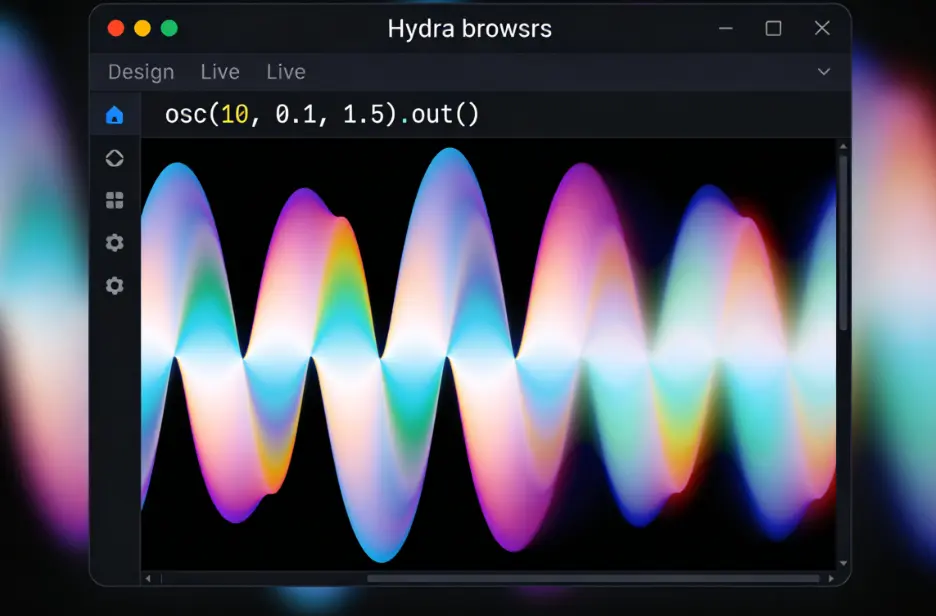
Hydra is a browser-based live coding environment that requires zero downloads. Simply visit the website, and you’re ready to synthesize. Try this basic code to see immediate results:
osc(10, 0.1, 1.5).out()
This single line creates an oscillating pattern. Modify the numbers and watch the visual transform in real-time.
Waaave Pool and Signal Culture Apps
For downloadable options, Waaave Pool offers glitch effects and feedback experimentation completely free. Signal Culture apps provide quick experimentation tools perfect for learning core concepts without complexity.
Your First Video Synthesis Project: A 10-Minute Tutorial
Start with Hydra. Type osc().rotate().out() to create rotating patterns. Add audio reactivity with a.show() to visualize your microphone input. Within ten minutes, you’ll have created your first audio-reactive visual.
Key Takeaway: You don’t need any equipment to start—just open a browser and begin experimenting with Hydra.
AI Video Generation: The Modern Alternative to Traditional Synthesis
While traditional video synthesis requires learning specialized tools and techniques, modern AI offers an alternative pathway to stunning visuals with minimal learning curve.
How AI Is Changing Video Creation
AI models can now transform static images into dynamic video content, opening creative possibilities that previously required extensive technical knowledge. These tools democratize video creation for everyone.
AI Image to Video: Transform Photos Into Professional Videos
For creators wanting immediate results, AI Image to Video provides a straightforward approach. The platform supports multiple AI models including Kling, Veo, and Wan, delivering 4K output without watermarks. Batch processing capabilities make it particularly valuable for content creators managing multiple projects.
Traditional Synthesis vs AI Generation: Which Is Right for You?
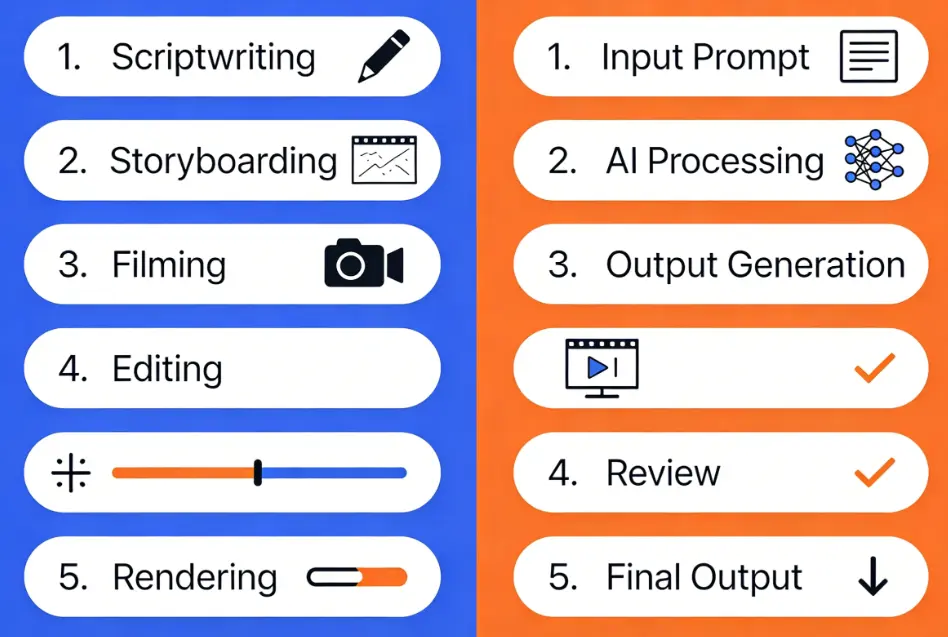
Traditional synthesis offers hands-on control, unique analog aesthetics, and deep creative exploration—but comes with a learning curve. AI generation delivers professional results quickly with minimal technical knowledge. Consider them complementary approaches: use AI for quick content needs while developing synthesis skills for artistic expression.
[Image: Comparison showing traditional synthesis workflow versus AI-generated video output]
Video Synthesis at Every Budget: From $0 to $5000+
One of the most common questions in the community is about cost. Here’s transparent pricing guidance for every level.
Free Tier: Software-Only Synthesis
- Hydra: Browser-based, completely free, perfect for beginners
- Waaave Pool: Free download for glitch and feedback effects
- TouchDesigner: Free for non-commercial use, professional capabilities
- Processing: Free creative coding environment
Under $500: Entry-Level Hardware
The Chroma Cauldron Mainbow (~$350) offers CV and audio reactivity at an accessible price point. Used Critter & Guitari Eyesy units provide another affordable entry into hardware synthesis.
$500-$1500: Serious Standalone Units
The Sleepy Circuits Hypno 2 ($1000-1400) receives enthusiastic community praise for its all-in-one approach and audio reactivity. The new Lumatic Rorschach (~$500) is gaining traction as an excellent beginner option.
$2000+: Modular Video Synthesis
LZX Industries Gen3 represents the modular gold standard, offering unlimited creative possibilities. Be prepared: complete systems typically require $2000-10000+ investment.
Key Takeaway: Start free with software, then graduate to hardware only after you’ve confirmed your passion for the medium.
Software vs Hardware Video Synthesis: Making the Right Choice
This decision shapes your creative journey. Understanding both approaches helps you choose wisely.
The Case for Starting with Software
Software offers zero cost to experiment, easy mistake correction through undo functions, extensive tutorials, and immediate access. You can explore deeply before committing financially.
When Hardware Makes Sense
Hardware provides tactile control essential for live performance, unique analog aesthetics impossible to replicate digitally, and a dedicated creative workflow. Some creators simply need physical knobs and buttons to express themselves fully.
Decision Framework: A Flowchart for Your Situation
Start with software if: you’re budget-conscious, exploring the medium, or primarily creating recorded content.
Consider hardware if: you perform live regularly, crave tactile control, or want specific analog aesthetics.
Essential Techniques Every Beginner Should Learn
Certain techniques apply across all tools and form the foundation of video synthesis practice.
The Video Feedback Loop: Cheapest Entry Point
Point a camera at a screen displaying that camera’s feed—this creates infinite recursive visuals. You can achieve this today using just your smartphone and laptop. This classic technique remains one of the most accessible entry points.
Audio Reactivity: Making Visuals Dance to Sound
Connecting audio signals to visual parameters creates synchronized experiences. Most modern tools support audio input, allowing your visuals to pulse and transform with music or ambient sound.
Understanding Signals: 1V, Sync, Ramps (Without the Jargon)
When researching hardware, you’ll encounter technical terms. Sync signals keep different modules coordinated. Ramps are sawtooth waves that create gradients. Understanding these basics helps you navigate equipment specifications confidently.
Building Your Video Synthesis Setup: Practical Considerations
Beyond the synthesizer itself, several practical elements complete your creative environment.
Display Options: From Old CRTs to Modern Monitors
CRT monitors provide authentic lo-fi aesthetics many artists prefer. Modern displays offer convenience and HD clarity. Your choice shapes your visual output’s character.
Capturing and Recording Your Output
A capture card bridges your synthesis output to your computer for recording or streaming. Budget options work adequately for starting out; invest in quality capture as your work advances.
Integrating with Audio Gear: MIDI and CV
If you already make music, video synthesis can integrate with your setup. CV (control voltage) connections let your audio modular control visual parameters. MIDI enables similar integration with digital equipment.
The Video Synthesis Community: Where to Learn More
The video synthesis community is notably welcoming and supportive of newcomers.
Reddit, Forums, and Discord Communities
The r/videosynthesis subreddit provides active discussion and beginner support. LZX forums and Modwiggler’s video synthesis subforum offer deeper technical knowledge and community connection.
YouTube Channels for Ongoing Learning
Channels like YOVOZOL and Dr. Yo Art receive consistent community recommendations for educational content. Watching experienced synthesists work accelerates your learning significantly.
From Hobbyist to Professional: Growth Pathways
Many successful visual artists began as curious hobbyists experimenting with free tools. The community includes people who’ve progressed from their first Hydra sketch to touring VJ sets and custom hardware design.
FAQs of Video Synthesis
What’s the cheapest way to get into video synthesis?
Open Hydra in your browser right now—it’s completely free, requires no downloads, and you can create visuals in minutes. For hardware, try creating a feedback loop with devices you already own.
Is video synthesis the same as VJing?
Not exactly. Video synthesis is a technique for creating visuals; VJing is a performance practice that may incorporate synthesis alongside other methods like video mixing and effects processing.
Can I use video synthesis for live performances?
Absolutely. Many tools are designed specifically for real-time performance. Hardware synthesizers and software like Hydra excel in live contexts with minimal latency.
Do I need programming skills for video synthesis?
No. Many hardware synthesizers require zero coding. Even software tools like Hydra use simple, learnable syntax. Start experimenting first; skills develop through practice.
What video synthesizer works with my eurorack audio modular?
LZX Industries modules use Eurorack format and integrate directly with audio systems. Other Eurorack-format video modules exist, though LZX remains the most established option.
Conclusion
Video synthesis is more accessible than ever before. You can start free with browser-based tools like Hydra, explore AI-powered alternatives like AI Image to Video for instant results, and gradually build toward hardware as your passion grows.
The community welcomes beginners. The resources are abundant. Your first mesmerizing visual is just minutes away.
