
A Ghibli-style AI ASMR channel hit 3.7 million views from just 15 videos — zero cameras, zero microphones, zero face on screen. AI ASMR is now one of the fastest-growing content categories on YouTube and TikTok, but choosing the right tool isn’t simple. Dozens of generators compete for attention, “free” claims often hide paywalls, and YouTube’s shifting policies keep creators anxious about monetization. This guide compares the best AI ASMR video generators with honest pricing, provides step-by-step workflows with and without Veo 3, and explains what it actually takes to monetize AI ASMR content in 2026.
What Is AI ASMR and Why Is It Going Viral?
What Is AI ASMR?
AI ASMR refers to videos generated entirely or primarily by artificial intelligence — both visuals and audio — designed to trigger that satisfying, tingly relaxation response. Unlike traditional ASMR made by human creators with professional microphones, AI ASMR currently shines with oddly satisfying visual content: glass fruit cutting, kinetic sand manipulation, object slicing, and material transformations. Most AI ASMR falls into the “satisfying content” bucket rather than personal-attention or whispering formats.
Why AI ASMR Videos Are Exploding on YouTube and TikTok
Production costs are near zero compared to traditional ASMR setups ($300–$2,000 for microphones and gear). No on-camera presence is required, making it ideal for faceless channels. Tools like Google Veo 3 now generate native audio synced to visuals — a breakthrough for ASMR quality. And short-form platforms reward visually striking, loop-worthy content. The Ghibli Days channel proves the ceiling: 3.7 million views and 64,000 subscribers from roughly 15 videos.
Best AI ASMR Video Generators Compared (2026)
Google Veo 3 — Best for Native Audio & Realism
Veo 3 is the current gold standard. Its native audio generation syncs sound directly to visuals — essential when the whole point is satisfying audio-visual harmony. Material physics (glass, liquid, food textures) look hyper-realistic. The main downsides are geographic restrictions and cost. Access it through Google AI Studio, OpenArt (~2,500 credits per video), Freepik (~35 EUR/month), or wrapper platforms like EaseMate and SuperMaker. Use “Veo3 fast” mode on OpenArt to save credits when testing prompts.
Kling AI — Best Free Alternative for AI ASMR
For creators who can’t access or afford Veo 3, Kling AI is the strongest alternative. It supports image-to-video animation and added native audio from version 2.6. The free tier works but comes with 2-hour queue times. One important detail: your source image must already include the knife or hand for Kling to animate cutting correctly. The standard “without Veo 3” pipeline runs: ChatGPT (prompt) → Leonardo AI (image) → Kling AI (video) → CapCut (editing).
AI Image to Video — Multi-Model Platform with Kling, Veo & Wan
AI Image to Video aggregates multiple AI engines — Kling, Veo, and Wan — in a single interface. This addresses a common pain point in creator communities: subscription fatigue from juggling separate tools. Switch between models depending on the ASMR style you need, generate in 4K without watermarks, and adjust aspect ratio, duration, and motion intensity for different platforms. Batch processing makes it practical for creators publishing several videos per week.
More AI ASMR Generators Worth Considering
Sora 2 is the go-to for animated and Ghibli-style ASMR, though clips are about 8 seconds each. Hailuo AI (MiniMax) is capable but not truly free despite the marketing. Seedance integrates natively with CapCut for creators already in that ecosystem. VEED.IO offers voice cloning for whisper-style content and the most complete editing suite (4.6/5 rating). ASMRVideos.io focuses exclusively on ASMR with 50+ templates and transparent pricing from $0.125/video.
AI ASMR Video Generator Comparison Table
| Tool | AI Model(s) | Native Audio | Free Tier | Starting Price | Best For |
| Google Veo 3 | Veo 3 / 3.1 | Yes | No | ~35 EUR/mo (Freepik) | Realistic ASMR with audio |
| Kling AI | Kling 2.1–2.6 | Yes (v2.6+) | Yes (queue) | Free / Paid upgrades | Free Veo 3 alternative |
| AI Image to Video | Kling + Veo + Wan | Varies by model | Yes | Tiered pricing | Multi-model flexibility |
| Sora 2 | Sora 2 | Limited | ChatGPT Plus | $20/mo | Ghibli/animated styles |
| Hailuo AI | MiniMax | Yes | Limited | Paid tiers | General AI video |
| VEED.IO | Multi-model | Yes | Yes | Free / Paid | Editing + generation |
| ASMRVideos.io | Veo 3 | Yes | 3 free videos | $19.90 | ASMR-only templates |
How to Make AI ASMR Videos: Step-by-Step Guide with Prompts
Step 1 — Choose Your ASMR Sub-Niche
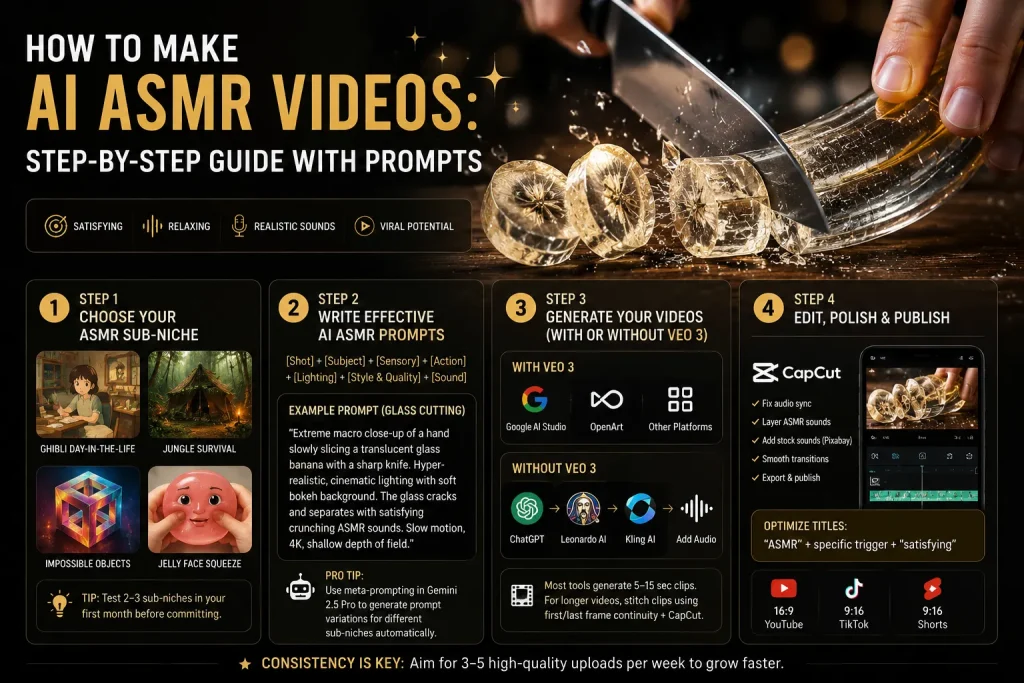
Don’t default to glass fruit cutting — it’s the most oversaturated format. Stronger starting points in 2026 include Ghibli-style day-in-the-life scenes, jungle survival ASMR with nature sounds, impossible objects for creative differentiation, and jelly face squeeze content which is emerging but underserved in English. Test 2–3 sub-niches in your first month before committing.
Step 2 — Write Effective AI ASMR Prompts
The prompt makes or breaks your output. Use this framework: [Shot Type] + [Subject/Material] + [Sensory Details] + [Action in slow motion] + [Lighting] + [Style & Quality] + [Sound Design Cues].
Here’s a glass cutting template optimized for Veo 3:
“Extreme macro close-up of a hand slowly slicing a translucent glass banana with a sharp knife. Hyper-realistic, cinematic lighting with soft bokeh background. The glass cracks and separates with satisfying crunching ASMR sounds. Slow motion, 4K, shallow depth of field.”
For the most scalable approach, try meta-prompting: feed a master template into Gemini 2.5 Pro and let it generate prompt variations for different sub-niches automatically.
Step 3 — Generate Your Videos (With or Without Veo 3)
With Veo 3: Enter your prompt into Veo 3 via Google AI Studio, OpenArt, or a multi-model platform and download the result. Use fast mode when testing.
Without Veo 3: Follow the pipeline behind a 223,000-view tutorial — ChatGPT for prompts, Leonardo AI for images, Kling AI for animation, then add audio separately. Quality is slightly lower, especially for audio sync, but it’s globally accessible and can be free.
Most tools generate 5–15 second clips. For longer content, stitch clips using the first/last frame continuity technique — match the ending frame of one clip to the starting frame of the next, then compile in CapCut with crossfades.
Step 4 — Edit, Polish & Publish
CapCut is the universal editing tool for AI ASMR — free, and it handles audio sync fixes, sound layering, and clip compilation. Layer stock sounds from Pixabay where AI audio falls short. Optimize YouTube titles with the formula: “ASMR” + specific trigger + “satisfying.” Export 9:16 for TikTok and Shorts, 16:9 for YouTube long-form, and aim for 3–5 uploads per week.
Can You Monetize AI ASMR Videos on YouTube?
YouTube’s 2026 Policy on AI-Generated Content
AI content is eligible for monetization — there’s no blanket ban. But the July 2025 “inauthentic content” update targets four red flags: template clones with tiny swaps, regurgitated content, repetitive formats with no fresh value, and slideshows with filler visuals. Channels that mass-upload nearly identical cutting compilations are most at risk. The safe approach: add original creative direction, disclose AI use when showing realistic scenarios, and follow the “70% AI, 30% human creativity” guideline.
How Much Do AI ASMR Channels Actually Make?
YouTube AdSense RPM for ASMR ranges from roughly $1.50 (general relaxation) to $9.00 (sleep/meditation). The widely cited “$7,500/month” figure comes primarily from selling digital products — prompt packs and tutorials — not from ad revenue alone. Most channels earn nothing in their first three months while building toward Partner Program eligibility (1,000 subscribers, 4,000 watch hours). The real opportunity is stacking streams: AdSense, Patreon, AI tool affiliates, and digital product sales.
FAQs About AI ASMR Video Generators
What is the best free AI ASMR video generator?
Kling AI offers the most capable free tier, though with 2-hour queue times. Multi-model platforms like AI Image to Video and EaseMate provide free access to multiple models. The proven no-cost workflow is ChatGPT → Leonardo AI → Kling AI → CapCut.
Can you make AI ASMR videos without Google Veo 3?
Yes. The standard alternative — ChatGPT for prompts, Leonardo AI for images, Kling AI for video, CapCut for editing — produces solid results. Audio sync quality is slightly lower, but the workflow is globally accessible and free.
How do you make long AI ASMR videos from short clips?
Generate multiple clips with a consistent visual theme, stitch them in CapCut using the first/last frame continuity technique, and layer continuous ambient audio underneath to mask gaps between clips. Long-form ASMR (20–60 minutes) earns significantly higher RPM than Shorts.
Will YouTube demonetize AI ASMR channels?
Not automatically, but channels producing repetitive low-effort AI videos risk flagging under the July 2025 policy. Add original creative direction, vary your formats, and disclose AI use where appropriate.
What are the most popular AI ASMR niches in 2026?
Glass fruit cutting leads in volume but also competition. Less saturated options with strong growth include Ghibli-style day-in-the-life, jungle survival, impossible objects, and jelly face content.
Conclusion
AI ASMR is a legitimate content opportunity in 2026, but success comes from picking the right tools for your budget, bringing original creative direction, and building revenue beyond ads. Start with one video using the prompt templates above, test a few sub-niches, and choose the workflow that fits your situation.






