What Is a Negative Prompt in AI?
A negative prompt tells the AI what to avoid, reduce, or remove from the final result.
If the positive prompt is the recipe, the negative prompt is the list of ingredients you do not want in the dish.
Stability AI describes negative prompts as the opposite of a prompt: they tell the model what not to generate.
Positive Prompt vs Negative Prompt
A positive prompt controls what should appear.
It includes your subject, style, action, setting, lighting, camera angle, and mood.
For example, your positive prompt might be:
“A realistic portrait of a young woman in soft window light, cinematic photography, natural skin texture“
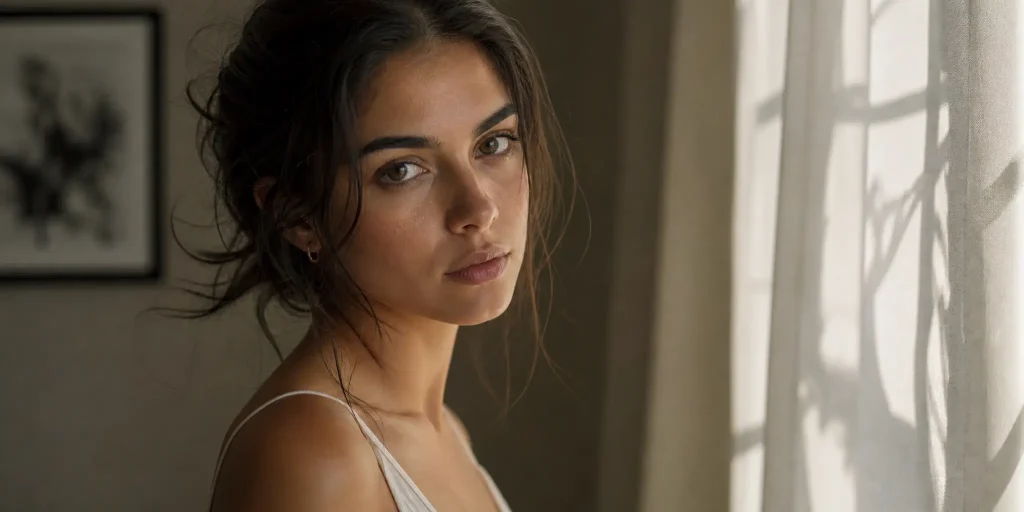
Your negative prompt might be:
“plastic skin, blurry face, extra fingers, bad anatomy, watermark, text, logo”
It helps reduce issues like:
- bad anatomy
- extra fingers
- blurry faces
- warped bodies
- messy backgrounds
- fake text
- logos
- watermarks
- low-quality artifacts
The positive prompt builds the scene.
The negative prompt cleans the room before the camera starts rolling.
Why Negative Prompting Became Important for AI Images and Videos
AI models are powerful, but they still guess. Sometimes they guess wrong.
They may add unreadable text to a poster. They may create extra fingers. They may distort a building. They may make a face look slightly different from frame to frame in an AI video.
Negative prompting became popular because it gives creators a simple way to reduce these errors.
For AI video, negative prompts are even more useful because small errors can become more obvious over time. A weird hand in one image is annoying. A weird hand moving for five seconds is much harder to ignore.
Before and After: What AI Negative Prompts Can Fix
Negative prompts work best when they target a clear problem.
Think of them like a repair kit, not a giant trash bag.
Fix Bad Hands, Blurry Faces, and Body Distortion
Human bodies are one of the hardest things for AI to generate correctly.
Hands, teeth, eyes, and limbs often break first.
With incorrect prompts and undertrained models, you might see: six fingers, fused fingers, melted teeth, warped face shape and the third arm strech out from one person.
A better negative prompt can reduce these issues.
Example: “bad anatomy, extra fingers, deformed hands, fused fingers, asymmetrical eyes, warped face, unnatural teeth, distorted body“
This does not guarantee a perfect result every time.
But it gives the model clearer boundaries.
Instead of saying only “make a beautiful portrait,” you are also saying, “do not make the usual AI mistakes.”
Clean Background Clutter and Random Objects
AI often adds details you never asked for.
A clean bedroom may suddenly include five lamps.
A product table may have random wires.
A city street may contain distorted signs and strange objects.
Use background-focused negative prompts when the scene feels messy.
Example:
“cluttered background, random objects, messy composition, duplicated objects, distorted architecture, distracting details”
This is useful for:
- product photography
- interior design images
- cinematic scenes
- website hero images
- clean commercial visuals
If the background is not important, keep it simple.
The more space you leave for random detail, the more likely AI is to fill it with visual noise.
Remove Text, Logos, Watermarks, and AI Artifacts
AI is not always good at generating readable text.
It may create fake letters, broken signs, logo-like marks, or watermark-looking shapes.
For most image and video projects, it is better to add real text later in editing.
This is especially important for:
- YouTube thumbnails
- ads
- product images
- social posts
- AI video clips
- website visuals
A clean image is easier to edit later.
A fake logo hidden in the background can make the whole result look cheap.
How to Write Negative Prompts for Your Own AI Projects
The biggest mistake beginners make is copying a huge negative prompt list from the internet.
That can work sometimes.
But often, it makes the prompt bloated and unfocused.
Start With the Problem, Not a Long Negative Prompt List
Before writing a negative prompt, reasearch your former results and ask:
What exactly is wrong with my result?
Is it the face?
The hands?
The background?
The lighting?
The motion?
The text?
The product shape?
Then choose negative words that match that problem.
A good negative prompt is like a doctor’s prescription. It should treat the actual symptom.
Do not use every medicine in the cabinet. It won’t help you by stacking all the keywords
Weight Negative Prompts for Stable Diffusion
Stable Diffusion is special. It supports prompt weighting, which allows you to control how strongly a word affects the final image.
Basic syntax:
- (keyword) → slightly increase the importance of a keyword
- (keyword:1.5) → give a specific weight (1.5 means stronger influence)
- [keyword] → reduce the importance of a keyword (supported by some interfaces)
For negative prompts, you can use weights to emphasize unwanted elements:
“(blurry:1.5), (bad anatomy:1.3), (low quality:1.2)”
This tells Stable Diffusion to pay more attention to avoiding these issues.
However, do not use extremely high weights. Overweighting negative prompts may create unnatural results or reduce image quality. In most cases, a weight between 1.1 and 1.5 is enough.
Negative Prompts for Different Scenarios
Different projects need different negative prompts.
Do not use the same list for every generation.
A portrait, a product image, and an AI video clip do not fail in the same way.
Realistic Portrait Negative Prompt
Use this for realistic humans:
“bad anatomy, bad hands, three hands, three legs, bad arms, missing legs, missing arms, poorly drawn face, poorly rendered hands, bad face, fused face, cloned face, worst face, three crus, extra crus, fused crus, worst feet, three feet, fused feet, fused thigh, three thigh, extra thigh, worst thigh, missing fingers, extra fingers, ugly fingers, long fingers, bad composition, horn, extra eyes, huge eyes, 2girl, amputation, disconnected limbs, cartoon, cg, 3d, unreal, animate, cgi, render, artwork, illustration, 3d render, cinema 4d, artstation, octane render, mutated body parts, painting, oil painting, 2d, sketch, bad photography, bad photo, deviant art, aberrations, abstract, anime, black and white, collapsed, conjoined, creative, drawing, extra windows, harsh lighting, jpeg artifacts, low saturation, monochrome, multiple levels, overexposed, oversaturated, photoshop, rotten, surreal, twisted, UI, underexposed, unnatural, unreal engine, unrealistic, video game, deformed body features”
Best for:
- portraits
- AI characters
- fashion images
- realistic video characters
- close-up shots
AI Video Negative Prompt
AI video has different problems because the image changes over time.
You may see flicker, face drift, warped movement, or unstable frames.
Use:
“flickering, unstable motion, changing face, inconsistent character, warped limbs, distorted hands, frame inconsistency, unnatural camera movement, jitter, motion artifacts”
Best for:
- image-to-video
- text-to-video
- AI film shots
- dancing videos
- character scenes
- product animation
For video, keep actions simple.
A negative prompt can reduce problems, but it cannot save an impossible shot.
If your subject is running, turning, jumping, and changing outfits in one five-second clip, the model has too much to solve at once.
Background and Product Image Negative Prompt
A city street may contain distorted signs and strange objects.
Use background-focused negative prompts when the scene feels messy.
Example:
“cluttered background, random objects, messy composition, duplicated objects, distorted architecture, distracting details”
This is useful for:
- product photography
- interior design images
- cinematic scenes
- website hero images
- clean commercial visuals
If the background is not important, keep it simple.
Negative Prompt for Different Models
Different AI tools handle negative prompts differently.
The idea is the same, but the input method may change.
Stable Diffusion Negative Prompt
Stable Diffusion workflows often include a dedicated negative prompt field, especially in popular interfaces and pipelines. The AUTOMATIC1111 Stable Diffusion WebUI documentation describes negative prompt as a way to specify what you do not want to see during sampling.
This makes Stable Diffusion suitable for more detailed negative prompt lists.
Example:
“(worst quality, low quality:1.4), (low resolution:1.2), bad anatomy, bad hands, text, error, missing fingers, extra digit, fewer digits, cropped, worst quality, low quality, normal quality, jpeg artifacts, signature, watermark, username, blurry, artist name, (cartoon, anime, illustration:1.3), painting”
For Stable Diffusion, negative prompts are often part of the normal workflow.
Midjourney Negative Prompt
Midjourney does not work exactly like Stable Diffusion.
Instead of a dedicated negative prompt box, Midjourney uses no parameter to tell the model what you do not want. Midjourney’s docs state that parameters go at the end of the prompt, and the no parameter is used to exclude things from the image.
Example:
“no cartoon, illustration, anime, drawing, painting, sketch, 3d render, cgi, plastic, artificial, fake, blurry, grainy, low quality, watermark”
For Midjourney, keep the negative part short and specific.
Do not try to paste a huge Stable Diffusion negative prompt list into every Midjourney prompt.
FAQ About Negative Prompts
What is a negative prompt?
A negative prompt is a list of things you want the AI to avoid, reduce, or remove from the final image or video. It helps prevent common problems like blurry faces, bad hands, extra fingers, text, logos, watermarks, messy backgrounds, and distorted anatomy.
Why do my images and videos still have issues despite using negative prompts?
Negative prompts can reduce unwanted results, but they cannot fix every issue. They cannot replace a strong positive prompt, a high-quality reference image, or overcome model limitations. If problems remain, simplify the scene, adjust one element at a time, reduce motion complexity for videos, and provide clearer details for portraits or product images.
Should I add “weight” into my negative prompts?
It depends on the AI model you use. In Stable Diffusion-based tools, adding weights like (blurry:1.5) or (bad anatomy:1.3) can help emphasize unwanted elements and improve results. However, prompt weighting is not a universal feature and may not work in other AI models. For models supplied in AI Image to Video, writing clear natural language negative prompts is usually more effective.
Should I use the same negative prompt for Stable Diffusion, Midjourney, and other AI video models?
No. Negative prompts are not universal. Stable Diffusion supports specific negative prompt syntax and weighting, while Midjourney and most AI video models rely more on natural language instructions.
| Model / Platform | Negative Prompt Support | Recommended Prompt Syntax | Example |
| Stable Diffusion (SD 1.5 / SDXL) | ✅ Full support | Keywords + weights | (blurry:1.5), (bad anatomy:1.3), low quality |
| Midjourney | ⚠️ Limited support | Use parameters or exclusions | --no blurry, bad anatomy |
| DALL·E / GPT Image | ❌ No separate negative prompt | Describe what to avoid naturally | Avoid distorted hands and unnatural facial features |
| Flux | ⚠️ Limited / workflow-dependent | Natural language description | A realistic portrait with clean hands and no visual artifacts |
| AI Video Models (Kling, Runway, Veo, etc.) | ⚠️ Usually no dedicated negative prompt | Describe unwanted results in text | Avoid flickering, extra limbs, and unstable motion |