Now, to move your AI film project forward, it’s time to create specific shots plan that bring your story world to life — storyboards. In our previous guides, we have covered how to create the visual assets, foe examples, an AI character reference sheet, and your design concept sheet.
If you are interested in building consistent AI characters, check out this guide first: Make Your AI Character Reference Sheet: Prompt for Consistency.
Before creating your storyboard, you should already have your visual assets, and the most important thing: a clear story outline prepared in your mind. The AI film project should begin with a complete idea of what story you want to tell and how each scene should unfold.
Once your story direction is clear, let’s move on to the next stage and start creating your AI film storyboard.
What Is A Storyboard and Why We Need It?
What Is a Storyboard? A Simple Explanation for AI Creators
Before creating an AI film, you need a visual plan to preview how the audience will see that story unfold. This is where a storyboard comes in.
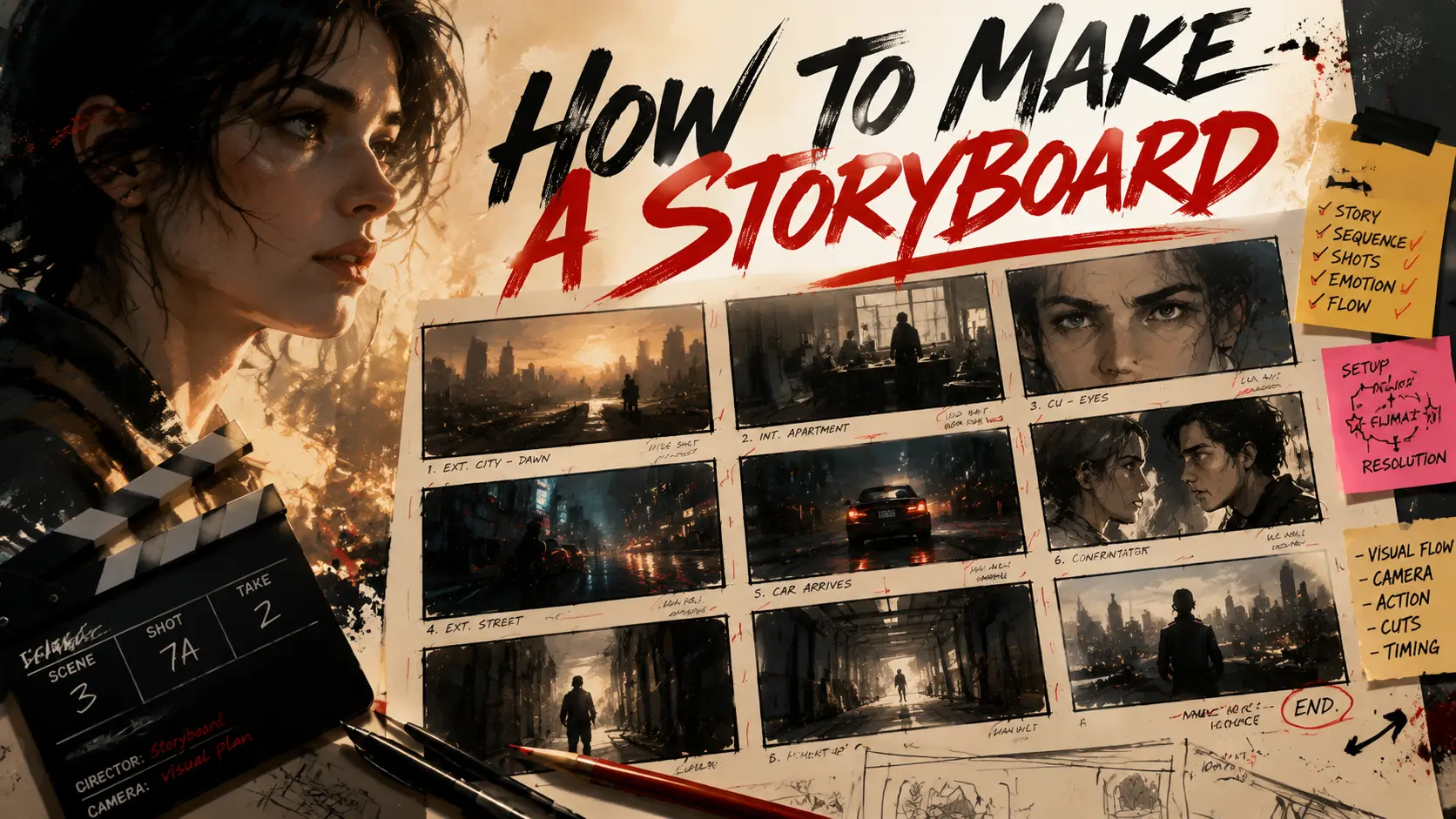
In traditional filming, a storyboard is a visual blueprint that shows how a story develops shot by shot before production begins, mainly created during the pre-production stage. Instead of describing a scene only with words, filmmakers break the story into individual frames or panels, with each panel representing a specific shot.
A professional storyboard helps filmmakers answer important questions:
- What does the camera see?
- Where is the character positioned?
- How does the camera move?
- What happens in this shot?
- How does this shot connect to the next one?
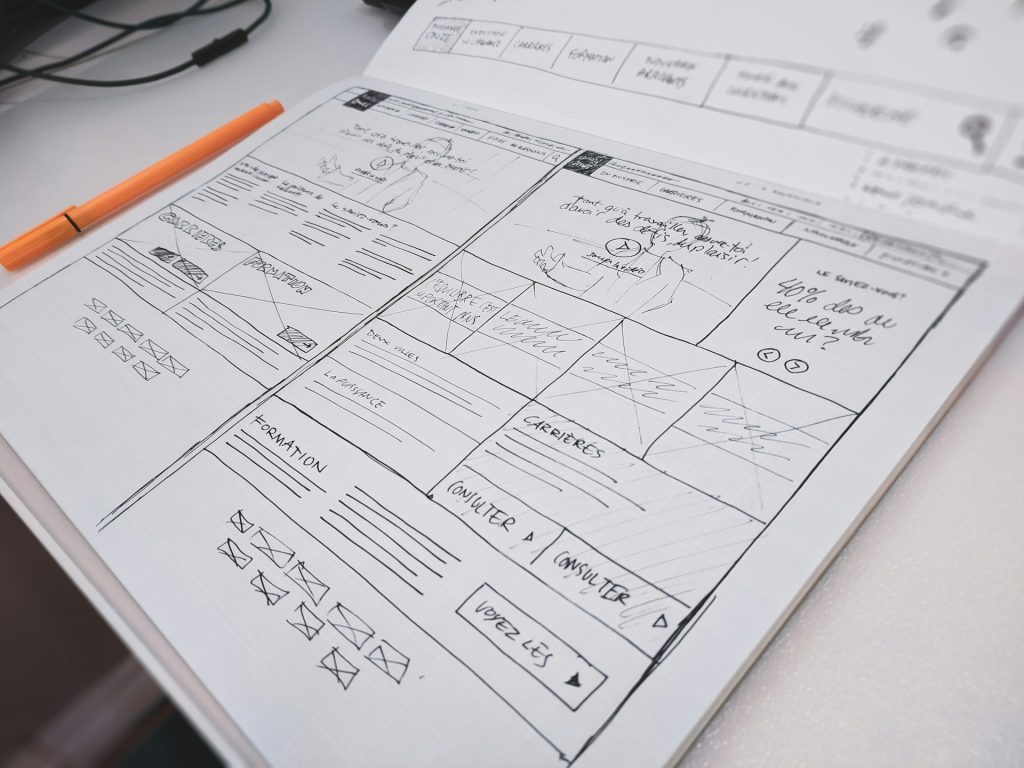
Storyboards are usually hand-drawn, including the visual composition, character position, camera angle. As long as the positions of the characters and the camera angles are clear, simple line drawings are enough. Action, dialogue, sound notes, and timing information are also attached to each panel.
Directors usually work with storyboard artists, or draw by themselves, to transform scripts into visual sequences before shooting starts. By sketching a shot, Directors may find the issues with shot transitions.
For a film crew, a storyboard works as a visual language to reduces uncertainty and helps the team make creative decisions earlier in the process. Adjustments made before filming are always cheaper than scrapping plans and re-creating them on the spot during filming.
For AI creators, the concept is very similar — but the “team member” receiving the instructions is no longer only a human crew. It is also the AI model.
Why Storyboards Are Even More Important for AI Film Projects
In traditional filmmaking, a storyboard helps staffs understand the director’s intention.
In AI filmmaking, a storyboard helps both the creator and the AI model understand the intended visual result.
Without a storyboard, the workflow often looks like this:
Idea → Prompt → Random Generation
You describe a scene, generate a video, check the result, and repeat. This process can easily lead to inconsistent characters, changing environments, and disconnected shots.
With a storyboard, the workflow becomes:
Story → Shot Planning → Visual References → AI Generation
Instead of asking AI to create an entire story at once, you break the film into smaller visual decisions.
Each storyboard panel becomes a clear instruction for the AI.
What You Need Before Creating A Storyboard for AI Filmmaking
Advised Essential Visual Assets Before Storyboarding
- A clear story outline
A strong story is the foundation of every AI film project. Before creating a storyboard, you should already know what story you want to tell, including the main characters, key events, emotional changes, and how each scene develops.
Remember: AI can help visualize your story, but it cannot replace storytelling decisions. A storyboard works best when it translates an existing creative idea into visual shots.
- Character reference sheet
Your characters should already have a consistent visual identity before entering the storyboard stage.
A character reference sheet defines important details such as facial features, hairstyle, outfit, body proportions, and unique accessories. It works as a visual anchor, helping AI maintain the same character appearance across different storyboard panels and future video shots.
- Visual design concept sheet
A design concept sheet defines the overall visual world of your AI film.
Similar to the world-building materials used in games and animation, it establishes the environment, architecture, color palette, lighting style, atmosphere, and important visual elements that appear throughout your story.
While a storyboard focuses on how the story unfolds, a design concept sheet defines what world the story exists in.
Having these references ready before storyboard generation helps AI create scenes that feel connected instead of looking like unrelated images.
Basic Knowledge Before Writing Storyboard Prompts
To create better results, I recommend you to learn some basic filmmaking language.
- Camera language
Learn the fundamentals of shot types and camera movements, such as: wide-angle lens, close-up shot, pan……
You haven’t know these terms? Don’t worry, please read the previous prompt guide series blog. You will handle the basic (even advanced) camera movements, camera lenses types and light settings. Each of the blogs is packed with useful information!
These knowledges help you communicate how the audience should experience the scene, not just what objects appear in the frame.
- Prompt writing skills
Creating AI storyboards is ultimately a communication process between you and the model.
A good storyboard prompt should describe:
- who is in the shot
- where the scene happens
- what the character is doing
- how the camera captures the moment
- what emotion or atmosphere the scene should create
This article will focus on how to structure these instructions into effective storyboard prompts, helping you turn your story ideas into clear visual sequences.
How to Prompt GPT Image 2 or Nano Banana to Generate a Grid Storyboard
Creating a storyboard with AI is not simply asking the model to generate a collection of beautiful images. A good storyboard requires you to think like a filmmaker first, then translate your creative decisions into a structured prompt.
The quality of your AI storyboard depends on how clearly you define the story segment, visual references, shot design, and layout requirements.
Break Your Story Into Short Storyboard Sequences Before Generation
One common mistake beginners make is asking AI to create a storyboard for an entire movie at once.
A single storyboard sheet is not designed to explain a complete story. Instead, it should visualize one specific story segment with several connected shots.
A better workflow is:
Complete Story → Scenes → Key Story Beats → Storyboard Sequence → Individual Shots
For example, instead of generating:
A storyboard about a detective discovering a secret laboratory.
Break it into a smaller sequence:
Shot 1: Establishing shot of the abandoned laboratory Shot 2: The detective enters the building Shot 3: The detective discovers a hidden door Shot 4: Close-up of the mysterious artifact
Each storyboard sheet should usually focus on one short sequence containing around 6–12 shots. This allows AI to understand the narrative progression instead of generating unrelated images.
What Information Should Be Included in Your Storyboard Prompt?
Since you already have character reference sheets and design concept sheets, you do not need to repeatedly describe every visual detail. Instead, use these references as anchors and focus your prompt on how the story should unfold.
A complete storyboard prompt should include:
- Reference Instructions:
- Tell AI how to use your existing assets. You even do not generate the sketch, but the realistic version directly.
- Example: “Use the provided character reference sheet and environment design sheet as visual references. Maintain consistent character appearance, costume, and environment style across all storyboard panels. This helps prevent characters or locations from changing between shots.“
- Story Context:
- Explain what happens in this specific story segment.
- Include: location, time, situation, emotional atmosphere
- Example: “A detective enters an abandoned underground laboratory at midnight while searching for hidden evidence.”
- Cinematic Style:
- Describe how the film should look.
- You can include: animation storyboard style, realistic cinematic storyboard professional film pre-visualization, pencil sketch storyboard, photorealistic storyboard frames
- Storyboard Layout
- AI needs clear instructions about the final format.
- For example: “Use a 4×3 grid layout with 12 panels. Each panel should include: storyboard image on the top, shot number, shot type, camera angle, camera movement, character action, and scene notes below. Arrange panels from left to right, top to bottom.“
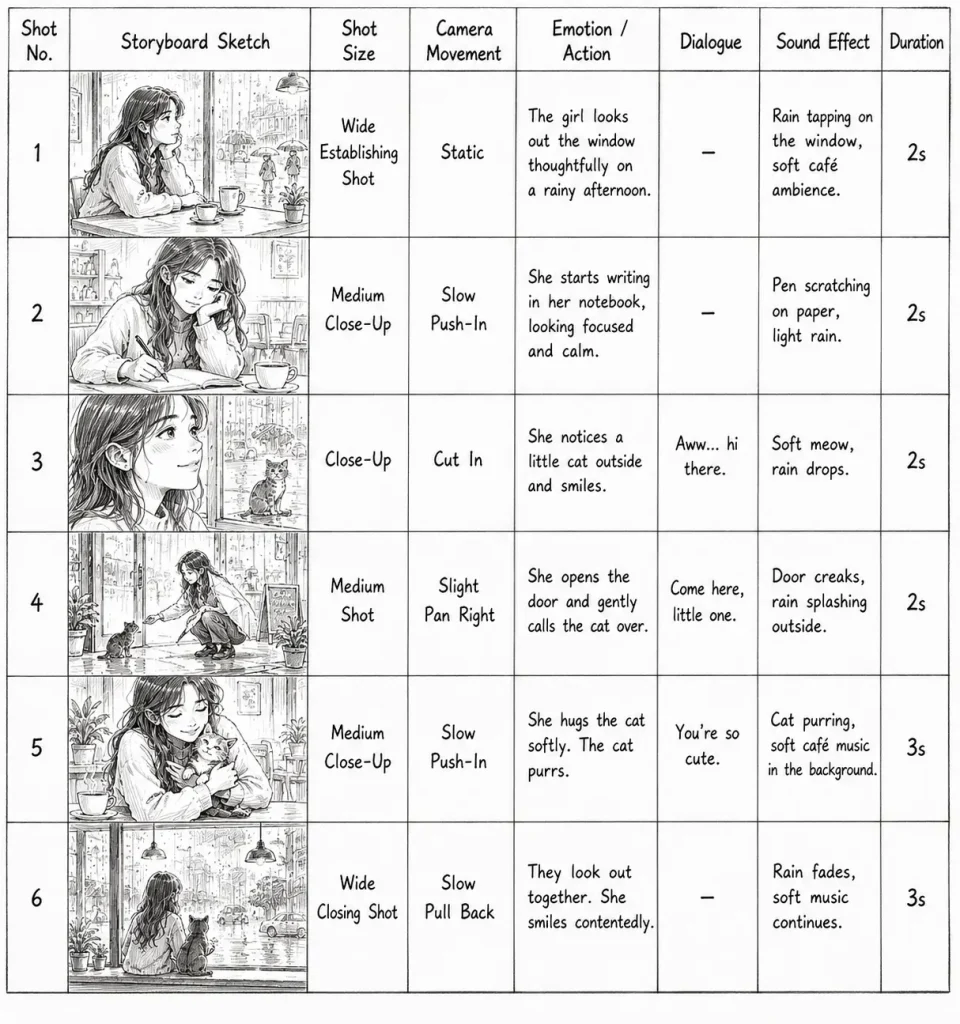
A 4×3 Grid Storyboard Template
Do not need to pay for an AI storyboard generator, here is a practical storyboard prompt for your reference:
Create an ultra-high-quality, detailed storyboard sheet for a xx-second video for [what happened in this story clip].
The theme is [xxxxx]. Use reference image for the character [xxx].
The format should be a single horizontal 16:9 storyboard sheet arranged in chronological order. Using a 4×3 grid layout with 12 panels.
The overall visual style should be [xxxxxx].
Each panel should clearly depict the camera angles of the final video, the movements of the cooking process…..
Depict it explicitly as high-quality animated artwork, not live-action.
The storyboard should consist of approximately 12 panels in total, visually expressing the following sequence.
Panel 1: Medium close-up shot.
[xxxxxx]
panel 02:
[xxxxxx]
……
You can fill in your AIfilm project information using this template.
Common Mistakes When Creating AI Storyboards
Generating the Entire Story in One Storyboard
A common mistake is asking AI to visualize an entire movie in one storyboard sheet. A good storyboard should focus on one short story sequence with 6–12 connected shots, allowing AI to understand the narrative progression and camera logic.
Ignoring Character and Visual Consistency
Without character references and visual guidelines, AI may change the character’s appearance, outfit, or environment between panels. Always provide your character reference sheet and design references when creating storyboard frames.
Adding Too Many Details Without Clear Structure
A long prompt does not always create a better storyboard. Focus on the information AI needs most: shot composition, character action, camera movement, and visual style.
Generating Low-Resolution Storyboards
Even though storyboard images are mainly for planning, higher-resolution outputs provide more useful details for reviewing character expressions, camera composition, and scene continuity.
Whenever possible, generate your storyboard in the highest resolution available. A clearer storyboard is easier to analyze, refine, and later use as a visual reference for AI video generation.