
AI ASMR channels are pulling in millions of views with no camera, no microphone, and no face on screen. Glass fruit slicing, jungle survival campfires, and surreal cake worlds are going viral across YouTube and TikTok — all generated from a simple text prompt.
The problem? Most beginners don’t know which tools to use, how to write prompts that produce genuinely satisfying ASMR visuals, or how the pieces fit together. And most tutorials only promote a single tool.
This guide walks through the entire process of making AI ASMR videos step by step — from picking your niche and choosing the right tools to writing effective prompts, generating clips, adding audio, and publishing your first video.
What Are AI ASMR Videos?
Before diving into the how-to, it helps to understand what AI ASMR actually is and why it’s taken off so quickly.
How AI ASMR Differs from Traditional ASMR
Traditional ASMR requires microphones, soundproofed rooms, and usually an on-camera presence. AI ASMR replaces all of that with text prompts fed into AI video generators that produce photorealistic visuals — often with synchronized or layered sound. It’s a fully faceless, equipment-free content format built around AI video generation rather than recording.
Why AI ASMR Content Is Trending Right Now
Several factors are driving the boom. AI video generators now produce realistic textures and satisfying slow-motion movements that trigger the same relaxation response as traditional ASMR. The rise of oddly satisfying content on YouTube Shorts, TikTok, and Instagram Reels has created massive demand. And the low barrier to entry means anyone can start — some channels have reached 150K+ subscribers in under three months using this approach. Both visual-only ASMR (cutting, slicing, textures) and audio-forward styles (whispering, ambient nature sounds) are thriving.
Best AI Tools for Making ASMR Videos
You’ll need tools for four stages: video generation, image creation, audio, and editing. Here’s what works in 2026.
AI Video Generators (Text-to-Video and Image-to-Video)
Google Veo 3 is the standout — it’s the only major model that generates synchronized audio and video in a single step. You can access it through Google Flow, OpenArt, or CapCut’s Dreamina. Kling AI is a strong image-to-video option with a free tier, and Hailuo AI offers a budget-friendly alternative. Seedance 2.0 excels at character consistency if your ASMR style includes recurring figures.
Many creators prefer the image-to-video pipeline: generate a detailed still image first, then animate it. Platforms like AI Image to Video support multiple models including Kling, Veo, and Wan, with 4K output and no watermarks — a convenient option when you want one place to handle the generation step.
AI Image Generators for ASMR Scenes
For creating starting images, Midjourney delivers the highest quality and offers --cref and --sref flags for maintaining visual consistency across scenes. Flux and Google Whisk (free for batch generation) are solid alternatives. Generating a detailed still image before animating gives you far more control over the final look — especially for glass objects, food, and macro textures.
Audio and Sound Effect Tools
Audio quality makes or breaks ASMR content. Pixabay provides free, royalty-free ASMR sound effects that most creators use for layering. ElevenLabs is the go-to for AI voice generation if your niche involves narration or whispered ASMR. Cartesia offers a budget-friendly alternative at roughly one-eighth the cost. Note that most AI video generators produce silent or low-quality audio — layering real sounds onto AI visuals is the standard workflow, with Veo 3 being the main exception.
Video Editing Tools
CapCut is nearly universal among AI ASMR creators — it’s free, includes AI features, and exports directly to TikTok and YouTube. DaVinci Resolve is a free, more advanced alternative. The editing step is where you trim clips, layer audio, add transitions, and assemble multiple short AI clips into a cohesive final video.
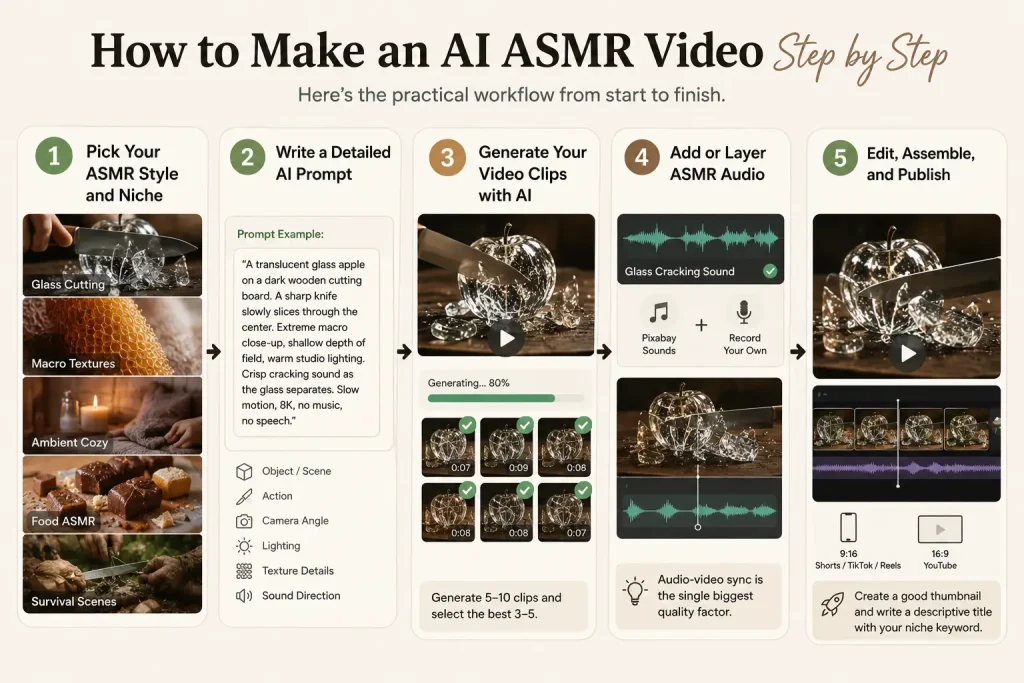
How to Make an AI ASMR Video Step by Step
Here’s the practical workflow from start to finish.
Step 1 — Pick Your ASMR Style and Niche
Choose one specific format before generating anything: glass cutting, macro textures, survival scenes, food, or ambient cozy content. Sticking to a single niche builds consistency and helps with audience growth. Your niche also determines which tools and prompt styles work best.
Step 2 — Write a Detailed AI Prompt
The prompt is what determines your output quality. A good ASMR prompt includes: the object or scene, the specific action (slicing, tapping, pouring), camera angle (macro close-up, shallow depth of field), lighting (soft, warm), texture details, and sound direction if the tool supports it.
Example prompt: “A translucent glass apple on a dark wooden cutting board. A sharp knife slowly slices through the center. Extreme macro close-up, shallow depth of field, warm studio lighting. Crisp cracking sound as the glass separates. Slow motion, 8K, no music, no speech.”
Step 3 — Generate Your Video Clips with AI
Generate short clips of 5–10 seconds each using your chosen tool. For text-to-video, paste your prompt and generate directly. For image-to-video, create a still image first and then animate it — AI Image to Video makes this straightforward with support for multiple AI models and adjustable motion settings. Most creators generate 5–10 clips and select the best 3–5 for the final video.
Step 4 — Add or Layer ASMR Audio
If you used Veo 3, audio may already be included. Otherwise, source matching sounds from Pixabay or record simple effects (tapping, crinkling) with your phone. In CapCut, align audio cues to visual actions — the crunch should hit exactly when the knife cuts. Audio-video sync is the single biggest quality factor cited by the ASMR community, so don’t rush this step.
Step 5 — Edit, Assemble, and Publish
In CapCut or DaVinci Resolve, trim your clips, arrange them in sequence, and add subtle transitions — avoid jarring cuts that break the relaxation feel. Adjust audio levels so sounds are prominent but not harsh. Export at 9:16 for Shorts, TikTok, and Reels, or 16:9 for long-form YouTube. Create an eye-catching thumbnail and write a descriptive title that includes your niche keyword.
Prompt Tips for Better AI ASMR Results
Generic prompts produce generic output. Here’s how to level up.
What Makes a Good ASMR Prompt
An effective ASMR prompt covers six elements: material and texture (glass, jelly, kinetic sand), action sequence with pacing (slow-motion, deliberate), camera specs (macro lens, extreme close-up), lighting (warm, soft, studio-lit), sound direction (crisp crunch, gentle tap, no background music), and technical specs (8K, 120fps). A vague prompt like “cutting fruit ASMR” will produce forgettable results. Specificity is everything.
Example Prompts for Popular ASMR Niches
- Glass fruit cutting: “A translucent blue glass orange on a marble slab. A chef’s knife slices it in half in slow motion. Extreme close-up, warm backlight, crisp cracking sound. 8K, no music.”
- Jungle survival: “Hands building a small campfire with dry twigs in a dense rainforest at dusk. Close-up of sparks catching. Rain falling softly in the background. Warm firelight, ambient jungle sounds. Cinematic, slow motion.”
- Macro texture: “Extreme macro close-up of a knife carving through a block of pastel purple soap. Thin curls peel off smoothly. Soft studio lighting, shallow depth of field. Quiet scraping sound. 4K, no speech.”
- Cake and jelly: “A miniature fantasy cottage sitting on top of a wobbling strawberry jelly cake. A fork gently presses into the jelly surface. Close-up, soft pastel lighting, satisfying squelch sound. Slow motion.”
Trending AI ASMR Niches Worth Trying in 2026
Not all niches are equal. Here’s where the views are right now.
Glass and Crystal Object Cutting
The most popular AI ASMR format — glass fruit, crystal objects sliced or shattered in slow motion. Demand is high, but competition is growing. Stand out by experimenting with unusual materials and unique color palettes.
Jungle and Snow Survival
Atmospheric scenes of building shelters, starting campfires, and crunching through snow. These lend themselves to multi-clip storytelling with layered nature sounds. Growing fast with less competition than glass cutting.
Macro Texture Close-Ups
Extreme close-ups of soap carving, kinetic sand, slime, and paint mixing. The visual detail carries these videos, making them a natural fit for image-to-video workflows. Strong performance on TikTok and Reels.
Cake, Jelly, and Miniature Worlds
Surreal jelly-topped cakes and miniature fantasy scenes sitting on desserts. This newer niche blends ASMR with imaginative visual storytelling — less saturated and highly shareable.
Food and Mukbang ASMR
AI-generated eating and cooking scenes with exaggerated crunch and texture sounds. It’s an established ASMR category now being recreated with AI tools. Believable results require careful audio layering — the sound of chewing needs to match what’s on screen.
FAQs About Making AI ASMR Videos
Do I need any equipment to make AI ASMR videos?
No. AI ASMR videos are generated entirely from text prompts and AI tools. You don’t need a camera, microphone, or studio. A computer or phone is enough to get started.
Can I monetize AI ASMR videos on YouTube?
Yes, but with conditions. YouTube requires AI-generated content to be original and provide genuine value. Disclosing AI use is recommended, and adding a human creative layer — custom audio, unique editing, or narrative — strengthens your monetization eligibility. YouTube’s policies on AI content are evolving, so check the latest guidelines regularly.
Which AI tool is best for making ASMR videos?
It depends on your workflow. Google Veo 3 is the top pick for synchronized audio and video. Kling AI and Hailuo AI work well for image-to-video animation on a budget. For creators who want multiple model options in one place, look for platforms that support several AI models so you can compare results without switching tools.
Are the AI tools actually free?
Most tools offer a free tier with limitations — fewer credits, lower resolution, or watermarks. Fully free workflows are possible but produce lower-quality results. Budget around $10–30 per month for consistent, high-quality output. Free tiers change frequently, so always verify current pricing before committing to a workflow.
How long does it take to make one AI ASMR video?
A short video (30–60 seconds) typically takes 1–3 hours for a beginner, including prompt writing, generating clips, selecting the best ones, adding audio, and editing. With practice, experienced creators produce 3–6 short videos per day.
Conclusion
Making AI ASMR videos comes down to a simple loop: pick a niche, write a detailed prompt, generate clips, layer quality audio, and edit everything into a polished final video. The tools are accessible, the barrier to entry is low, and the audience is massive — but what separates forgettable content from viral content is prompt specificity and audio quality.
Start with one niche, one tool, and one video. Refine your prompts based on what works, publish consistently, and expand from there. Ready to create your first AI ASMR video? Try AI Image to Video to turn your prompts into stunning, high-quality clips — and start building your channel today.






