
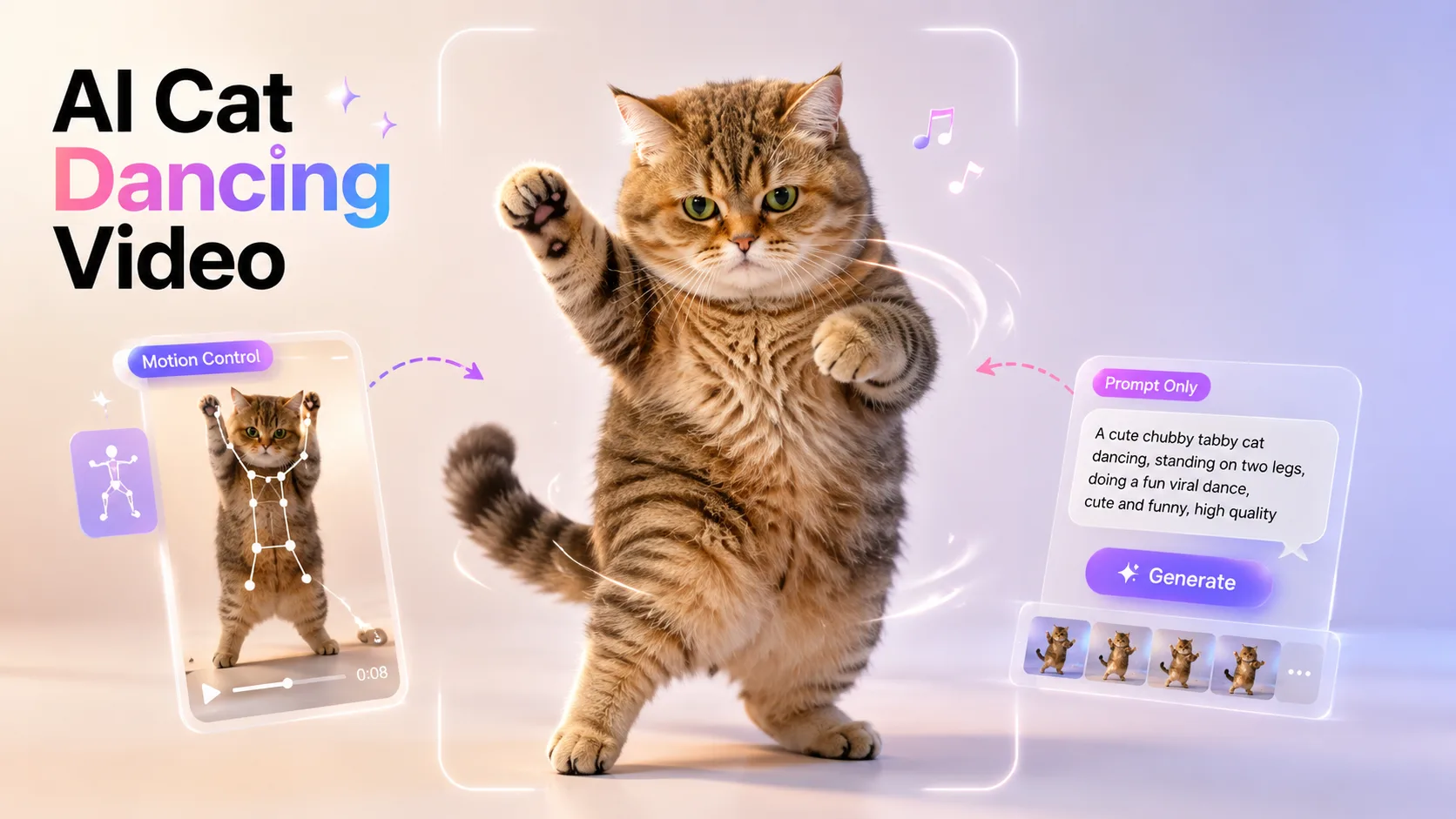
You scrolled past a cat nailing a full dance routine to trending audio and thought, “How do I make that?” Good news: you can turn a single cat photo into a dancing clip in about five minutes, no editing skills required.
The tricky part is that most beginners don’t know which photo to use, which tool actually works, what to type as a prompt, or how to make the movement look like a real viral short instead of a stiff AI animation. Those are the exact roadblocks people complain about most.
This guide is a simple, no-jargon walkthrough: choosing the right photo, making your cat dance with Motion Control or a prompt-only method, fixing the common glitches, and exporting a clean 9:16 video for TikTok, Reels, or YouTube Shorts.
Two Ways to Make an AI Cat Dancing Video
There are two simple ways to make your cat dance with AI:
● Motion Control — upload a short dance reference, such as a TikTok-style viral move, and the AI transfers that motion to your cat. This is the best option if you want a synced, trend-ready video that feels made for TikTok, Reels, or Shorts.
● Prompt Only — upload your cat photo and describe the dance in words. This method is faster and more flexible, but the motion is less controlled, so it works best for funny freestyle dances or quick meme-style clips.
For the most viral-looking result, start with Motion Control. For the fastest test, use a prompt-only workflow.
How to Create Your AI Cat Dance Video Step by Step
Now let’s turn those two methods into a real workflow. Below, you’ll learn how to make a cat dancing video with Motion Control first, then how to create a freestyle version using only a prompt.
Method 1: Use Motion Control for TikTok-Style Viral Moves
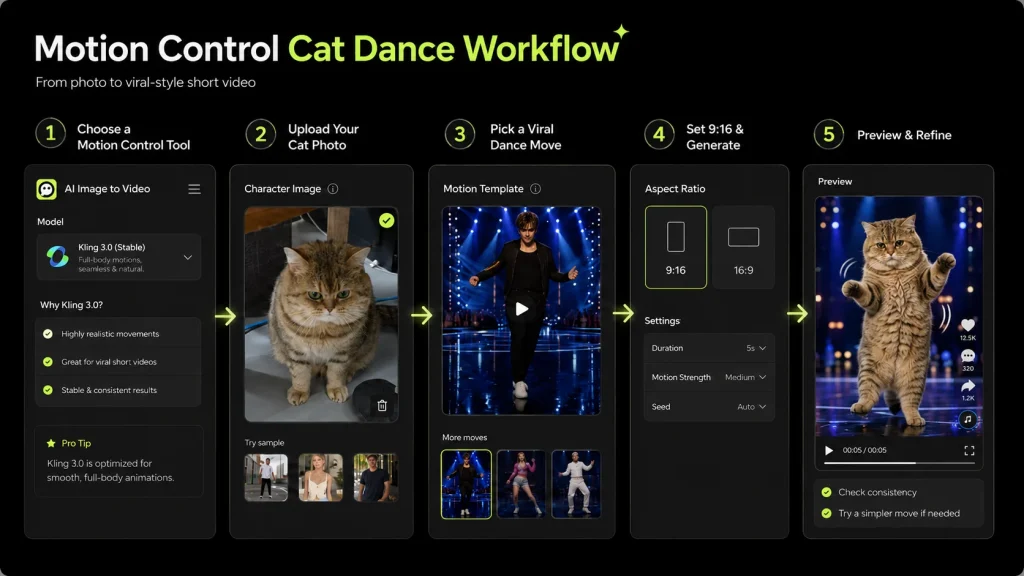
If you want a more viral-looking AI cat dancing video, Motion Control is the best place to start. Instead of letting the AI invent the movement, you choose a built-in dance action and apply it to your cat.
Step 1: Choose a Tool That Supports Motion Control
Start with an image-to-video tool that supports Motion Control, so you can apply more precise dance movement to your cat video.
Step 2: Upload Your Cat Photo
Upload a clear, full-body cat photo. A front-facing image with visible legs and paws usually works best, because the AI needs to see the body clearly before it can animate the dance.
Step 3: Pick a Built-In Viral Dance Move
Next, choose a built-in dance action. Focus on short, loop-friendly moves inspired by TikTok trends, these types of motions usually work better than long or complicated choreography.
Step 4: Set the Video Format and Generate
Set the aspect ratio to 9:16 so the video fits TikTok, Reels, and Shorts. Then generate your video.
Step 5: Preview and Refine
Watch the result and check whether the cat stays consistent and the dance looks natural. If the motion feels too strong or unnatural, try a simpler built-in move and generate again.
Method 2: Use Prompt Only for Freestyle Cat Dance Videos
If you want a faster and more flexible way to make an AI cat dancing video, use the prompt-only method. Instead of choosing a fixed dance action, you describe the movement in words and let the AI generate it.
Step 1: Upload Your Cat Photo
Upload a clear, full-body cat photo. A sharp image with visible legs and paws gives the AI a better base for dance movement.
Step 2: Set the Video Format
Choose the 9:16 aspect ratio so your video fits TikTok, Reels, and Shorts. Keep the clip length around 6–12 seconds for a short, loop-friendly result.
Step 3: Write Your Dance Prompt
Describe the dance as clearly as possible. A good prompt should include the dance move, camera behavior, facial expression, and ending pose.
For example:
[your cat] + [specific dance move] + [camera behavior] + [facial expression] + [ending pose]
Avoid vague prompts like “cat dancing,” because they often lead to random or unnatural motion.
Step 4: Generate the Video
Once your prompt is ready, generate the video and wait for the preview.
Step 5: Preview and Refine
Watch the result and check whether the movement looks natural and the cat stays consistent. If the body looks warped, lower the motion intensity. If the face or fur markings change too much, shorten the clip or generate again.
Copy-Paste Prompts for Your AI Cat Dance Video
Prompts are the single highest-engagement thing readers ask for — and the easiest to get wrong. Here is a formula plus ready-made prompts you can paste straight in.
The Simple Cat Dance Prompt Formula
Use this fill-in-the-blank structure:
[your cat] + [specific dance move] + [camera behavior] + [facial expression] + [ending pose]
Naming the exact move and expression keeps the motion believable and the cat “on model.” Vague prompts like “cat dancing” give the AI too much room to invent, which is when things get weird.
Prompt for a TikTok-Style Viral Cat Dance
“An orange tabby cat standing on two legs doing a short viral TikTok-style dance, bouncy side-step motion, paws moving to the beat, tail swaying naturally, playful happy expression, vertical 9:16 frame, static camera, ends in a confident cute pose.”
Prompt for a Hip-Hop Cat Dance
“An orange tabby cat standing on two legs doing a smooth hip-hop dance, bouncing to the beat, tail swaying naturally, happy expression, static camera, ends in a confident pose.”
Prompt for a K-Pop Cat Dance
“A fluffy grey cat performing an energetic K-pop-inspired dance, synchronized paw and body movements, cute confident face, vertical 9:16 frame, clean studio background, ends with a playful pose.”
Prompt for a Moonwalk Cat Video
“A black cat moonwalking backward like a pop dance performance, smooth glide, same fur pattern throughout, soft studio lighting, static camera, short loopable 8-second video.”
Prompt for a Funny Meme Cat Dance
“A chubby white cat doing a silly meme dance, small bouncy steps, paws waving in the air, funny serious expression, tail moving naturally, vertical 9:16 frame, ends by freezing in a dramatic pose.”
Troubleshooting: Fix Distorted, Blurry, or Off-Model Cat Videos
Almost every first attempt has one of four problems. Here is the symptom and the fix for each.
Distorted or Broken Cat Body
Cause: a cropped or side-on photo, or motion intensity set too high.
Fix: use a full-body, front-facing photo with visible legs, and dial the motion intensity down a notch.
Unnatural or Stiff Dance Motion
Cause: the move is too complex, or the prompt is too vague.
Fix: use Motion Control with a simple TikTok-style reference move, or name the exact dance move in your prompt.
Blurry or Low-Quality Output
Cause: a low-resolution source photo or a low export setting.
Fix: start with a sharp, well-lit photo and export in HD or 4K, watermark-free, for crisp results.
The Cat’s Face or Markings Keep Changing
Cause: identity drift across the clip.
Fix: use one clear reference photo, keep clips short, lock the same character or seed where available, and add “keep the same fur pattern” to your prompt.
Export, Share, and Post Your AI Cat Dance Video Safely
Your clip is done — now get it ready for short-form platforms.
Export in the Right Format for TikTok, Reels & Shorts
Export vertical 9:16 in HD or 4K without a watermark. A clean, watermark-free clip looks more professional and is easier to reuse across TikTok, Instagram Reels, and YouTube Shorts.
Keep the length in that 6–12 second loop range for the best replay value.
Add Music Without Copyright Trouble
Use the platform’s built-in licensed or trending audio, or a royalty-free track, instead of adding a copyrighted song manually. This is the simplest way to avoid muted audio or a takedown.
Keep It Fun, Honest, and Harmless
Label content as AI where it matters, don’t use it to mislead people, and keep it playful. That lighthearted, harmless energy is exactly what makes dancing pet AI videos work.
FAQs About Making an AI Cat Dancing Video
Is it free to make an AI cat dancing video?
Most generators offer free credits or a trial, then charge for watermark-free HD/4K, longer clips, and higher quota. Expect a free first try, with paid plans for volume.
Should I use Motion Control or a prompt?
Use Motion Control if you want a TikTok-style viral dance that follows a specific move. Use a prompt if you want a faster freestyle result without uploading a motion reference.
How long does it take to make a dancing cat AI video?
Usually a few minutes end to end, plus a take or two to refine the movement.
What’s the best AI cat dance video generator for beginners?
Look for one with prompt-based image-to-video generation, vertical 9:16 export, motion intensity controls, and Motion Control support for dance references.
Why does my AI cat look fake or distorted?
Almost always the photo, the motion intensity, or a vague prompt. Use a sharp full-body photo, lower the motion intensity, and name the exact move.
Can I post AI cat dance videos on TikTok, Reels, and Shorts?
Yes. Export 9:16, use licensed audio, keep it honest, and a watermark-free clip stays more platform-friendly.
Conclusion
Making an AI cat dancing video comes down to five moves: a clear full-body photo, the right generation method, a TikTok-style motion reference or solid prompt, a quick troubleshooting pass, and a clean 9:16 export with safe music.
If you want the most viral-looking result, use Motion Control with a short dance reference. If you want something quick and funny, use the prompt-only method and generate a freestyle cat dance in minutes.
None of it requires editing skills — just a good photo and a couple of takes. Pick your best cat photo, openImage to Video, and create your first dancing cat clip today.






