
Can AI make a full anime episode?
Yes — but not in the way many people imagine.
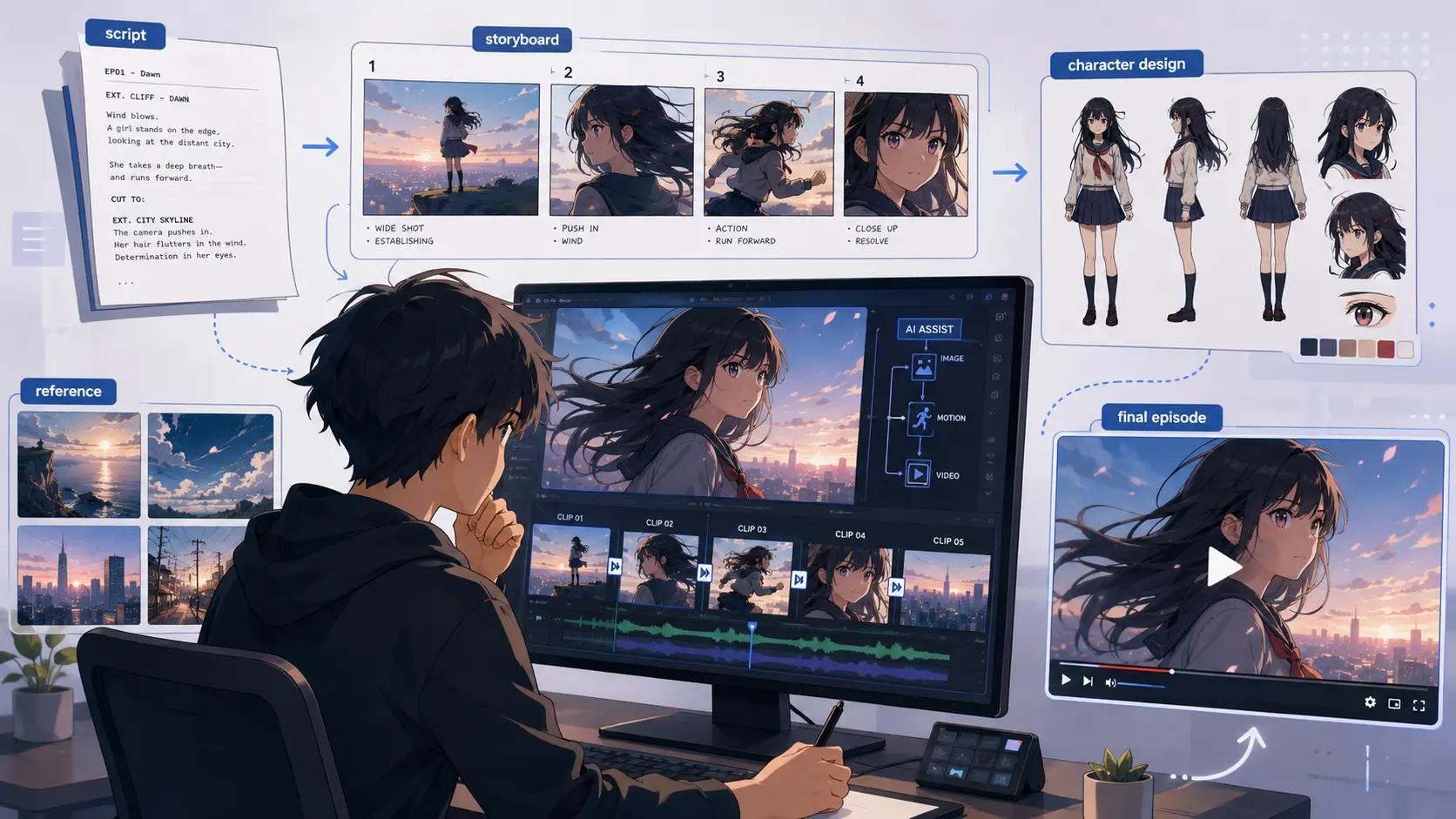
AI is already good enough to help solo creators make anime-style scenes, trailers, character moments, and even longer episode-like projects. But the real workflow is not “type one prompt and get a finished 28-minute anime.” It is much closer to production: write the story, plan the shots, design characters, create reference images, generate short clips, edit them together, add voice and sound, then keep fixing what breaks.
A recent Reddit post in r/OpenAI gives a useful real-world example. The creator shared a clip from a 28-minute anime-style episode called Blood Exodus, made with Sora. The post itself received heavy discussion, not only because the visuals were impressive, but because people immediately started asking the real questions: How many prompts did this take? How were the characters kept consistent? Why did some shots feel more 3D than 2D? Why did some details change between scenes? And how much editing was involved?
That comment section is more useful than a polished product demo because it shows what AI anime production actually looks like today: possible, exciting, messy, and still very human.
The Short Answer: Yes, But Not in One Click
AI can generate anime-style shots. It can create a dramatic close-up, a moving background, a character turning toward the camera, a fantasy city, a monster reveal, or a short action beat. What it cannot reliably do yet is generate a full episode with stable characters, clean continuity, natural pacing, believable dialogue timing, and consistent style from beginning to end.
That is why the better answer is:
AI can help make a full anime episode, but the creator still has to build the episode shot by shot.
This matches how current AI video systems are designed. OpenAI’s video generation documentation describes video creation as a process of prompts, image references, reusable character assets, clip extension, video editing, and downloaded assets — not a one-click full-episode pipeline. It also recommends using shorter clips when iterating on prompt, motion, or composition, while longer generations are better for fuller beats or scenes.
That matters for anyone searching “can AI make a full anime episode.” The answer is not a simple yes or no. The real question is whether you understand the workflow.
A finished anime episode needs more than moving images. It needs a script, shot order, character design, worldbuilding, camera direction, dialogue, editing rhythm, music, sound effects, subtitles, and final polish. AI can help with many of these pieces, especially visual generation, but it does not automatically connect them into a satisfying episode.
So yes, AI can help you make one. But no, it will not do the whole job for you.
What the Reddit Case Actually Shows
The Reddit post is useful because it does not present AI anime as a perfect miracle. It shows a creator trying to make something long-form with limited resources, then answering questions from viewers who noticed both the achievement and the flaws.
The creator’s post says the show is called Blood Exodus, and the uploaded Reddit video is a 161-second clip from a 28-minute anime-style episode. The thread had around 148 comments when retrieved, which gives us enough discussion to see what real viewers cared about.
One of the most important details came from the creator’s own replies. They explained that scenes only last about 15 seconds, and that natural dialogue pacing means each character can only have a few lines within that window. In another reply, the creator said the video generations were made of 10–15 second generations, with many outputs containing errors.
That is the key lesson.
The 28-minute episode was not generated as one continuous anime film. It was built from many short generations. The creator had to select usable clips, work around errors, sync audio, and assemble everything into something watchable.
The time investment also matters. The creator said the long-form project took about two to three months of nonstop work with Sora 2, and that character design and writing had started before.
That breaks the biggest myth around AI video: cheap does not mean effortless.
The same creator said the project cost almost nothing to make and was done on a phone, with the only paid item being an optional $8 music plan. But low financial cost did not remove the time cost, planning cost, or creative cost.
This is why the case is so valuable. It shows that AI lowers the production barrier, especially for solo creators, but it does not erase production itself.
Why Making Full AI Anime Is Still Hard
The hardest part of AI anime is not generating one beautiful shot. That is becoming easier.
The hard part is making 50, 100, or 200 shots feel like they belong to the same episode.
Character consistency
Character consistency is one of the first problems viewers notice. A single image can look great, but a full episode needs the same person to appear across many angles, lighting conditions, emotions, and movements. The face should not subtly change every scene. Hair should stay the same. Clothing details should not disappear. Body proportions should not shift.
In the Reddit thread, one commenter directly asked how the creator was able to create consistent characters, saying they had watched many videos on that topic but had not seen results as close. Another commenter noted that scriptwriting, voice, editing, and sound design still require work, and warned that style consistency takes extra time.
This is where many beginners fail. They start with video generation before they have locked down the character design.
A better workflow is to create a character sheet first. For an anime project, that means front view, side view, back view, face close-up, outfit reference, expression references, and color palette. The higher the image quality, the better. If the character only exists from one angle, the model has to invent details when the camera changes.
Style drift
Even when the character design stays recognizable, the animation style can drift.
The Reddit creator admitted this directly. They said that although character designs were consistent, the animation itself tended not to be. They also noted that Sora seemed to move toward a 3D look when unique angles and actions were involved, which made it take more time to get something coherent.
This is a huge issue for AI anime.
A short clip can hide style drift. A full episode cannot. If one scene looks like hand-drawn anime, the next looks like 3D game cinematics, and the next looks like semi-realistic digital painting, viewers will feel the break even if they cannot explain it technically.
That is why full AI anime needs a visual bible: aspect ratio, lighting style, line quality, color palette, camera language, character sheets, and scene references. Without that, the project becomes a collection of impressive clips instead of a consistent episode. If you want to maintain a consistent art style, you can read this blog post about anime art style prompts for AI video.
Action scenes and complex motion
Action is another hard part.
The creator specifically mentioned that a motorcycle chase sequence was a nightmare because the tool struggled with action in moving vehicles. They said it took the most time to piece together and that the final version had to be shorter and less chaotic than originally planned.
This is not surprising. Fast motion, vehicles, fighting, crowds, and multi-character choreography are hard because they require spatial consistency. The model has to understand where characters are, how they move, where the camera is, what objects are doing, and what should remain stable between frames.
For beginners, this means one thing: do not start with a battle scene. If you are sophomores to create highly sensory, adrenaline-pumping stories, it’s worth studying how to craft compelling fight scenes.
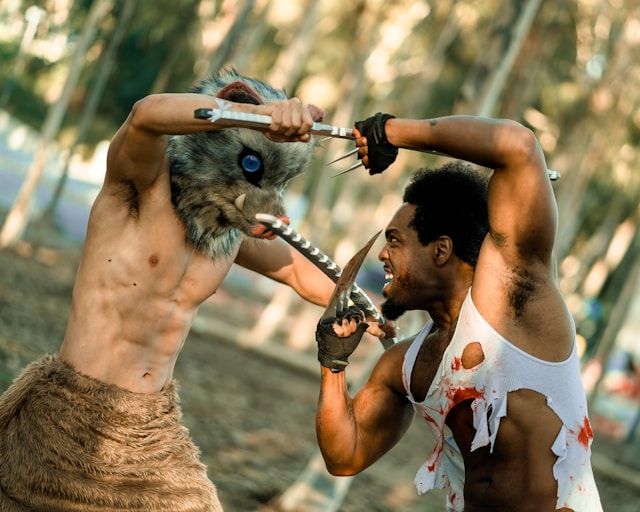
Start with controlled motion: a character turning, walking, reacting, looking up, holding a weapon, standing in the rain, or moving through a simple background. Build confidence before attempting chase scenes or fights.
Voice, audio, and lip sync
A full anime episode is not just visuals. It also needs audio.
One Reddit commenter pointed out that scriptwriting, voicing, editing, and sound design do not simply come with the generated video. The creator also explained that much of the audio was pulled from clips filled with errors and then synced with the final visuals.
That is a major production reality. AI tools may generate sound, but it may not be the sound you want. Dialogue may not match the emotional timing. Music may not support the scene. Sound effects may need to be replaced. Subtitles may need to be added manually.
This is why AI anime production is closer to editing than magic. The creator is still responsible for shaping the experience.
Why Some AI Anime Still Feels Weird
A lot of AI anime looks impressive for the first few seconds. Then something starts to feel off.
The Reddit comments show why.
One viewer asked bluntly, “Why did nothing happen?” Another told the creator to work on the writing. That sounds harsh, but it points to a real issue: beautiful visuals are not the same as storytelling.
Anime works because of tension, motivation, rhythm, and payoff. A character walking through a dramatic scene is not enough. The audience needs to know what they want, what is stopping them, why the moment matters, and what changes by the end of the scene.
Long-form AI content exposes weak writing quickly. A 10-second clip can survive on atmosphere. A full episode cannot.
Continuity is another reason AI anime feels strange. One commenter carefully listed specific issues: tents changing size, footprints appearing between shots, blood disappearing, old and new cars mixed together, fluorescent lights, confusing street logic, and modern clothing that seemed out of place. Their larger point was important: in AI shows, it can be hard to tell what is intentional and what is just a model flaw.
That is exactly the problem with long-form AI video.
When a detail changes in a normal animated episode, viewers usually assume it means something or that it was a small production error. In AI-generated episodes, viewers may assume the system lost control. That damages trust.
This is why creators need to fix continuity at the image stage, not only the video stage. If the tent size, clothing, wounds, background cars, lighting, or location logic already looks wrong in storyboard frames, generating video will only make the problem worse.
Originality also matters. Some Reddit comments compared the work to existing anime or fantasy properties. That reaction is common with AI content because many models produce styles that feel familiar. But for long-form projects, familiarity can become a weakness. If the audience feels the world is only a remix of famous anime, they are less likely to care about the characters.
For AI anime to move beyond “AI slop,” it needs more than quality. It needs intent.
How to Build an AI Anime Workflow with AI Image to Video
Although this creator was able to complete the project on an almost zero budget using Sora 2, Sora was shut down in April 2026, leaving users scrambling to find alternatives. I’m afraid this creator, too, will be one of us. This is where AI Image to Video fits in — not as a magic full-episode button, but as a practical production step with Competitive pricing.
The unique value of image-to-video is control. Text-to-video starts from words, so the model has more room to invent. Image-to-video starts from a visual frame, which gives the model a stronger anchor. For anime projects, that matters because your biggest problems are consistency, composition, and style.
AI Image to Video supports a workflow where users upload an image, add a prompt, choose aspect ratio, select duration, and generate short video clips. The page lists common aspect ratios such as 1:1, 3:4, 4:3, 9:16, and 16:9, with short clip durations such as 3 and 5 seconds. It also presents the product as a tool for turning static images into motion for storytelling, marketing, and creative use.
For anime-style production, that means AI Image to Video is best used after planning, not before it.
Step 1: Write the script and shot-by-shot storyboard
Start with the story. Define the episode idea, characters, setting, conflict, dialogue, emotional beats, and scene order.
Then turn the script into a shot-by-shot storyboard. Each shot should have a number and a purpose:
- Shot 001: wide shot of the ruined city
- Shot 002: close-up of the heroine opening her eyes
- Shot 003: over-the-shoulder shot of the enemy approaching
- Shot 004: reaction shot as wind moves through her hair
- Shot 005: low-angle shot of a sword hitting the ground
This is not just organization. It protects the project from becoming random. If a shot does not move the story forward, reveal character, build mood, or connect two moments, it may not need to exist.
Step 2: Create character designs and scene references
Before generating video, create character and location references.
For each important character, prepare front, side, and back views. Add facial close-ups, expressions, outfit details, accessories, and color notes. For locations, create clean references for the main settings: a street, bedroom, temple, battlefield, classroom, train station, or fantasy city.
This step directly addresses the biggest AI anime pain point: consistency. A clear visual reference gives each later clip a stronger foundation.
Step 3: Generate numbered storyboard images
Next, turn every planned shot into a still image.
These are not final illustrations. They are production frames. Number them clearly: Shot 001, Shot 002, Shot 003. Keep them in folders by scene.
This makes your project easier to manage. You can check whether a character’s outfit changes, whether the location still makes sense, whether the camera angle connects to the previous shot, and whether the episode has enough visual variety before spending time on video generation.
Step 4: Turn each storyboard image into a short clip
Now use AI Image to Video.
Upload one storyboard image, add a focused motion prompt, and generate a short clip. Do not ask one clip to do too much. A good image-to-video prompt should describe one main movement:
- The camera slowly pushes toward the character’s face.
- Wind moves through her hair and coat.
- The character turns toward a distant explosion.
- Rain falls as neon light flickers behind him.
- Smoke moves across the battlefield while the camera pans left.
This is the right role for AI Image to Video: turning keyframes into usable anime-style clips.
The goal is not to generate the whole episode at once. The goal is to generate controlled pieces that you can actually edit.
Step 5: Edit, add audio, and polish
Once the clips are ready, bring them into your editor. Arrange them according to the storyboard numbers. Cut weak motion. Remove awkward frames. Adjust timing. Add voice, subtitles, sound effects, music, and transitions.
This is where the project becomes an episode.
Without editing, you have clips. With editing, you have sequence, rhythm, and story.
What Beginners Should Try First
Do not start with a 28-minute episode.
That Reddit case is inspiring, but it also took two to three months of focused work, plus years of character and story development. If you start with a full episode, you will probably run into every problem at once: inconsistent characters, style drift, missing shots, bad pacing, messy audio, and too many clips to manage.
Start with a 15-second anime scene.
A simple beginner workflow could look like this:
- Write one short scene.
- Create or upload one character image.
- Create three to five storyboard images.
- Use AI Image to Video to animate each image into a short clip.
- Edit the clips together.
- Add music, subtitles, and simple sound effects.
- Export it as an anime-style short.
Good first projects include an anime character intro, a fantasy establishing shot, a transformation clip, a dramatic close-up, a short trailer for a fictional series, or an anime-style TikTok video.
These projects are small enough to finish, but still teach the real skills you need for longer AI anime: shot planning, visual consistency, motion prompting, clip selection, and editing.
What This Means for Solo Creators
The most exciting part of the Reddit case is not that AI replaced anime production. It is that a solo creator with limited resources could make something that looked like the beginning of a real animated project.
That is the real shift.
AI video tools are powerful because they help people who already have stories but lack a studio, budget, animation team, or technical pipeline. They do not remove the need for taste. They move the effort into new areas: writing, directing, reference building, prompt control, clip selection, editing, and publishing.
For creators, that is good news. You do not need to start with a perfect full episode. You can start with one image and one short clip. Then you can build.
AI Image to Video is especially useful at that starting point because it gives creators a practical bridge between still visual ideas and moving scenes. If you have a character frame, a scene concept, or a storyboard image, you can begin testing motion quickly instead of waiting until you have a full production setup.
That is the right promise: not “make a full anime episode instantly,” but “turn your anime idea into the first moving shot.”
Final Verdict: Can AI Make a Full Anime Episode?
Yes, AI can help make a full anime episode. But today, a more honest answer is this:
AI can generate the shot materials for an anime episode. The creator still has to make the episode.
The Reddit case shows what that really means. A 28-minute anime-style project is possible, but it requires short generations, many failed outputs, writing, character planning, audio syncing, editing, and months of work. It is not one prompt. It is production.
The hardest parts are not only technical. You need stable characters, consistent style, controlled motion, believable continuity, clear story pacing, and sound that matches the scene. These are the same things viewers notice when they decide whether an AI anime feels like a real project or just a string of pretty clips.
For most creators, the smartest first step is not a full episode. It is one scene.
Write a short moment. Create a character image. Generate a few storyboard frames. Use AI Image to Video to turn those frames into short anime-style clips. Edit them together. Learn what breaks. Then make the next scene better.
That is how AI anime becomes real: not all at once, but shot by shot.






