
Remember those dramatic sunrise shots, emotional transformation scenes, and the feeling that anything was possible the moment the opening song kicked in?
That classic Digimon-style opening energy is still powerful today. The good news is that you no longer need years of animation training to recreate it. With the right AI workflow, you can build a short anime opening parody that feels nostalgic, dramatic, and surprisingly close to the vibe you remember.
The bad news is that most people start the wrong way. They type something like “make a Digimon opening parody” into an AI video tool, then get random clips with inconsistent characters, weak motion, and none of that 90s anime emotion.
This guide is built to fix that.
Instead of giving you a giant tool list and abstract theory, I’ll show you a simple workflow that beginners can actually follow, a low-cost setup that keeps spending under control, and prompt templates you can copy right now.
What You’re Actually Making
Before you open any AI tool, get clear on the goal.
You are not trying to recreate the full original opening frame by frame. That usually leads to stiff results, copyright headaches, and wasted generations.
You are trying to make a Digimon-style anime opening parody. That means you borrow the emotional language:
- dramatic sky shots
- heroic character reveals
- transformation energy
- group running scenes
- nostalgic 90s anime color and framing
But you replace the content with your own idea.
That idea could be funny, heartfelt, or absurd. Office workers becoming “final forms” before Monday meetings. Pet cats evolving into increasingly dramatic apartment guardians. Friends turning into overpowered versions of themselves after drinking convenience-store coffee. The format stays familiar. The subject becomes yours.
That is what makes the parody feel recognizable without becoming a direct copy.
The Easiest Workflow for Beginners
Here’s the cleanest way to do this without getting overwhelmed:
Step 1: Pick a Short Concept
Do not start with a full 90-second opening.
Start with 10 to 20 seconds. That is enough to make the joke land and enough for viewers to recognize the reference.
A simple structure works best:
- Shot 1: dramatic sunrise or sky
- Shot 2: character introduction
- Shot 3: transformation moment
- Shot 4: group run or heroic final pose
That alone already feels like an anime opening parody.
A good beginner concept sounds like this:
“Office workers evolve into their ultimate forms before a Monday morning meeting.”
It is clear, visual, easy to stylize, and funny because the presentation is way more dramatic than the subject.
Step 2: Break the Video Into 4 Shots
Do not ask AI to create the whole parody at once.
Generate it shot by shot.
For example:
Shot 1 — Establishing scene
A glowing sunrise over a fantasy city or digital landscape.
Shot 2 — Character reveal
Your main character stands in silhouette with wind blowing through their hair or clothes.
Shot 3 — Transformation
Energy burst, glowing particles, dramatic evolution.
Shot 4 — Finale
Your team runs toward camera or poses together against a vivid sky.
This step matters because AI video tools are much better at generating short, focused scenes than one long sequence.
Step 3: Generate a Reference Image First
This is where most beginners mess up.
If you only use text-to-video for every shot, your character may change face, outfit, or hairstyle between clips. That kills the anime-opening feel instantly.
A much smarter workflow is:
- generate one strong character image first
- keep that look consistent
- use image-to-video for multiple shots
This gives the AI something visual to anchor to. It is much more reliable than rewriting the character from scratch every time.
If your chosen tool supports image reference, use it for every shot involving the same character.
Step 4: Generate Each Shot Separately
Now make your clips one by one.
For each shot, keep three things consistent:
- the same character description
- the same style language
- the same emotional tone
Your prompts should stay visually locked to a “90s anime opening” mood. If one clip feels modern and glossy while another feels hand-drawn and nostalgic, the final parody will look messy.
If you are not sure how to write prompts for each shot, you can also learn how to convert video to prompt by analyzing style, camera movement, and scene structure from existing clips.
Step 5: Edit Everything Together
Once you have 4 decent shots, drop them into a simple editor like CapCut.
Trim them to rhythm.
Cut on the beat.
Use only light transitions.
Do not over-edit.
Anime openings feel powerful because of timing and emotion, not because of fancy editing tricks.
If you can line up the sunrise reveal, transformation burst, and final running shot with music, even a short parody can feel convincing.
The Best Low-Cost Setup for Newbies
If you are new and do not want to overspend, use this stack:
Image generation: any tool you already have access to for character stills
Video generation: Kling or another affordable image-to-video model
Editing: CapCut
Music: royalty-free anime-style instrumental or your own parody-style soundtrack
This is the cheapest practical setup because it avoids the most expensive mistake: burning credits on long text-to-video generations that still do not keep your character consistent.
A good budget workflow looks like this:
- create 1 reference image
- create 4 short clips from that image or slight variations
- edit into a 10–20 second parody
- export vertical for Shorts/Reels/TikTok or horizontal for YouTube
That is enough to publish, learn, and improve without turning the project into a money pit.
4 Copy-and-Use Prompt Templates
These prompts are designed to help you extract prompt from a video in practice, not just learn theory. Replace the bracketed parts with your own subject.
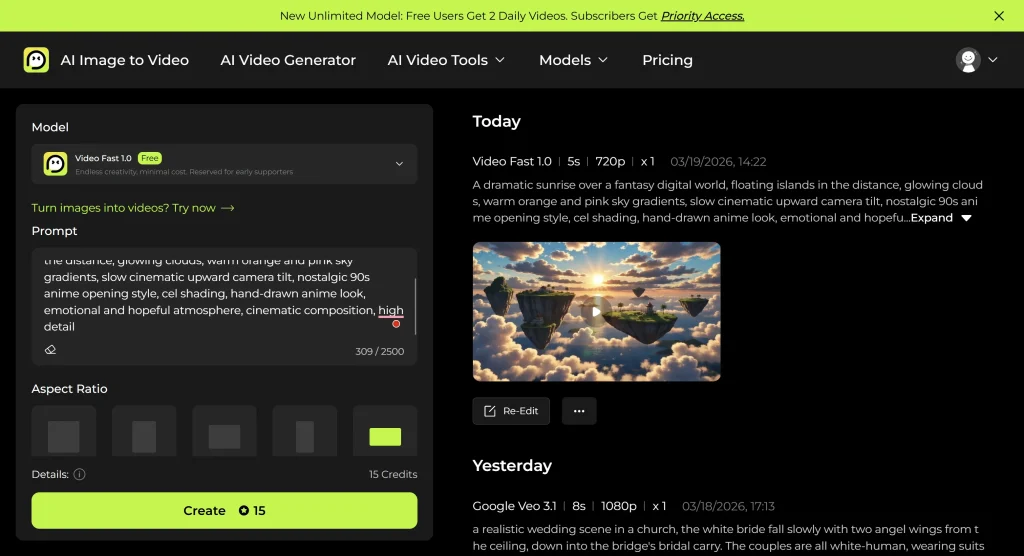
1. Sunrise Opening Shot
Prompt:
A dramatic sunrise over a fantasy digital world, floating islands in the distance, glowing clouds, warm orange and pink sky gradients, slow cinematic upward camera tilt, nostalgic 90s anime opening style, cel shading, hand-drawn anime look, emotional and hopeful atmosphere, cinematic composition, high detail
Use this for:
Your very first shot. It instantly tells viewers, “Yes, this is doing the anime-opening thing.”
2. Hero Silhouette Reveal
Prompt:
[Character name] standing on a hill in silhouette, wind moving hair and clothing, glowing sunset sky behind them, low-angle camera, heroic pose, dramatic anime opening composition, 90s anime aesthetic, cel shading, hand-drawn look, nostalgic color palette, emotional and iconic framing
Use this for:
The “main character introduction” moment. Even if your parody is funny, this shot should still feel sincere.
3. Digivolution-Style Transformation
Prompt:
[Character name] surrounded by intense glowing energy, swirling particles, dramatic transformation burst, bright light expanding outward, abstract digital space in background, dynamic rotating camera, anime evolution sequence, 90s Japanese animation style, cel shading, hand-drawn transformation effect, powerful emotional climax, high detail, cinematic motion
Use this for:
Your parody’s biggest visual payoff. This is where the joke or tribute really lands.
4. Group Running Finale
Prompt:
A group of [number] characters running toward the camera together, determined expressions, speed lines in background, dramatic sky overhead, strong forward motion, anime opening final sequence, 90s anime style, cel shading, nostalgic heroic energy, dynamic composition, hand-drawn anime look, cinematic ending shot
Use this for:
The last shot before your music peaks or your logo/title card appears.
A Simple Example You Can Follow Today
Here is a beginner-friendly parody concept that is easy to generate:
Concept:
“Office workers digivolve into their final forms before a Monday morning meeting.”
4-shot structure:
Shot 1: Sunrise over a glass office tower, exaggerated anime sky
Shot 2: Tired employee in silhouette holding coffee like a sacred artifact
Shot 3: Transformation into ultimate corporate warrior with glowing tie and flying paperwork
Shot 4: Team running toward camera with laptops, coffee cups, and maximum determination
Why this works:
- the structure feels instantly familiar to anime fans
- the subject is silly enough to create parody value
- the visuals are easy for AI to understand
- the contrast between “epic” and “office life” makes the joke work
This is the kind of concept I recommend for a first project. It is easier than trying to imitate monster anatomy, creature evolution chains, or complex fight scenes right away.
The Biggest Mistakes to Avoid
Most bad AI anime parody videos fail for very predictable reasons.
The first is trying to generate too much at once. One long prompt usually creates messy motion, weak pacing, and style drift.
The second is changing prompt language too aggressively between shots. If one clip says “nostalgic 90s anime” and the next says “modern cinematic animation,” the final video will feel disconnected.
The third is skipping the reference image step. If your character keeps changing, the audience stops feeling like they are watching an opening. It just becomes a random clip montage.
The fourth is trying to recreate the original too literally. That makes the project harder, less funny, and riskier to publish. A better parody borrows the emotional grammar, not every exact visual beat.
A Short Note on Music and Copyright
Keep this simple.
If you plan to publish the parody publicly, do not rely on the original soundtrack recording. That is the fastest way to trigger copyright problems.
A safer move is to use:
- royalty-free anime-style music
- your own original instrumental
- a clearly transformed parody approach rather than a direct copy
Your video should feel like an homage or parody, not a re-upload with different visuals.
That is enough guidance for a tutorial page. You do not need a giant legal lecture here.
Final Thoughts
Making a Digimon-style anime opening parody with AI is absolutely possible, even if you are a beginner.
The trick is not finding some magic “anime parody” button. The trick is using a workflow that AI can actually handle:
start small, build shot by shot, lock your character with a reference image, keep the style consistent, and focus on the emotional beats that made classic anime openings unforgettable in the first place.
If you only take one thing from this guide, let it be this:
Do not try to make the whole opening at once.
Make four great shots first.
That is how the parody starts feeling real.






