Every existing review of A2E AI was written by a competitor promoting their own tool. Pollo AI, MagicLight, ZenCreator, Filmora — each published a “review” that conveniently concludes their platform wins. That leaves creators with zero neutral information.
A2E gives you access to 13+ video generation models under one roof with free daily credits. But it has real limitations too — short clips, credit waste from failed outputs, and pricing changes that frustrated early users. This guide delivers what you need: how A2E works, what it costs, and whether it fits your workflow.
What Is A2E AI Image to Video?
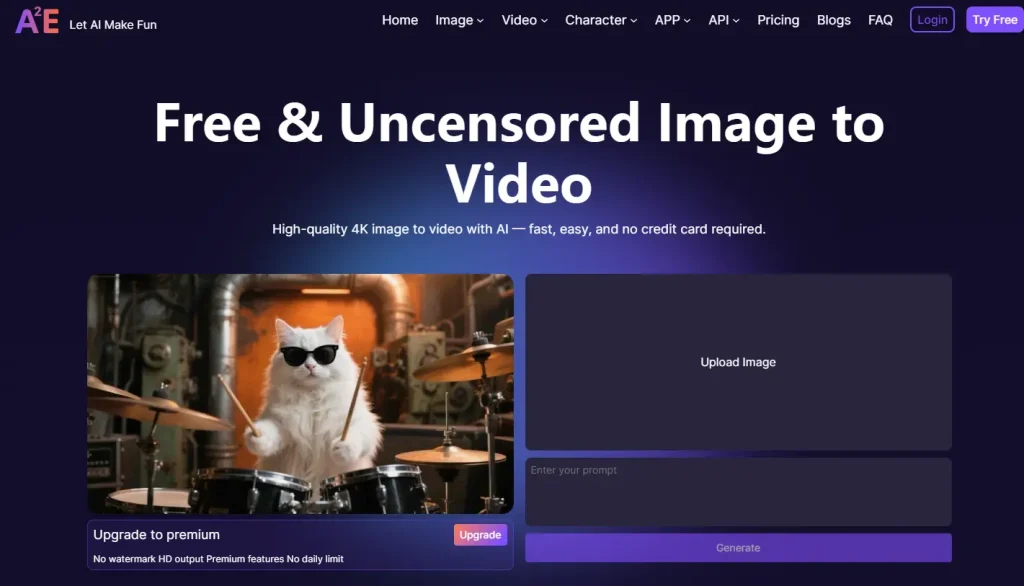
A2E is a multi-model AI video aggregator. Instead of building one proprietary engine, it hosts models from multiple providers — Kling, Seedance, Wan, Veo, Sora, and Hailuo — in a single interface. You upload an image, write a prompt describing desired motion, pick a model, and generate a 5-10 second video clip.
How A2E’s Image-to-Video Technology Works
Upload a JPG or PNG, describe the movement you want (a person turning their head, wind through hair, a camera pan), select one of 13+ AI models, and generate. Each model processes your image differently, so you can test the same image across multiple engines to find what works best for your content.
What Sets A2E Apart from Single-Model Platforms
Most competitors lock you into one engine — Runway uses Gen-4, Kling has its proprietary model, HeyGen focuses on avatars. A2E’s aggregator approach (13+ video models, 12+ image models, 4 voice models) lets you compare outputs without managing separate accounts. The platform draws roughly 156K monthly visits.
How to Use A2E Image to Video (Step-by-Step)
No written tutorial for A2E exists online. Here’s the process broken down.
Step 1: Create Your Account and Claim Free Credits
Sign up to receive 100 credits immediately, then 30 free credits daily that refresh each day. Important: credits do not roll over. That’s approximately 2-3 standard video generations per day.
Step 2: Upload Your Image and Write a Prompt
Upload a high-resolution JPG or PNG. Describe the motion you want — not the static scene. “Woman slowly turns head with hair blowing in wind” works better than “beautiful woman with long hair.” Focus on one or two movements.
Step 3: Choose Your AI Model and Generate
Start with Wan 2.7 (balanced quality, lower credit cost) or Kling 3.0 (stronger physics for motion). Test at 720p before committing to 4K, since higher resolution consumes more credits.
Tips for Getting Better Results on Your First Try
Community reports suggest roughly half of generations don’t match the prompt. To minimize waste:
- Use well-lit, high-resolution source images
- Test prompts at lower resolution first
- Stick to 1-2 specific motions per generation
- Try the same prompt across 2-3 models to compare
- Avoid complex multi-character scenes initially
Key Features of A2E Image to Video
Beyond basic generation, A2E offers a full creative toolkit that justifies its aggregator positioning.
Multi-Model Selection (13+ AI Video Engines)
Available models include Wan 2.6/2.7, Veo 3.1, Kling 3.0, Seedance 2.0/1.5 Pro, Hailuo 2.3, Sora 2 Pro, HappyHorse, and Grok Imagine. No other single platform offers this breadth of selection.
4K Video Output and Resolution Options
Output ranges from 720p to 4K, with clip duration spanning 5-10 seconds depending on model and settings. Higher resolutions cost proportionally more credits.
Face Swap, Head Swap, and Character Consistency
Face swap, head swap, and cloth swap tools help maintain character identity across clips. Community feedback is mixed — convenient but quality varies. Virtual try-on supports e-commerce applications.
Voice Cloning and Lip Sync
Four voice providers (A2E native, MiniMax, Cartesia, ElevenLabs) support 50+ languages with synchronized lip movement for talking head videos.
API Access and Developer Integration
A REST API with MCP server support enables programmatic generation. On-premise Docker deployment is also available — a key differentiator since most competitors lack APIs or charge enterprise rates.
A2E AI Models Explained: Which One Should You Choose?
Choosing the wrong model wastes credits. Here’s what each engine does best.
Best for Realistic Motion: Kling 3.0
Excels at physics-aware motion — objects interacting naturally, people walking, dynamic camera movements. Higher credit cost but fewer retries needed.
Best for Portraits and Facial Expressions: Hailuo 2.3
Community-recognized for facial expression quality. Ideal for talking head videos at lower credit cost. Less effective for landscapes or full-body action.
Best for Cinematic Quality: Seedance 2.0
Strongest model for structural coherence and visual fidelity. Note: applies face censorship on certain content types.
Best for General Use: Wan 2.7
Balanced performance at moderate credit cost — the recommended starting point. Competent across the board without excelling in one area.
Best for Highest Quality Output: Veo 3.1
Google’s premium model with the highest absolute quality and native audio generation. Reserve for final outputs where quality justifies the cost.
Model Comparison Table
| Model | Best For | Credit Cost | Quality | Key Limitation |
| Kling 3.0 | Realistic motion | High | 4.5/5 | Slower generation |
| Hailuo 2.3 | Portraits/faces | Low | 4/5 | Weak on landscapes |
| Seedance 2.0 | Cinematic scenes | High | 5/5 | Face censorship |
| Wan 2.7 | General use | Medium | 3.5/5 | Master of none |
| Veo 3.1 | Maximum quality | Very High | 5/5 | Expensive per clip |
A2E AI Pricing: What It Actually Costs Per Video
Pricing confusion ranks as the top user complaint across all sources analyzed.
Free Tier: What 30 Daily Credits Actually Gets You
You receive 100 credits at signup (one-time) plus 30 daily credits — roughly 2-3 videos per day. Credits expire at midnight with no accumulation.
Paid Plans: Pro and Max Breakdown
Paid tiers start at $9.9/month. Pro delivers 60 daily credits; Max provides 90. Additional packages ($19.90 for 1,800 credits) available. Note: the previously offered unlimited MAX plan was discontinued.
The Real Cost: Factoring in Failed Generations
If a video costs 15 credits and you need 3-5 attempts for a usable result, your real cost is 45-75 credits per output. Some users report spending $100+ before producing satisfactory videos. Start with lower-resolution test runs to preserve your budget.
How A2E Pricing Compares to Competitors
| Platform | Starting Price | Free Tier | Credits Refresh |
| A2E | $9.9/mo | 30 daily | Daily |
| Kling AI | $6.99-10/mo | 66 daily | Daily |
| Runway | $12-15/mo | 125 one-time | Monthly (no refresh) |
| Hailuo AI | $9.99/1,200 credits | Available | Monthly |
| Pika | $8-10/mo | Available | Monthly |
Is A2E AI Safe? Trust and Privacy Analysis
Safety is the second most-asked question about A2E after pricing.
Trust Signals: Trustpilot Rating and Review Breakdown
A2E holds a 4.5/5 Trustpilot rating from 102 reviews (84% five-star). Positive reviews highlight model variety and ease of use. The 11% one-star reviews cite refund difficulties and output inconsistency.
Data Handling and Content Privacy
A2E runs on AWS infrastructure with auto-deletion policies for generated content and a CSAM reporting system. Users uploading personal images should review the privacy policy directly.
Known Issues You Should Know About
Three documented concerns: (1) hidden prompt injection where A2E adds SFW text to prompts, affecting even non-restricted workflows; (2) unlimited MAX plan removed without adequate notice; (3) daily credits don’t roll over.
A2E vs. Competitors: Side-by-Side Comparison
A2E vs. Kling AI
Kling offers 66 daily free credits (vs. A2E’s 30) and excels as a focused single engine. A2E wins on model variety and content flexibility. Choose Kling for free-tier value; choose A2E for multi-model access.
A2E vs. Runway
Runway provides professional controls (motion brush, fine-grained editing) at $12-15/month but credits don’t refresh. Choose Runway for precision tools; choose A2E for variety and affordability.
A2E vs. Seedance 2.0
Seedance is available within A2E and through other aggregators at ~$0.07/clip. A2E’s advantage: access Seedance alongside 12 other models in one platform.
A2E vs. HeyGen
HeyGen targets enterprise teams ($29-149/month) with 175+ languages and corporate avatars. Choose HeyGen for corporate video at scale; choose A2E for individual creators.
Full Platform Comparison Table
| Platform | Price | Models | Max Res | Content Policy | API |
| A2E | From $9.9/mo | 13+ | 4K | Permissive | Yes |
| Kling AI | From $6.99/mo | 1 | 4K | Moderate | Limited |
| Runway | From $12/mo | 1 | 4K | Strict | Yes |
| HeyGen | From $29/mo | Multiple | 4K | Strict | Yes |
| Hailuo AI | From $9.99 | 1 | HD | Moderate | No |
| AI Image to Video | Free + packages | Multiple (Kling, Veo, Wan) | 4K | Moderate | No |
What Real Users Say About A2E Image to Video
What Users Appreciate
Multi-model access is consistently praised as a unique value proposition. Budget creators value daily credit refreshes. Developers highlight API availability. The 84% five-star Trustpilot rating reflects majority satisfaction.
Common Complaints and Frustrations
Top concerns: the “free” label feels misleading given daily caps; output quality is inconsistent; the MAX plan removal frustrated paying users; referral spam erodes trust; and face swap quality gets mixed reviews.
Who A2E Is Best For (and Who Should Look Elsewhere)
Best for: creators wanting multi-model access without multiple subscriptions, developers needing API integration, and those wanting fewer content restrictions.
Look elsewhere if: you need videos longer than 10 seconds, prioritize one best-in-class model, want free local generation (ComfyUI + Wan 2.2), or require enterprise SLAs.
FAQs About A2E AI Image to Video
Is A2E AI free?
Partially. You get 100 signup credits and 30 daily credits — enough for 2-3 generations per day. Paid plans start at $9.9/month. Daily credits don’t roll over.
Is A2E AI safe to use?
A2E holds a 4.5/5 Trustpilot rating from 102 reviews with AWS infrastructure and content safety reporting. Some users flagged prompt injection concerns. Legitimate but newer than established competitors.
How long are A2E AI videos?
Individual clips run 5-10 seconds. For longer content, generate multiple clips and combine them in an editor like CapCut or Premiere Pro.
Which AI model should I use on A2E?
Kling 3.0 for realistic motion, Hailuo 2.3 for portraits, Seedance 2.0 for cinematic quality, Wan 2.7 for balanced general use, and Veo 3.1 for maximum quality at premium cost.
Does A2E AI have an API?
Yes. A2E provides a REST API with MCP server support for programmatic video generation. API calls consume credits from your account.
What are the best alternatives to A2E?
Kling AI for the best free tier, Seedance 2.0 for quality, Runway for professional controls, HeyGen for enterprise, and AI Image to Video for watermark-free HD output with batch processing.
Conclusion
A2E stands alone as a multi-model AI video aggregator with 13+ engines, free daily credits, and developer API access. Its strengths are model variety and convenience. Its limitations are short clip durations, credit waste from retries, and pricing instability.
Start here: Claim A2E’s 100 free signup credits and test 2-3 models using the tips above. Compare against Kling AI’s free tier (66 daily credits) to see which platform fits your workflow.