

Grok killed free video generation in March 2026, and demand for no-cost AI video tools has surged since — but most “free” platforms bury credit limits, watermarks, and paywalls behind the signup button.
Vidu AI produces decent results, yet its free tier feels tight: 720p resolution, clips capped at a few seconds, and credits wasted on misfired prompts. Most “alternative” roundups are written by competitor tools promoting themselves.
We tested 15 free Vidu AI alternatives with identical prompts and ranked them on output quality, free credits, video length, and ease of use.
What Is Vidu AI (and Why Look for Free Alternatives)?
Vidu AI converts text and images into short video clips. It built a following for accessible pricing, but its free tier leaves many looking elsewhere.
What Vidu AI Does Well
Vidu offers 20 free daily credits and paid access from just $10/month — among the lowest entry points available. Some Reddit users prefer it over Sora for certain projects.
Key Limitations of Vidu AI’s Free Tier
- 720p resolution cap — no 1080p on free tier
- 4–8 second clips at most
- Prompt sensitivity — misreads burn limited credits
- Minimal audio control
- No redo option on failed generations
What to Look for in a Free Vidu AI Alternative
Focus on: renewable daily credits, output resolution (1080p minimum), clip length, watermark policy, image-to-video and text-to-video support, and audio generation.
Quick Comparison: Free Tier Breakdown
Free Credit Comparison Table
| Tool | Daily Free Credits | Max Length (Free) | Resolution | Watermark | I2V | T2V |
| AI Image to Video | Varies | Varies | Up to 4K | No | ✅ | ✅ |
| Kling AI | ~66 (~2 videos) | 5 sec | 1080p | No | ✅ | ✅ |
| Google Veo 3.1 | ~3 videos | 8 sec | 1080p+ | No | ✅ | ✅ |
| Luma Dream Machine | ~5 generations | 5 sec | 1080p | No | ✅ | ✅ |
| Hailuo AI | Limited | 6 sec | 1080p | No | ✅ | ✅ |
| PixVerse | Daily login reward | 4 sec | 1080p | Yes | ✅ | ✅ |
| Runway ML | 125 (one-time) | 5 sec | 1080p | Yes | ✅ | ✅ |
| Meta AI | Unlimited | Varies | 720p | No | ❌ | ✅ |
| Pika Labs | Limited | 3 sec | 1080p | Yes | ✅ | ✅ |
| Seedance | Via third-party | Varies | 1080p | Varies | ✅ | ✅ |
| Wan AI (local) | Unlimited | Unlimited | 1080p | No | ✅ | ✅ |
| LTX Video (local) | Unlimited | Unlimited | 720p+ | No | ✅ | ✅ |
| InVideo AI | Limited | 25 min | 1080p | Yes (free) | ❌ | ✅ |
| Hunyuan Video | Unlimited | Varies | 1080p | No | ✅ | ✅ |
| LMSYS Arena | Unlimited (voting) | Varies | Varies | No | ✅ | ✅ |
How We Tested and Ranked
Each tool was tested with the same prompts and scored on visual quality, motion realism, prompt adherence, and generation speed.
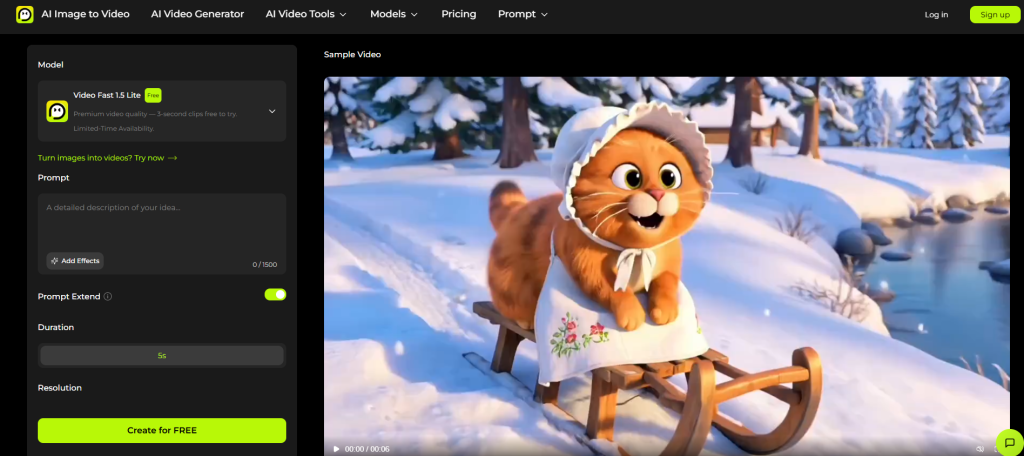
AI Image to Video – Best All-in-One Free Alternative
AI Image to Video consolidates leading models into one workspace — no juggling multiple accounts.
Key Features
- Kling, Veo, and Wan models from one dashboard
- Up to 4K resolution, no watermarks
- Adjustable aspect ratio, duration, and motion intensity
- Batch processing and TikTok-optimized exports
Best Use Cases
Built for social media creators producing TikTok, Reels, or Shorts at scale, and marketing teams wanting multi-model access without separate subscriptions.
Pros and Cons
Pros: Multi-model access, 4K output, watermark-free, batch processing. Cons: Newer platform with a smaller community than established competitors.
Kling AI – Best Free Motion Quality
Kling AI consistently tops Reddit recommendations for motion realism and character consistency.
Key Features
Text-to-video, image-to-video, motion transfer, Kling 3.0 model, built-in audio sync, clips up to 3 minutes on paid tiers.
Free Tier Details
Roughly 66 credits/day (~1–2 videos). Free clips max at 5 seconds, no watermark. Paid plans from $5.90/month.
Pros and Cons
Pros: Leading motion quality, character consistency, motion control. Cons: Limited free generations, 5-second cap.
Google Veo 3.1 – Best Free Output Quality
Accessible through Google AI Studio, Veo 3.1 delivers what many creators consider the highest-fidelity free AI video available.
Key Features
Photorealistic output, native audio generation, physics-aware scene rendering, 1080p+ resolution.
Free Tier Details
Rate-limited to ~3 videos/day through AI Studio. Requires a Google account. Native audio included.
Pros and Cons
Pros: Best visual fidelity, native audio, genuinely free. Cons: Rate-limited, slower generation.
Luma Dream Machine – Easiest Free AI Video Generator
Luma’s Dream Machine stands out for creators who want results without a learning curve.
Key Features
Fast image-to-video processing, Ray 3.14 model, stylized cinematic output, near-zero onboarding friction.
Free Tier Details
Around 5 free generations/day with quick turnaround. No credit card required.
Pros and Cons
Pros: Simplest interface, fast generation, good stylized output. Cons: Stylized over photorealistic, fewer controls.
Hailuo AI – Best for Speed and Volume
Hailuo AI (by MiniMax) prioritizes speed and natural-looking motion.
Key Features
Hailuo 2.3 model, text-to-video, image-to-video, 1080p output, fast processing.
Free Tier Details
Limited daily credits with a 6-second clip cap. Generation speed outpaces most competitors.
Pros and Cons
Pros: Fastest generation, natural motion, realistic results. Cons: 6-second free cap, limited credits.
PixVerse – Best Free Stylized and Anime Video
PixVerse carves out a niche in anime and stylized video generation with daily login rewards.
Key Features
Multiple visual styles (anime, realistic, cinematic), PixVerse v4.5/v5/v6 models, 1080p.
Free Tier Details
Daily login credits refreshing every 24 hours. Amounts have been trimmed recently.
Pros and Cons
Pros: Style variety, daily credits, strong anime output. Cons: Reduced free allowance, niche focus.
Runway ML – Best Free Creative Control
Runway offers the most professional editing toolkit in AI video and the only truly unlimited subscription tier.
Key Features
Gen-4 Turbo model, multi-scene editing, camera control, video-to-video transformation.
Free Tier Details
125 credits on signup (one-time, ~5–10 clips). Paid from $15/month to $95/month (Unlimited).
Pros and Cons
Pros: Deepest creative controls, professional output, unlimited paid option. Cons: One-time free credits, premium pricing.
Meta AI – Best Completely Free Option
Meta AI is completely free and unlimited through existing Facebook or Instagram accounts.
Key Features
Text-to-video and text-to-image, no signup barrier for Meta users, unlimited generations.
Free Tier Details
No credit limits, no restrictions. Runs within the Meta ecosystem.
Pros and Cons
Pros: Truly unlimited, zero friction, no new account needed. Cons: Below-premium quality, limited controls, requires Meta account.
Pika Labs – Best for Quick Social Clips
Pika focuses on distinctive visual effects and stylized clips built for TikTok and Reels.
Key Features
Unique special effects, multiple style modes, Pika 2.5 model, text-to-video and image-to-video.
Free Tier Details
Limited free credits on signup. Paid from $8/month.
Pros and Cons
Pros: Eye-catching effects, fun output, social-first design. Cons: Limited free credits, not for long or photorealistic content.
Seedance – Best for Cinematic Quality
Seedance (ByteDance) is gaining ground as the premier choice for cinematic sequences with character consistency and audio.
Key Features
Multi-shot sequences with audio, lip sync, character consistency, camera control, Seedance 2.0 model.
Free Tier Details
Accessible through platforms like Higgsfield, which offers promotional pricing and occasional free trials.
Pros and Cons
Pros: Top cinematic quality, character consistency, lip sync. Cons: Limited direct free access, third-party dependent.
Free Open-Source Alternatives (Run Locally for Unlimited Generation)
With a capable GPU, open-source models unlock genuinely unlimited, free video generation — no credits, no watermarks, no fees.
Wan AI (Alibaba) – The Open-Source Gold Standard
Wan 2.6–2.7 is the leading open-source video model, delivering cinematic motion locally via Pinokio or ComfyUI. Cloud access via Hugging Face Pro ($10/month).
LTX Video (Lightricks) – Best for Storyboards
LTX-2.3 excels at storyboard-to-video workflows and is more beginner-friendly than Wan for local setup.
Hardware Requirements and Setup Guide
- Minimum: 8GB VRAM GPU (e.g., RTX 3060)
- Recommended: 12GB+ VRAM for faster, higher-quality results
- Easiest path: Pinokio (one-click installer)
- Most flexible: ComfyUI (powerful but steep learning curve)
How to Maximize Free AI Video Credits (Tips & Workarounds)
Stack Free Tiers Across Multiple Tools
Use daily credits from Kling + Luma + PixVerse + Hailuo for 10–15 free videos per day. Rotate based on prompt type.
Use LMSYS Video Arena for Free Premium Access
LMSYS Video Arena generates free clips via blind voting — compare two outputs, vote, and keep both. Accesses models normally behind paywalls.
Extend Short Clips with the Last-Frame Technique
Use the final frame of a clip as the starting image for the next generation. This chains 5-second clips into longer sequences.
Optimize Settings to Stretch Credits
Test prompts at lower resolution and shorter duration first. Only render at full quality once the composition works.
Which Free Vidu AI Alternative Should You Choose?
For Beginners (No Technical Setup)
Luma Dream Machine for simplicity or Meta AI for zero friction.
For Content Creators (TikTok, YouTube, Reels)
Kling AI for motion quality. PixVerse for stylized and anime content.
For Professional/Cinematic Use
Google Veo 3.1 for visual fidelity. Seedance for character-consistent sequences. Runway for creative control.
For Budget-Conscious Users Who Want Unlimited
Meta AI for truly unlimited free access. Wan AI locally for higher quality with GPU hardware.
FAQs of Free Vidu AI Alternatives
Is there a completely free alternative to Vidu AI?
Yes. Meta AI offers truly unlimited free generation. Google Veo 3.1 via AI Studio is free but rate-limited. For unlimited local generation, Wan AI runs free on any 8GB+ VRAM GPU.
What is the best free AI video generator with no watermark?
Kling AI and Google Veo 3.1 both produce watermark-free output on free tiers. AI Image to Video also offers watermark-free results up to 4K.
Can I run AI video generators locally for free?
Yes. Wan AI and LTX Video are open-source and run locally via Pinokio or ComfyUI. You need a GPU with at least 8GB VRAM (RTX 3060 or equivalent). Completely free with no caps.
Which free AI video tool produces the longest clips?
InVideo AI creates videos up to 25 minutes (watermarked on free tier). For generative clips, Kling AI offers up to 10 seconds free.
What happened to Grok’s free video generation?
Grok discontinued free AI video generation in March 2026. Even paid SuperGrok subscribers ($30/month) report shrinking quotas and tighter content filters.
Is Vidu AI better than Kling AI?
Kling AI generally outperforms Vidu in motion quality and character consistency, but Vidu AI gives more generous daily free credits (20 vs. ~2 videos). It depends on whether you prioritize per-clip quality or volume.
Conclusion
The free AI video landscape in 2026 rewards creators who know where to look. Kling AI leads for motion quality, Google Veo 3.1 for visual fidelity, Luma for simplicity, and Meta AI for unlimited access. Power users can run Wan AI locally for boundless generation.
For multi-model convenience with 4K watermark-free output, try AI Image to Video — it brings Kling, Veo, and Wan together under one roof.






