You’ve seen them all over TikTok and Instagram — anime characters performing the Joker stair dance, the Mona Lisa nailing trending choreography, or a coworker’s face mapped onto a viral dance clip. The tool behind most of them? Viggle AI.
With over 40 million users and reactions ranging from “feels illegal to be free” to “is this a scam?”, Viggle has become one of the most talked-about AI animation tools online. This guide covers everything — technology, features, real pricing data, privacy concerns, and alternatives — so you can decide whether it’s worth trying.
What Is Viggle AI?
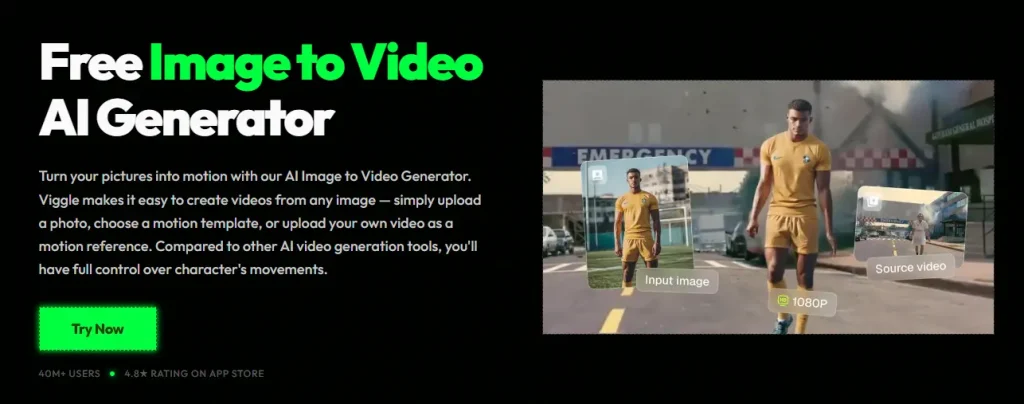
Viggle AI is a free AI-powered animation platform that transforms any still image into a moving, animated character. You upload a photo, select a motion reference, and the AI handles the rest — no animation experience required. It’s available on web, mobile, and Discord, and it’s primarily used for creating memes, dance videos, and viral social media content.
How Viggle AI Works: The JST-1 Physics Model
What sets Viggle apart is its proprietary JST-1 video-3D foundation model. While most AI video tools use per-frame 2D diffusion, JST-1 applies physics-aware 3D motion transfer — it understands how bodies move in three-dimensional space, producing more natural and consistent animations.
A Google AI Studio case study confirmed that Viggle also integrates Gemini 2.0 Flash and Imagen 3 for additional generation capabilities.
Who Made Viggle AI? The Company Behind It
Founded by Hang Chu with $19 million in funding, Viggle AI has surpassed 40 million users globally. Its community spans English, Spanish, Portuguese, Bangla, and Chinese-speaking creators.
Where to Use Viggle AI (Web, iOS, Android, Discord)
Viggle is available as a web app (viggle.ai), iOS and Android native apps, and a Discord bot. Yes — you can create animations directly on your phone.
Viggle AI Key Features Explained
Viggle offers a deeper toolset than you might expect. Here’s what each feature does.
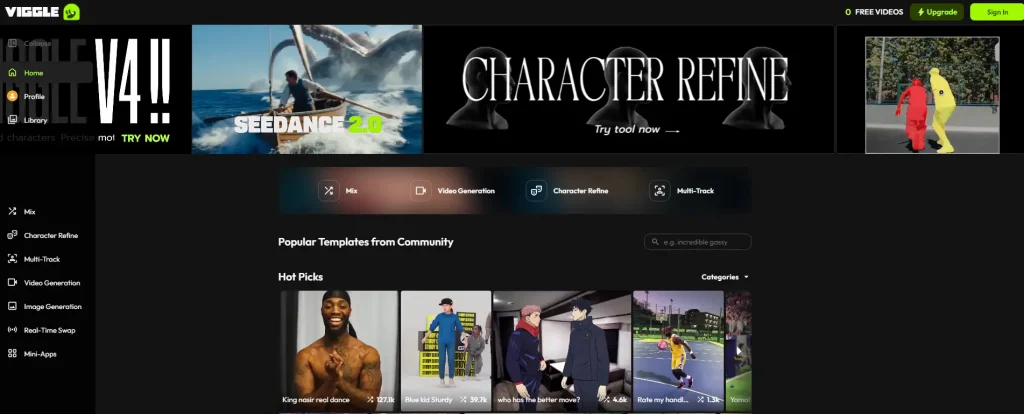
Mix – Swap Any Character Into Any Video
Mix is the flagship feature driving most viral content. Upload a character image, pick a reference video or template, and the AI maps your character onto the motion — producing those dancing anime characters and celebrity memes you see everywhere.
Move – Animate a Character With a Custom Background
Move animates a character while preserving or replacing the background, keeping the focus on the character’s motion with a custom backdrop rather than inserting into existing footage.
Multi – Animate Up to 5 Characters at Once
Multi animates up to five characters in one scene — one of the most requested features across global user communities. Requires a paid plan.
Rap and Mic – AI Music and Voice Content
Rap generates lip-synced music videos from a character image, while Mic creates voice-driven content — differentiating Viggle from pure motion-transfer tools.
Live – Real-Time Streaming Avatars
Viggle LIVE enables real-time avatar streaming for VTubing and livestreams, though VTuber communities have raised impersonation concerns. Requires the $19.99/month Live plan.
Editor and Character Refine (V4)
The built-in multi-track editor handles clip combining and timing adjustments. The newest addition, Character Refine (V4), tackles the “melting glitch” from earlier versions with improved frame-by-frame consistency and output up to 60 seconds.
Templates Library (8,000+)
Viggle hosts over 8,000 motion templates — trending TikTok choreography, dance sequences, and action clips — so you don’t need to source your own reference videos.
How to Use Viggle AI: Step-by-Step Tutorial
Creating Your Account and Getting Started
Sign up at viggle.ai using Google authentication or email. The dashboard presents feature tabs (Mix, Move, Multi, etc.) and a template browser.
Creating Your First Video With Mix
- Select the Mix tab
- Upload a clear character image (front-facing, clean background works best)
- Choose a motion template or upload your own reference video
- Adjust settings and hit generate
- Wait for processing and download your result
Using Motion Templates vs. Custom Reference Videos
Templates are faster and optimized for popular trends. Custom reference videos offer full creative control but less predictable results. Start with templates, then experiment with your own clips.
Tips for Getting the Best Results
- Use images with clean, simple backgrounds
- Avoid complex hand poses — hand quality remains a known weakness
- Desktop tends to be more reliable than mobile when errors occur
- Generate during off-peak hours to reduce queue times
Viggle AI Pricing: Free vs. Pro vs. Live vs. Max
Free Plan – What You Actually Get
The free tier gives you 3-5 relaxed-mode videos per day at 720p with a watermark, 2 concurrent generations, and 15-60 day file storage. Enough to test the tool, but the watermark and resolution cap limit serious use.
Pro, Live, and Max Plans Compared
| Plan | Price/Month | Credits | Daily Relaxed | Resolution | Concurrent | Storage |
| Free | $0 | — | 3-5 | 720p | 2 | 15-60 days |
| Pro | $9.99 | 80 | 10 | 1080p | 4 | Permanent |
| Live | $19.99 | 200 | 25 | 1080p | 6 | Permanent |
| Max | $79.99 | 800 | 80 | 1080p | 10 | Permanent |
Credit System Explained: How Far Do Your Credits Go?
This is where user frustration peaks. One Reddit user reported that the $9.99 Pro plan yielded only 4 images and 2 eight-second videos before 80 credits were gone. Credits deplete faster than marketing implies, so estimate your expected usage before committing to a paid tier.
Is Viggle AI Safe? Privacy, Security, and Legal Concerns
Data Privacy and Content Deletion
A popular r/privacy thread found that uploaded files remained accessible via direct cloud storage links even after deletion requests. Viggle’s support initially quoted a 12-month deletion window before correcting it to 12 hours. US-based users currently lack GDPR-equivalent protections.
Non-Consensual Use and Misuse Risks
Teachers have reported students creating “school slander” videos by superimposing faculty faces onto embarrassing clips. Real people’s likenesses have also become meme templates without their consent — highlighting significant moderation gaps.
Copyright and Legal Considerations
Viggle’s templates include copyrighted music and movie clips. Legal liability for distributing infringing output likely falls on the end user, not the platform. Whether the templates themselves are properly licensed remains unclear, and commercial use eligibility is still unanswered across official and community sources.
Mod APK and Third-Party Risks
Modded APKs don’t work — credits are server-side. Unofficial versions only expose your device to security risks with zero benefit.
What Can You Create With Viggle AI? Real Use Cases
Memes and Viral Social Media Content
This is Viggle’s sweet spot — anime characters dancing, historical figures performing TikTok trends, and face-swap humor. Communities like r/LobotomyKaisen specifically voted to keep Viggle memes because they’re considered “harmless fun” distinct from threatening AI art.
TikTok, Reels, and Shorts Dance Videos
Social media creators use Viggle for eye-catching short-form content. Creator @PixelSynth reportedly grew from 5,000 to 90,000 subscribers primarily through Viggle-generated videos.
Fan Edits and Fandom Content
Anime, gaming, and pop culture communities animate their favorite characters in creative scenarios — from dance battles to crossover scenes.
Brand Marketing and Pre-Visualization
A Texas-based game studio reportedly cut motion prototyping time by 80% using Viggle. Creators also pair Viggle with CapCut, MidJourney, and Mixamo for more polished workflows.
Viggle AI Limitations and Known Issues
Output Quality Constraints
Resolution caps at 1080p with no 4K option. Clips typically run 7-25 seconds (up to 60s on V4). Hands are frequently described as “unusable,” realistic faces trigger uncanny valley effects, and foot sliding appears in longer clips.
Processing Times and Server Queues
Expect 1-5 minutes off-peak, but users report 45+ minute waits during busy periods. Server failures sometimes occur without error messages, affecting free and paid accounts alike.
Customer Support Issues
Multiple sources describe Viggle’s support as slow or unresponsive. A Pro subscriber reported no reply after filing a credit depletion complaint.
Best Viggle AI Alternatives in 2026
If Viggle doesn’t fit your needs, consider these alternatives.
Kling AI – Best for Cinematic Quality
4K/60fps output, Motion Brush, and video extension up to 3 minutes. Free tier with 66 daily credits; paid from $9.90/month.
Runway ML – Best for Professional VFX
Comprehensive VFX suite with Multi-Motion Brush, inpainting, and industry-grade rendering. Paid from $15/month.
Pika – Best for Creative Character Animation
PikaSwaps for character insertion and surreal effects. Free tier available; paid from $10/month.
DomoAI – Best for Anime and Stylized Content
30+ art styles, 4K resolution, and 30-second clips. Starter plan $9.99/month.
CapCut AI (Dreamina) – Best Free Alternative
Template-based motion with deep TikTok integration and built-in editing. Free to start; Pro at $9.99/month.
| Tool | Best For | Max Resolution | Free Tier | Starting Price |
| Viggle AI | Memes & dance content | 1080p | Yes | $9.99/mo |
| Kling AI | Cinematic quality | 4K/60fps | Yes | $9.90/mo |
| Runway ML | Professional VFX | 4K | Yes | $15/mo |
| Pika | Creative animation | 1080p | Yes | $10/mo |
| DomoAI | Anime/stylized | 4K | No | $9.99/mo |
| CapCut AI | Free TikTok content | HD | Yes | $9.99/mo |
FAQs About Viggle AI
Is Viggle AI free?
Yes. The free plan offers 3-5 relaxed-mode videos daily at 720p with a watermark. Paid plans from $9.99/month remove the watermark and unlock 1080p.
How long does Viggle AI take to generate a video?
Typically 1-5 minutes during off-peak hours. During busy periods, waits can exceed 45 minutes. V4 has improved speeds for certain tasks.
Can you use Viggle AI on your phone?
Yes. Native apps are available for iOS and Android, and the web version works in mobile browsers.
Does Viggle AI replace professional animators?
No. Viggle handles social media content and quick animations, not production-grade work. It’s capped at 1080p with short durations and known hand/face quality issues.
Can you use Viggle AI videos commercially?
No clear answer exists. Viggle’s ToS doesn’t explicitly address commercial licensing for generated content. Review the latest terms and consult legal counsel before commercial use.
Is Viggle AI a deepfake tool?
Not exactly. Viggle uses motion transfer rather than face replacement. Output is intentionally stylized and visibly AI-generated, which communities note distinguishes it from deepfake technology.
Conclusion
Viggle AI is a uniquely accessible tool for turning photos into animated content, powered by physics-aware AI that delivers surprisingly natural motion. It’s ideal for meme creators, social media enthusiasts, and anyone wanting to experiment without a learning curve.
Go in with realistic expectations, though. Credits deplete faster than marketing suggests, output quality has clear ceilings, and privacy deserves scrutiny. For professional needs or higher resolution, alternatives like Kling AI, Runway ML, or AI Image to Video may be better fits.
Ready to try it? Start with Viggle’s free plan and test Mix with a simple character image. You’ll know within a few generations whether it fits your workflow.