AI kissing video generators have become some of the most searched creative tools of 2026. But after sifting through dozens of product pages, Reddit threads, and YouTube reviews, one thing is clear: most “guides” are just marketing in disguise.
Users consistently report the same frustrations — tools marketed as “free” that aren’t, confusing credit systems, and surprise billing. This guide provides a transparent look at DeeVid AI, a practical walkthrough, honest pricing, and a head-to-head comparison of the top alternatives.
What Is an AI Kissing Video Generator?
These tools transform static photos into short animated clips of people kissing. They use AI to analyze facial features, predict natural motion, and generate frame-by-frame video from a single image or photo pair.
How AI Kissing Video Technology Works
The core technology uses facial landmark detection — the AI maps key facial points (eyes, nose, lips, jawline) and synthesizes realistic kissing motion. The same tech powers AI lip sync and hug generators. Most tools produce 5-to-15-second clips, with sustained motion beyond 10 seconds remaining technically challenging.
Image-to-Video vs Text-to-Video: Which Works Better for Kiss Videos?
Image-to-video is the preferred method. Upload a real photo, and the AI animates it while preserving likenesses. Text-to-video creates characters from prompts, offering more creative freedom for fictional content but less control over the final look. For personal photos, image-to-video delivers better results.
DeeVid AI Kissing Video Generator: An Honest Look
What Is DeeVid AI?
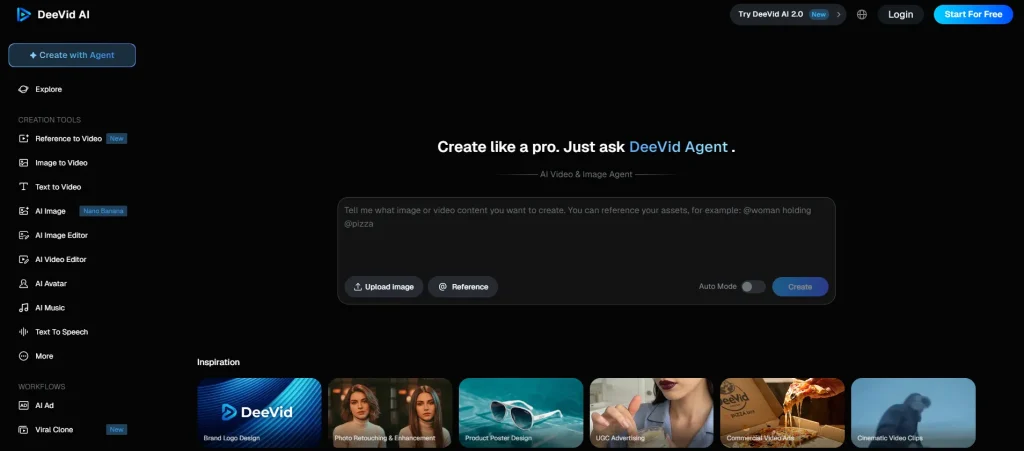
DeeVid AI is a Singapore-based platform offering text-to-video, image-to-video, and video-to-video generation across web, iOS, and Android. It integrates models including Google Veo 3, with kissing videos being one of many features alongside lip sync, avatars, and ad creation.
Key Features for Kissing Videos
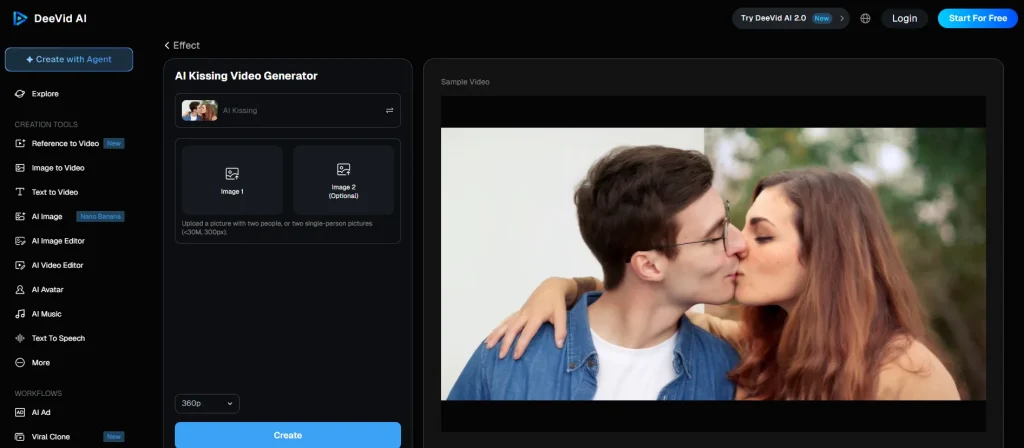
DeeVid provides a dedicated AI Kissing template with multiple styles, support for couple photos and separate portraits, and three model tiers — Fast V2.0 (quick previews), Quality V2.0, and Master V2.0 (highest fidelity). The AI Hug Generator and Lip Sync features complement the kissing tool.
DeeVid AI’s Template-Based Approach (No Prompt Needed)
DeeVid’s standout advantage is its no-prompt template system. Unlike competitors where results depend on prompt-writing skill, you simply upload a photo and select a template. This makes it genuinely beginner-friendly.
What Real Users Are Saying
DeeVid holds a 1.6 out of 5 on Trustpilot (159 reviews, 76% one-star). Key complaints include:
- Billing issues: Unauthorized charges of $200-$300+ after cancellation attempts
- Misleading credit counts: Plans advertise “40 videos” but deliver 12-25
- Quality drops: Output quality reportedly declines after moving from free trial to paid
- No account deletion and AI-only customer support (roughly 1% reply rate)
On the positive side, free trial quality is decent, the template approach works well, and early users found it comparable to Kling AI for short clips.
How to Make an AI Kissing Video with DeeVid AI (Step-by-Step)
Step 1: Sign Up and Understand Your Free Credits
Create an account to receive 20 free credits. Each kissing video costs about 10 credits, so your free allowance covers roughly 2 videos. Credits expire after 30 days.
Step 2: Choose the AI Kissing Template
Navigate to the kissing templates and select a kiss style. No prompt writing is required.
Step 3: Upload Your Photo(s)
Upload a couple photo or two individual portraits. Photo quality determines output quality — use well-lit, clear images with visible facial features and side-profile or three-quarter angles.
Step 4: Customize Your Kiss Style and Settings
Select your kiss style and model tier. Use Fast V2.0 for cheap previews, then Quality or Master for final renders. Higher-quality models consume more credits.
Step 5: Generate, Preview, and Download
Generation takes 20-60 seconds. Preview before downloading. Be cautious of the “No Limit” button, which users report triggers unintended purchases.
Tips for Creating Realistic AI Kissing Videos
Photo Selection Tips (Lighting, Angle, Resolution)
- Use directional lighting for natural depth
- Choose side-profile or three-quarter angles
- Keep a slight gap between faces in couple photos
- Avoid sunglasses, heavy filters, or facial obstructions
Best Prompt Ideas for Different Kiss Styles
For prompt-based tools:
- Romantic: “Gentle forehead kiss at golden hour, soft lighting”
- Cinematic: “Dramatic rain-soaked kiss, close-up, water droplets visible”
- Playful: “Surprise cheek peck, one person laughing, bright light”
- Anime: “Cherry blossom kiss, soft pastel colors, wind in hair”
Common Mistakes to Avoid
- Low-resolution photos or heavy filters
- Group photos instead of couple/individual shots
- Expecting smooth motion beyond 5-10 seconds (a current technical limit)
- Overly complex prompts — simpler descriptions produce more reliable output
What DeeVid AI Actually Costs (Pricing Breakdown)
Free Trial: What You Really Get
DeeVid’s 20 free credits yield about 2 kissing videos. Compare with Vidu AI (fully free), Virbo (“100% free unlimited”), and MyEdit (daily free credits). “Free” means very different things across tools.
Paid Plans: Credit Costs and Hidden Charges
Paid plans start at $14/month, but the variable credit system means actual output depends on model and video type. Reddit users report getting 12-25 videos from plans advertised as “40 videos.” Annual billing defaults have caught subscribers off guard.
Cost-Per-Video: The Real Math
At $14/month for 12-25 outputs, DeeVid costs roughly $0.56-$1.17 per video. Higgsfield runs $150-300 per cinematic reel at the premium end, while KissGen AI offers a $5 lifetime deal.
Billing Pitfalls to Watch Out For
- Confirm monthly vs. annual billing before subscribing
- Screenshot cancellation confirmations — charges may continue
- Monitor your card post-cancellation
- No account deletion option currently exists
- Credits expire after 30 days regardless of usage
Best AI Kissing Video Generators Compared (2026)
DeeVid AI — Best for No-Prompt Beginners
Template-based and beginner-friendly, but the 1.6/5 Trustpilot score warrants caution on paid plans.
Pollo AI — Best for Multi-Model Access
Access Sora 2, Veo 3, Seedance 2.0, and Kling AI through one dashboard. 4.3/5 Trustpilot across 4,000+ reviews.
Virbo (Wondershare) — Best for Customization
French wedding kiss, parental affection, passionate embrace styles with scene settings like beach sunset. Wondershare brand adds trust.
Media.io — Best for Multiple Kiss Effects
Named romantic templates (Peak of Eternity, Moonlit Beach Kiss) and a unique Multi-Person Kiss Filter.
VEED.IO — Best for Content Creators
Full editing suite (subtitles, voiceover, music) with multi-model backend. 4.6/5 rating, used by Fortune 500 companies.
Vidu AI — Best Free Option
Genuinely free with anime and fictional character focus. Upload, select a template, generate — no credit card needed.
ComfyUI + CivitAI — Best for Privacy (Local Generation)
Unlimited free generation on your own GPU with community-built kissing LoRAs. Nothing gets uploaded. Requires technical setup. For a simpler privacy-focused alternative with watermark-free output, AI Image to Video handles image-to-video generation without the hardware requirements.
Quick Comparison Table
| Tool | Free Tier | Paid Price | Prompt Needed? | Watermark? | Trust Score |
| DeeVid AI | ~2 videos | $14/mo | No | Varies | 1.6/5 |
| Pollo AI | Limited | Varies | Yes | Varies | 4.3/5 |
| Virbo | Claims unlimited | Paid tiers | Yes | Varies | N/A |
| Media.io | Limited | Paid tiers | No | Yes (free) | N/A |
| VEED.IO | No card needed | Paid tiers | Yes | Yes (free) | 4.6/5 |
| Vidu AI | Fully free | None | No | No | N/A |
| AI Image to Video | Available | Paid tiers | Yes | No | N/A |
| ComfyUI | Unlimited | Free (GPU) | Yes | No | N/A |
AI Kissing Video Use Cases and Creative Ideas
Romantic Occasions (Weddings, Anniversaries, Valentine’s Day)
AI kissing videos work surprisingly well as personalized digital gifts. Animate a wedding photo for an anniversary or create a Valentine’s Day post that stands out from generic content.
Fan Content and Anime Characters
Fandom content generates the highest engagement by far. A K-Pop “kiss cam” edit pulled 2,374 Reddit upvotes, while a similar YouTube fan video hit 642,000 views. Tools like Vidu AI and Seedance 2.0 excel here.
Social Media and Viral Content
For TikTok, use vertical 9:16 clips under 60 seconds. Instagram Reels need strong caption hooks. Always use watermark-free output — watermarked clips signal amateur quality.
Privacy, Safety, and Ethical Considerations
How Your Photos Are Protected
DeeVid claims to delete photos after processing. KissGen AI auto-deletes after 24 hours. But the only guarantee your images stay private is local generation via ComfyUI. Always review each platform’s data policy before uploading personal photos.
Consent and Responsible Use
Creating AI kissing videos of fictional characters is generally acceptable. Using photos of real people requires explicit consent. Content involving minors is never acceptable. Real harm cases have already surfaced — from school bullying to family conflicts. Multiple jurisdictions now classify non-consensual AI intimate content as illegal.
FAQs About AI Kissing Video Generators
Is DeeVid AI free for making kissing videos?
DeeVid offers 20 free credits (about 2 videos). Ongoing use requires a $14/month subscription.
What is the best free AI kissing video generator?
Vidu AI is genuinely free with no paid tier. Virbo also markets as free, though limits may apply.
Can I make an AI kissing video on my phone?
Yes. DeeVid has iOS/Android apps, and web-based tools like Virbo and AI Image to Video work in mobile browsers.
How long does it take to generate an AI kissing video?
Typically 20-60 seconds depending on tool and quality settings.
Do AI kissing video generators add watermarks?
Most do on free tiers. DeeVid, MyEdit, and Vidu AI claim watermark-free free output, though policies shift frequently.
Can I use AI to make two people kiss from separate photos?
Yes — DeeVid, Media.io, and Virbo all support two separate portrait uploads. Single couple photos generally produce more natural results.
Is it legal to create AI kissing videos?
Fictional characters and consenting participants are fine in most jurisdictions. Non-consensual content of real people is increasingly illegal.
Why does my AI kissing video look bad or glitchy?
Usually poor photo quality — bad lighting, low resolution, or obstructed faces. Upgrading from fast to quality model tiers also helps.
How do I cancel my DeeVid AI subscription?
Go to account settings, cancel, and screenshot the confirmation. Monitor your payment method afterward. No account deletion option exists.
What is the maximum length for AI kissing videos?
Most tools produce 5-15 second clips. Motion beyond 10 seconds is technically limited across all current models.
Conclusion
DeeVid AI’s template approach makes it one of the easiest ways to create AI kissing videos — no prompt skills needed. But its billing transparency issues and low trust scores mean testing with free credits before paying is essential.
The right tool depends on your priorities: Vidu AI for zero cost, Pollo AI for model variety, VEED.IO for professional workflows, or ComfyUI for full privacy. Whichever you choose, great photos and realistic expectations matter more than the tool itself.