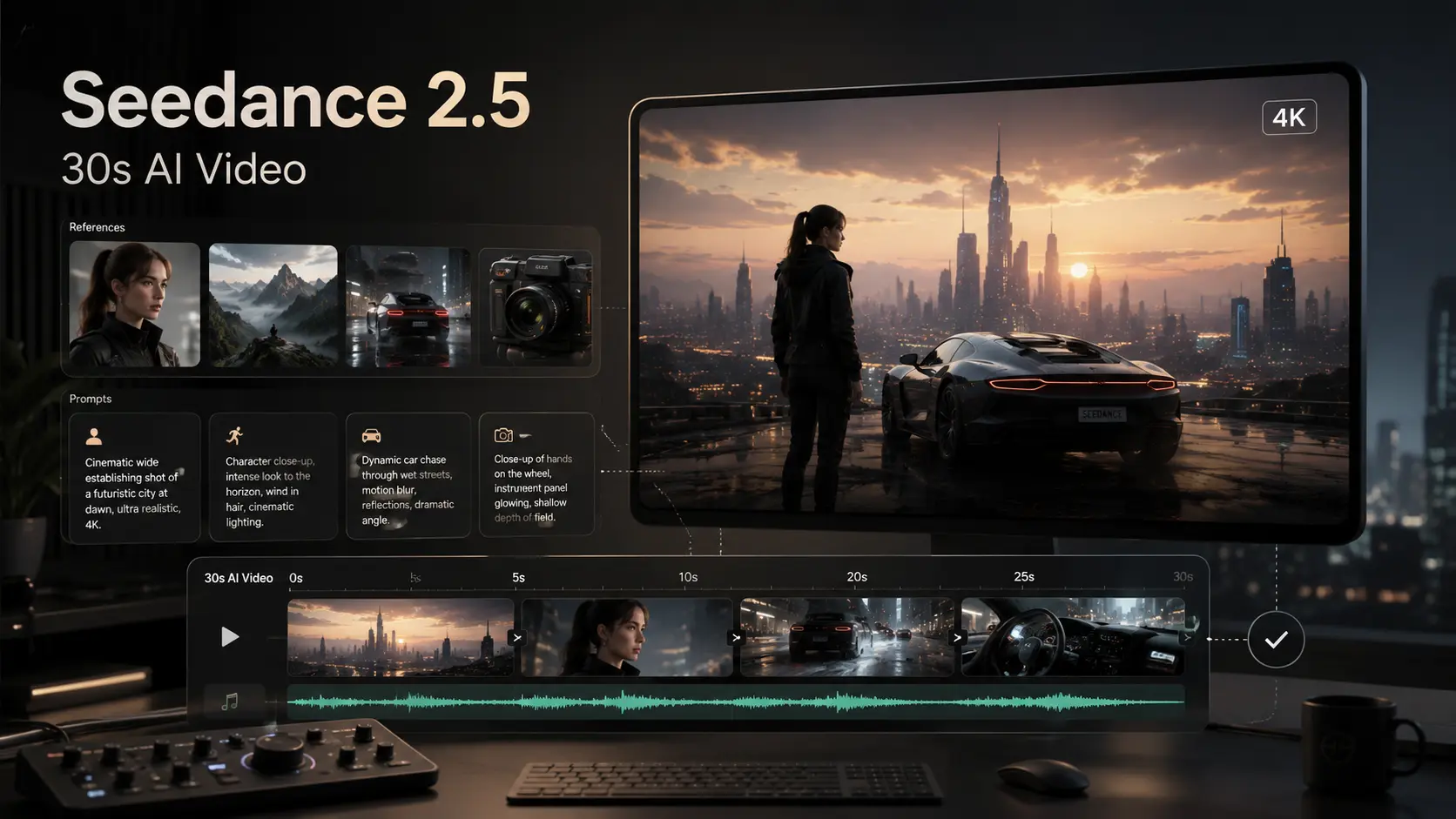
Most AI video generators excel at producing brief visual moments, often limiting creators to 4-second clips that are difficult to stitch into a coherent story. Seedance 2.5, ByteDance’s next-generation AI video model under the Doubao and Volcano Engine ecosystem, changes this. It moves AI video closer to professional production by introducing longer native clips, massive reference control, and precise editing tools.
In this guide, you will learn what Seedance 2.5 changes from version 2.0, why its 30-second runtime and 50 reference inputs matter, and how to structure prompts for high-quality results.
What Is Seedance 2.5 AI Video Generator?
A next-generation AI video model from ByteDance
Seedance 2.5 is a multimodal AI video generator designed to create and edit videos using text, images, video clips, and audio references. Developed under ByteDance’s Volcano Engine division, it builds upon the multimodal foundation of Seedance 2.0. The model is built specifically for content creators, marketing teams, independent filmmakers, and corporate video editors who need predictable, production-grade workflows.
Why Seedance 2.5 is getting attention
The platform stands out as one of the most important AI video model updates to watch in 2026 due to several user-facing improvements:
- Native longer video generation that eliminates the need to constantly merge short clips.
- Massive reference capacity that solves character and style drifting across frames.
- High-fidelity visual consistency that preserves textures, branding, and faces.
- Production-ready video editing built for rapid creative revisions.
Key Seedance 2.5 Features: 30-Second Clips, 50 References, and Better Control
30-second native AI video generation
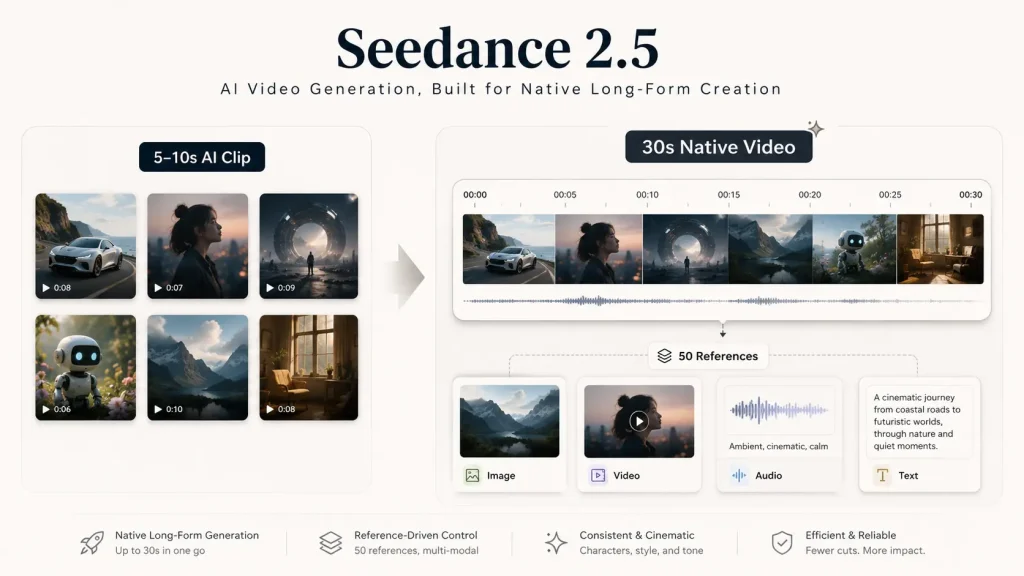
The industry standard for AI video has long been capped at 4 to 10 seconds. Seedance 2.5 introduces native 30-second clip generation. This length gives creators enough runtime to establish a beginning, a sustained movement, and a meaningful visual payoff. It allows users to build an entire advertisement, a complete social media hook, or a continuous short scene without visual jumps.
| Use Case Scenario | Traditional AI Tools | Seedance 2.5 (30 Seconds) |
| Product Ads | Fragmented close-ups only | Complete product reveal and feature demonstration |
| Travel Vlogs | Single landscape pan | Continuous shot from intro hook to scenery change |
| Cinematic Shorts | Action snippet with no context | Developing character action and sustained suspense |
50 full-modality reference materials
Controlling AI output usually requires trial and error. Seedance 2.5 addresses this by allowing up to 50 full-modality reference materials to guide a single project, allowing the model to look beyond text prompts alone.
- Image References: Supply product photos, character faces, environment backdrops, and brand color palettes to lock in the visual style.
- Video References: Input existing footage to dictate specific camera pans, pacing, or transition styles.
- Audio References: Use music tracks or voice tones to automatically establish the rhythmic pacing and mood of the clip.
- Text Instructions: Direct the core narrative, apply scene constraints, and specify camera details.
For example, when creating a smartphone commercial, an editor can upload ten angles of the physical phone, a lighting reference video, and a background track. Seedance 2.5 synthesizes these inputs, ensuring the product’s shape remains accurate throughout the 30-second shot.
More precise AI video editing
Seedance 2.5 is designed to function as an efficient AI video editing generator. In real production, creators rarely get a perfect shot on the first attempt. Instead of discarding a nearly perfect video because of a minor flaw, users can utilize precise structural tools to target specific areas. You can replace an isolated object while keeping the camera angle, adjust a character’s outfit, or fix small visual errors without regenerating the entire clip.
Seedance 2.5 4K Workflow: How to Think About High-Resolution AI Video
What “4K workflow” means for AI video creators
When planning a Seedance 2.5 4K video project, a “4K workflow” does not mean simply clicking a render button. It represents a deliberate production pipeline structured to deliver pristine high-resolution output.
[Sharp Reference Images] ➔ [Detailed Prompt Formula] ➔ [Stable Base Video Generation] ➔ [Targeted AI Editing] ➔ [4K Upscale & Export]
A professional workflow relies heavily on the quality of your initial assets. Because Seedance 2.5 processes complex inputs deeply, low-quality input images or vague text descriptions will yield messy results that degrade when scaled. True 4K production requires maximizing reference clarity and planning your prompt structures around high-resolution details.
How to prepare source materials for better 4K-style results
To achieve a crisp, premium look that scales cleanly to higher resolutions, keep this source material checklist in mind:
- Source Sharpness: Upload high-resolution reference images (minimum 2K or 4K source files) that feature clean edges and sharp focuses.
- Isolate the Subject: Keep primary subjects distinct. Avoid crowded or visually muddy reference backgrounds that might confuse the model’s spatial reasoning.
- Consistent Lighting: Ensure that your various reference images share similar lighting directions and color temperatures.
- Limit Style Overlap: Do not mix conflicting artistic styles. Avoid uploading a watercolor painting alongside a photorealistic product image.
Best use cases for a 4K-oriented Seedance workflow
High-resolution workflows are highly beneficial for commercial spaces, including premium product commercials, digital fashion lookbooks, real estate showcases, and cinematic music visuals.
However, remember that a stable, clear, and visually consistent video is often more valuable than raw pixel count. For fast-paced social media platforms like TikTok or Instagram Reels, a highly stable 1080p generation that preserves character features perfectly will outperform a shaky, distorted 4K video every time.
Seedance 2.5 Prompt Tips for Better AI Video Results
Use a clear prompt formula
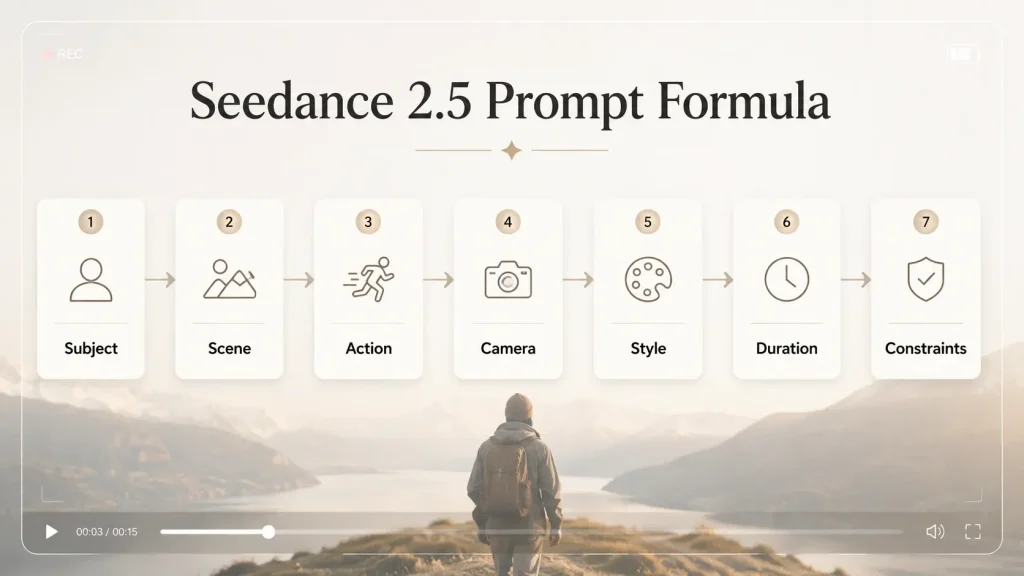
To get the best out of Seedance 2.5 prompts, drop conversational language and use an structured format. The model responds best to specific, categorized details.
The Seedance 2.5 Prompt Formula:Subject + Scene Context + Specific Action + Camera Movement + Visual Style & Lighting + Clip Duration + Constraints (Negative Prompts)
Prompt example for a 30-second cinematic clip
If you want to create a narrative piece, structure your text to guide the model through an extended sequence.
- Prompt Example: “Create a 30-second cinematic video of a young traveler standing on a quiet coastal road at sunrise. The camera starts with a medium shot, slowly pulls back, then rises into a wide aerial view of the ocean. Keep the character’s outfit, face, and backpack consistent throughout the video. Use soft golden lighting, realistic motion, natural wind, and smooth camera movement. Avoid distorted hands, flickering faces, or sudden scene changes.”
Prompt example for a product video
When handling brand assets, accuracy is everything. Use prompts that reference your uploaded images explicitly.
- Prompt Example: “Create a 30-second premium product video for a minimalist wireless headphone. Use the provided product images as the main reference. The video begins with a close-up of the headphone on a dark matte surface, then the camera slowly rotates around the product as soft studio light reveals the texture. Add subtle floating dust particles and a clean luxury commercial style. Keep the product shape, logo position, and color accurate. Avoid extra buttons, wrong branding, or warped edges.”
Common Seedance prompt mistakes to avoid
- Overloading the narrative: Do not ask for multiple completely different scene changes in a single prompt. For a 30-second video, one continuous scene with stable motion works best.
- Omitting camera direction: Leaving out camera movements causes the AI to defaults to static, lifeless shots.
- Conflicting references: Uploading different face models for the same character will cause severe facial flickering.
- Text rendering expectations: AI video models still struggle with fine text. Avoid prompting for complex signage directly via text prompts; handle these with reference images or post-production edits instead.
Limitations, Copyright Notes, and Seedance 2.5 Alternatives
Current limitations to mention
Despite its power, Seedance 2.5 is not without its limitations. Because it is an advanced enterprise-grade model, public access, regional availability, and final pricing structures can fluctuate. Furthermore, longer video runtimes require significant compute power; generating complex 30-second scenes might take multiple attempts to perfect. Fine-grained human anatomy—like hands, intricate facial expressions, or precise typographic text—will still require manual quality checks.
Copyright and commercial-use reminders
When working with an AI video generator with reference images, copyright boundaries are critical. Avoid uploading images of copyrighted fictional characters or celebrity likenesses for commercial campaigns. For business projects, rely entirely on original corporate photography, licensed stock elements, or proprietary brand assets. Always review the platform’s specific commercial terms of service before deploying an AI-generated asset into a paid ad campaign.
When to use an alternative AI video generator
Seedance 2.5 is ideal for creators who require deep, multi-reference control, long-form 30-second native generation, and advanced structural editing capabilities.
However, if you simply want a quick, effortless way to animate an image for social media or need an instant, simple text-to-video clip, a lighter alternative might fit your needs better. If you want a simpler way to turn images into short AI videos, try our AI Image to Video Generator tool. It is designed for rapid image animation, instant social media clips, and straightforward, prompt-based video creation without the steep learning curve.
FAQ
Is Seedance 2.5 available now?
Seedance 2.5 has been officially introduced through ByteDance’s enterprise arms. Public rollouts and testing phases depend heavily on your geographic region, platform access points, and enterprise account status through Volcano Engine.
How long can Seedance 2.5 videos be?
The most notable upgrade in this version is its ability to generate up to 30 seconds of native, single-clip video directly from your initial configuration, moving past older 4-second limitations.
Does Seedance 2.5 support 4K video?
While high-resolution capabilities are woven into the Seedance architecture, it is best to view this as a 4K-oriented workflow. Creators use high-resolution reference materials and clean prompts, then utilize the ecosystem’s upscaling features to deliver final 4K outputs.
What references can Seedance 2.5 use?
It is a true multimodal system, meaning it can process text descriptions, high-resolution source images, existing video clips for motion guidance, and audio files for rhythmic pacing.
What is the best prompt formula for Seedance 2.5?
The most effective formula is: Subject + Scene Context + Specific Action + Camera Movement + Visual Style + Duration + Performance Constraints.
Is Seedance 2.5 good for product videos?
Yes, it is exceptionally well-suited for e-commerce and product marketing. Because it accepts up to 50 reference inputs, you can supply multiple angles of a real item to maintain perfect brand consistency throughout the video.
Can I use Seedance 2.5 for copyrighted characters?
It is highly recommended to avoid generating copyrighted materials or using celebrity likenesses without explicit legal permission, especially if you intend to monetize, distribute, or run commercial ads with the output.
“`htmlTry Seedance 2.5 AI Video Generator
Turn prompts or images into AI videos with a simple, beginner-friendly workflow. Start creating Seedance-style videos for free.