Model
Video Fast 1.0 Free
Endless creativity, minimal cost. Reserved for early supporters
Image
Drag & Drop, Paste, or Click to Upload
PNG, JPG, JPEG, WEBP , Max 10 MB
Prompt
0 / 2500
Aspect Ratio
1:1
3:4
4:3
9:16
16:9
Duration
3 s
5 s
Resolution
480p
720p
Create for FREE
Sample Video
Sample video preview

Convert Photo to Video Free: Transform Your Images Into Dynamic Motion Content

Looking to convert photo to video free? Our AI-powered platform transforms static photos into captivating motion clips within seconds. This free image to video converter online empowers creators, marketers, and everyday users to turn pictures into video without expensive software required. Simply upload your favorite photo, enter an optional creative prompt describing the motion you envision, and watch the transformation unfold. Whether you need engaging photo-based content for social media campaigns, polished materials for presentations, or beautiful compilations to preserve cherished memories, our picture to video converter delivers stunning results that capture attention across every digital platform. Millions of users trust our platform to convert their most important photos into professional motion content.
Original Photo
Prompt
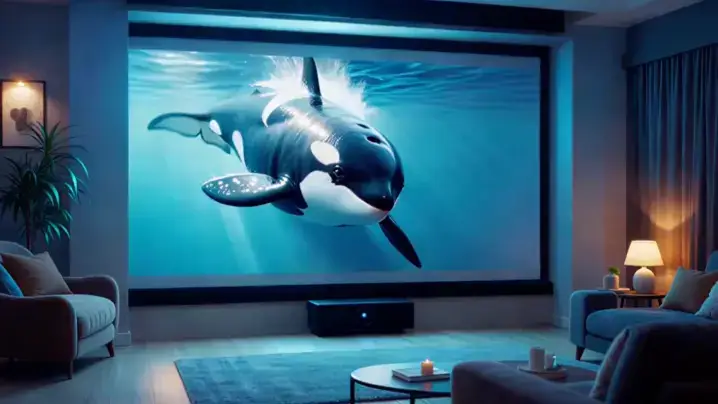
A killer whale bursts through the cinematic projection screen into the modern home theater room, water droplets glistening with ultra-HD clarity as ambient lighting shimmers across its sleek body, shadows dancing across cozy furnishings while the stationary camera captures every detail of the holographic leap.
Sample Clip
Original Photo
Prompt
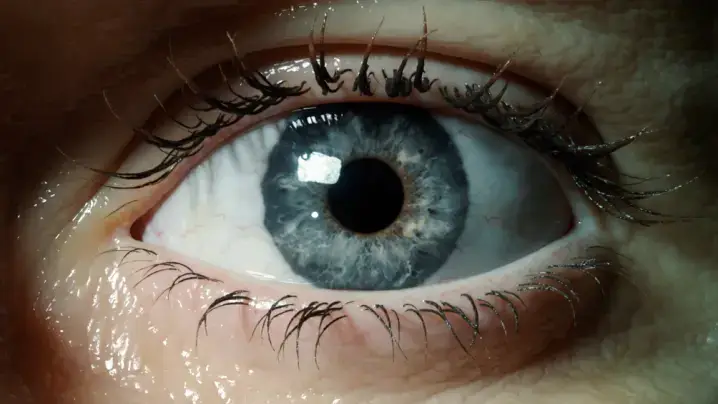
First person view, hyper-fast camera movement. 1. Start: Extreme close-up of a human eye. 2. Action: The camera flies violently FAST forward into the black pupil. 3. Transition: As we pass through the pupil, the scene instantly dissolves into a stormy ocean. The darkness of the pupil becomes the dark water. Continuous shot, motion blur during the zoom, seamless blend.
Sample Clip
Original Photo
Prompt
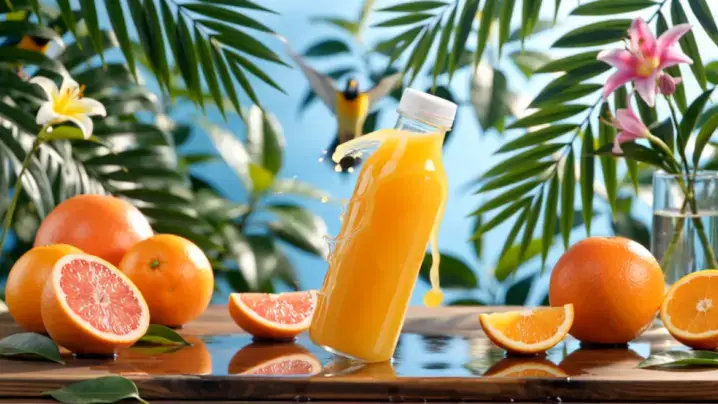
The orange juice bottle splashes dynamically, droplets cascading through lush greenery as grapefruits roll gently and tropical leaves sway. A colorful bird takes flight while sunlight filters through dancing foliage, the camera slowly zooming in to capture vibrant fruit textures and floral details against the energetic atmosphere.
Sample Clip

Image to Video Converter: Professional Features Designed for Everyone

Our platform combines cutting-edge artificial intelligence technology with thoughtful, user-friendly design. When you convert images to video using our system, you gain access to professional-grade capabilities rivaling expensive desktop software. The platform handles everything from quick single-frame photo transformations to efficient batch processing of entire photo libraries, ensuring you can turn image into video regardless of technical background. Advanced algorithms analyze your photos while the interface remains approachable for photo enthusiasts ready to convert their collections.

Create Video from Single Image with Intelligent AI Motion

Wondering how to turn a picture into a video that looks professionally produced? Our AI analyzes depth, perspective, composition, and focal points within your uploaded photo to generate natural camera movements automatically. The system creates realistic pans across landscape photos, gentle zooms toward portrait subjects, and immersive parallax effects—all happening when you convert photo to video ai free online. This technology ensures every photo transformation looks cinematic, breathing authentic life into static snapshots through intelligent motion generation respecting original photo composition. Professional results emerge from even amateur snapshots through our sophisticated photo analysis algorithms.

Start Creation

Make a Video from Images with Pristine HD Quality

Export your transformed photo content in stunning 1080p resolution completely free of watermarks. Unlike competing tools where you convert picture to video only to discover logos stamped across your work, our platform preserves original photo quality throughout the transformation process. When you turn photo into a video here, the output maintains exceptional sharpness, accurate color reproduction, and fine detail—ready for commercial applications, social sharing, or presentations where photo quality matters. Enterprise clients and individual creators alike appreciate our commitment to delivering pristine, unmarked photo transformations every time.

Start Creation

Picture to Video Converter Online: Complete Creative Customization Control

Take complete creative control with our comprehensive customization toolkit. Adjust motion intensity from subtle to dramatic based on your image's aesthetic qualities. Set duration from 3-second attention-grabbers to 15-second narrative sequences. Select aspect ratios optimized for YouTube, TikTok, Instagram, or custom dimensions. This pic to video converter provides professional options through an interface intuitive enough for anyone to create stunning content effortlessly within minutes. Beginners and professionals alike appreciate the streamlined workflow and powerful output capabilities our platform delivers.

Start Creation

Convert Image to Video Online Free: Three Straightforward Steps

Upload Your Source Photo

Select the image you want to transform. This photos to video converter accepts JPG, PNG, and WEBP formats up to 10MB without quality loss. Enter an optional text prompt like "gentle forward zoom" or "smooth cinematic pan" to guide the AI. Convert pic to video for business or turn images into a video sequence for personal projects in seconds.

Configure Your Output Parameters

Select your preferred duration, choose between 720p and 1080p resolution, and pick the aspect ratio matching your target platform. The image to video convert process adapts to your specifications—whether you need pics into video for mobile or make images into video for large-screen presentations.

Generate and Download Your Creation

Click generate and let our AI transform your static photo into dynamic motion content. Processing completes within 30 seconds to 2 minutes. Preview directly in browser, then save the MP4 file instantly. Need adjustments? Regenerate with alternative parameters at no cost.

Turn Pictures into Video: Versatile Applications Across Industries

Turn images into video to unlock creative possibilities spanning professional and personal domains. From marketers seeking to convert photos to video online for campaigns to educators developing engaging lessons from photo assets, our tool adapts to diverse requirements with picture transformations that consistently impress audiences.

Social Media
Marketing & Advertising
Education
Personal Memories

Social Media Content Creation and Engagement

Static photos increasingly struggle for attention in today's motion-prioritized social media feeds. When you convert photo into video, engagement improves dramatically—motion content from photos typically receives 40-50% higher interaction rates on Instagram, TikTok, and YouTube Shorts. Turn pictures to video optimized for each platform's photo specifications. This photo to video converter online ensures your photo content captures scrolling users' attention while dynamic clips consistently outperform static posts.

Convert Images to Video: Real User Experiences

Best Way to Make Picture to Clip Using Image to Video Converter

Needed to convert image to short video for my online shop listings. This tool delivered professional results from my product photos. Amazing that it's truly free with no watermarks! Easy to convert any image quickly.

Jennifer Adams
Creator

Great Image to Motion Convert Tool for Bloggers

As a busy social media manager, I use this tool daily managing multiple client accounts. Consistent quality keeps every client satisfied with results delivered on time. Best online photo to video converter available today.

Mark Thompson
Blogger

Helped Me Make Clips Out of Images Efficiently

Transformed presentation charts using this tool to turn image to video overnight—audience engagement changed completely. Colleagues asked which tool I discovered for creating such compelling content.

Anna Wilson
Designer

Fastest Way to Convert Photo Into Footage

This picture to video converter free actually delivers exactly what it promises. Converted hundreds of property listing photos with every output looking sharp and professional from the original. Outstanding results for real estate marketing campaigns.

Ryan Mitchell
Marketer

Outstanding Image Convert to Motion Results

My students respond dramatically better when I make images into video rather than showing static slides. This free platform transformed my teaching approach entirely and improved classroom engagement significantly.

Linda Chen
Agency

Love This Photo to Video Converter Free Tool

Zero technical skills required, yet I was creating beautiful content within minutes. Perfect kapwing image to video alternative for everyday users. Now I convert picture to video online for every trip memory.

Steve Roberts
User

Best Way to Make Picture to Clip Using Image to Video Converter

Needed to convert image to short video for my online shop listings. This tool delivered professional results from my product photos. Amazing that it's truly free with no watermarks! Easy to convert any image quickly.

Jennifer Adams
Creator

Great Image to Motion Convert Tool for Bloggers

As a busy social media manager, I use this tool daily managing multiple client accounts. Consistent quality keeps every client satisfied with results delivered on time. Best online photo to video converter available today.

Mark Thompson
Blogger

Helped Me Make Clips Out of Images Efficiently

Transformed presentation charts using this tool to turn image to video overnight—audience engagement changed completely. Colleagues asked which tool I discovered for creating such compelling content.

Anna Wilson
Designer

Fastest Way to Convert Photo Into Footage

This picture to video converter free actually delivers exactly what it promises. Converted hundreds of property listing photos with every output looking sharp and professional from the original. Outstanding results for real estate marketing campaigns.

Ryan Mitchell
Marketer

Outstanding Image Convert to Motion Results

My students respond dramatically better when I make images into video rather than showing static slides. This free platform transformed my teaching approach entirely and improved classroom engagement significantly.

Linda Chen
Agency

Love This Photo to Video Converter Free Tool

Zero technical skills required, yet I was creating beautiful content within minutes. Perfect kapwing image to video alternative for everyday users. Now I convert picture to video online for every trip memory.

Steve Roberts
User

News

MiniMax or Hailuo AI? Know The Company and Its Competitiveness in Video Generation

MiniMax or Hailuo AI? Know The Company and Its Competitiveness in Video Generation

If you have been following AI video generation lately, you may have noticed two names appearing almost side by side: MiniMax and Hailuo AI. After MiniMax Hailuo appeared at Cannes as a global partner of WAIFF 2026, the question became even more common: is Hailuo AI a standalone tool, a MiniMax product, or a serious new competitor in AI video? The short answer: Hailuo AI is part of the MiniMax ecosystem, but it has become one of the company’s most visible creative products. That distinction matters. Many creators waste time comparing MiniMax and Hailuo as if they were separate platforms. In reality, understanding how they connect — and what Hailuo actually does well — helps you judge whether it is worth testing for AI video creation. This guide clears up the naming confusion, explains MiniMax’s rise, and breaks down Hailuo AI’s real strengths and limits in today’s crowded AI video market. What Is MiniMax and What Is Hailuo AI? The naming confusion is the single biggest barrier for new users trying to evaluate this platform. Let’s untangle it. MiniMax — The Company Behind the Technology MiniMax is a Chinese artificial intelligence company founded in 2022, currently valued at approximately $13.7 billion. Headquartered in Shanghai, the company was established by a team with deep expertise in large-scale AI model development. MiniMax’s mission centers on building multimodal AI — systems that can process and generate text, audio, and video. Unlike companies that specialize in one modality, MiniMax set out to build capabilities across the entire spectrum of media generation from day one. Hailuo AI — MiniMax’s Video Generation Product Hailuo AI is the consumer-facing video generation platform built and operated by MiniMax. Think of it like the relationship between Google (the company) and YouTube (the product) — MiniMax is the parent entity, and Hailuo AI is one of its flagship products. When someone says “I made this with Hailuo AI,” they’re using MiniMax’s technology. When industry reports reference “MiniMax’s video capabilities,” they’re talking about Hailuo. Same technology, different labels depending on context. The Full MiniMax Product Ecosystem Hailuo Video is just one piece of a broader suite: This ecosystem is what sets MiniMax apart from single-product competitors. Each tool feeds into the others, creating a multimodal pipeline that few rivals can match. How MiniMax Achieved Rapid Growth Going from a startup to a $13.7 billion valuation in roughly three years is extraordinary, even by AI industry standards. Here’s how it happened. From Startup to $13.7 Billion Valuation MiniMax attracted significant investment early, positioning itself among the top tier of Chinese AI companies alongside players like Zhipu AI and Moonshot AI. Its valuation grew rapidly through successive funding rounds, fueled by both the global AI investment boom and demonstrable product traction. The company’s ability to ship working products — not just research papers — gave investors confidence that MiniMax could convert technology into revenue. The Multimodal Strategy — Text, Voice, and Video Under One Roof Most AI startups pick one lane: text generation, image creation, or voice synthesis. MiniMax bet on all of them simultaneously. This multimodal approach paid off in two ways. First, it attracted developers who wanted a single API provider for multiple content types. Second, it created natural cross-selling opportunities — a creator using Hailuo for video might also adopt Speech 2.8 for voiceovers. The MiniMax-M2 model, with 230 billion parameters and 10 billion active, provides the foundational intelligence that powers everything from the Talkie character platform to the Video Agent beta. Building an Ecosystem of Products and Partnerships Strategic partnerships accelerated adoption. MiniMax integrated Hailuo 2.3 directly into VEED, a popular professional video editing platform, on launch day. Third-party platforms like Pollo AI and FluxNote also incorporated Hailuo models, expanding its reach beyond the official website. The Hyperbond Studio partnership produced “Call Me Sensei,” a language-learning dating simulator powered by Speech 2.8 — a creative demonstration of how MiniMax’s voice technology extends into interactive entertainment. Global Expansion and Community Adoption Hailuo’s growth isn’t limited to China. International creators have embraced the platform for everything from cinematic short films to anime-style music videos. Notable examples include “NOOR,” an AI-generated love story set during the 1971 Indo-Pak War that combined Hailuo with other AI tools, and “Overlap,” an AI proof-of-concept trailer that accumulated over 664,000 views on YouTube. Reddit communities like r/singularity and r/aipromptprogramming regularly feature Hailuo comparisons and creative showcases. What Makes Hailuo AI Stand Out in Video Generation The AI video generation market is crowded. Veo, Kling, Wan, Runway — each platform claims superiority. Here’s where Hailuo genuinely differentiates itself. Motion Coherence and Physics Simulation Hailuo produces some of the most natural-looking motion in AI-generated video. Dance choreography flows realistically, crowd scenes maintain individual consistency, and object interactions follow believable physics. This is a meaningful differentiator. Many competing platforms still produce jittery movements or physically impossible interactions that break immersion. According to side-by-side comparisons, Hailuo 2.3’s physics handling consistently outperforms its earlier versions and matches or exceeds several Western alternatives. Emotional Micro-Expressions and Character Depth Where Hailuo 2.3 truly shines is in subtle facial expressions — a raised eyebrow, a slight smile, a moment of hesitation. This capability makes it particularly strong for narrative and character-driven content. A comparison of 10 emotional states across Minimax, Kling, Vidu, and Runway showed Hailuo rendering nuanced emotion with greater consistency. For creators producing storytelling content, this matters more than raw resolution. Anime, Illustration, and Stylized Content Hailuo 2.3 introduced dedicated optimization for anime and illustrative styles, an area where many competitors focus exclusively on photorealism. Creators working in stylized genres — anime shorts, illustrated narratives, motion comics — find that Hailuo handles non-photorealistic content with fewer artifacts. This specialization has attracted a growing community of anime content creators who previously relied on image-only AI tools. Versatile Generation Modes Hailuo offers multiple input workflows: Each mode serves different creator needs. Director Mode is essential for filmmakers wanting cinematic control, while Subject Reference solves the persistent problem of character consistency that plagues most

Best Free AI Video Generators Without Watermark in 2026

Best Free AI Video Generators Without Watermark in 2026

Free AI video generators sound amazing until you try to export. Some tools let you generate a clip, then add a watermark at download. Others give you a few free credits, but the limit disappears after one or two tests. And a few platforms are free to try, but not really free to use every day. This guide compares the best free AI video generators without watermark in 2026, based on what matters most to creators: export access, free limits, video quality, audio support, and practical use cases. Free plans change often, so always check the current terms before using any tool for commercial work. But if you want a clear starting point, this ranking will help you avoid the usual paywall traps. Quick Comparison: Best Free AI Video Generators Without Watermark Tool Free Limit Watermark-Free? Best For Main Catch AI Image to Video Free users get daily video credits Yes Turning images into short videos quickly Best for short image-to-video clips Meta AI Very generous / often unlimited Yes High-volume free creation Limited control, silent output Kling AI Daily free credits Yes Best quality-to-credit balance Credits run out fast Hailuo AI Daily credits + starter bonus Yes Character consistency Short clip length Qwen AI Daily free credits Yes Image-to-video and lip-sync tests Limited daily volume Luma Dream Machine Monthly free renders Yes Cinematic realism Low monthly limit Pika Labs Monthly credits Yes Creative effects Lower resolution on free tier Runway One-time free credits Yes Testing pro-level quality Not sustainable as a free tool ComfyUI + Wan Unlimited locally Yes Power users with GPUs Technical setup required Vheer Free tool suite Usually yes All-in-one simple workflow Quality varies Upsampler Free access Usually yes No-sign-up testing Limits may be unclear PixVerse Free tier Varies Extra generation rotation Watermark status can vary How We Judged These Free AI Video Generators For this list, the most important factor was not just whether a tool can generate video for free. The key question is: can you export a usable video without a watermark? We looked at five practical criteria: This matters because many “free AI video generator” tools are only free at the prompt stage. A tool is much less useful if the watermark appears only after export, or if the free credits disappear before you can create anything usable. Best Free AI Video Generators Without Watermark AI Image to Video: Best for Turning Still Images Into Short Videos AI Image to Video is a practical choice if you already have an image and want to turn it into a short video quickly. Instead of starting from a blank text prompt, you can upload a JPG, PNG, JPEG, or WEBP image, add a prompt, choose an aspect ratio, and generate a short AI video. This makes it especially useful for creators who need social media visuals, product motion clips, animated thumbnails, faceless TikTok content, travel photos, real estate previews, or simple marketing videos. The workflow is beginner-friendly: upload an image, describe the motion you want, then generate the video. AI Image to Video also supports common aspect ratios such as 9:16 for TikTok, Reels, and Shorts, as well as 16:9 for YouTube-style videos. Free users get daily video credits, so it works best for creators who want a simple image-to-video tool without installing software or learning a complex workflow. Best for: beginners, social media creators, marketers, and anyone who wants to animate existing images.Not ideal for: users who need long videos, advanced editing controls, or unlimited free generation. Meta AI: Best for High-Volume Free AI Video Creation Meta AI is one of the strongest options for creators who want to generate many AI videos without paying upfront. It supports text-to-video and image-to-video, and free exports are generally watermark-free. Its biggest advantage is volume. Compared with tools that use strict daily or monthly credits, Meta AI gives creators more room to experiment. That makes it useful for TikTok, Reels, Shorts, meme content, and quick creative testing. The main downside is control. Meta AI often defaults to vertical video, which is great for short-form platforms but less ideal for YouTube long-form content. One practical workaround is to create a horizontal 16:9 image first, then animate it with image-to-video. This gives you more control over framing. Best for: creators who need lots of free, watermark-free clips.Not ideal for: users who need advanced camera control, audio, or cinematic consistency. Kling AI: Best Overall Free AI Video Generator for Quality Kling AI is one of the best balanced free AI video generators right now. It offers daily free credits, supports both text-to-video and image-to-video, and can produce high-quality motion compared with many free tools. For most creators, Kling is a strong first choice when quality matters. It works well for product shots, cinematic scenes, character animation, short social videos, and image animation. The limitation is credits. Free daily credits are useful, but they are not unlimited. If you regenerate a lot to get the perfect shot, your credits can disappear quickly. Kling also offers audio features, but they may cost far more credits than silent video generation. Best for: creators who want better quality without paying immediately.Not ideal for: unlimited daily production or audio-heavy workflows. Hailuo AI: Best for Character Consistency Hailuo AI, also known through MiniMax, is useful when you need the same character to appear across multiple clips. Character consistency is one of the hardest parts of AI video creation, and many platforms treat it as a premium feature. Hailuo’s subject reference features make it a good choice for short series, recurring characters, AI influencer content, or story-based clips. You can upload a reference and use it to guide future generations. The downside is clip length and free volume. It is better for creating short scenes than long videos. If you want to build a full video, you will likely need to generate multiple clips and stitch them together in an editor. Best for: character-based AI videos and short series.Not ideal for: long-form generation in one

Why GPT Image 2 Images Feel More Useful for Creators

Why GPT Image 2 Images Feel More Useful for Creators

GPT Image 2 is getting attention because its images feel less like experiments and more like assets creators can actually use. It is not just about sharper details or prettier styles. The real upgrade is practical: clearer text, cleaner layouts, more consistent characters, polished product visuals, and stronger first frames for AI videos. For creators, that matters. A good AI image should not only look impressive for five seconds. It should be useful enough for a blog cover, thumbnail, social post, ad concept, or visual story. So what actually feels different in GPT Image 2? Let’s look at where it improves — and where it still feels like AI. Why GPT Image 2 Feels Different From Older AI Image Models Older AI image models could look impressive at first glance, but the flaws showed up quickly: broken text, messy layouts, inconsistent characters, and polished visuals that still felt artificial. GPT Image 2 feels different because it handles the practical side of image generation better. Posters look more readable, products are clearer, characters stay more recognizable, and visuals feel more purposeful. That is why creators are paying attention — it does not just make prettier images, but more usable ones. The Image Effects People Notice Most GPT Image 2 feels different because its improvements show up in places creators actually use. The results are not just prettier; they are easier to turn into thumbnails, covers, product visuals, story assets, and first frames for videos. Text in Images Looks Much More Readable Text is one of the clearest improvements. Older AI image models could create a strong poster background, then ruin it with broken letters, fake words, or unreadable symbols. That made the image hard to use for thumbnails, ads, product labels, menus, and social posts. GPT Image 2 handles short text better. Titles look cleaner, labels are easier to read, and simple poster copy feels more intentional. This matters because creator visuals often depend on just a few clear words: a YouTube thumbnail needs a hook, a TikTok cover needs a bold phrase, and a product mockup needs a label that does not look broken. Still, it is not perfect. Long text, prices, dates, brand names, small disclaimers, and non-English copy still need manual checking. Posters and Covers Feel More Designed GPT Image 2 also makes posters, covers, and promotional visuals feel more complete. Instead of placing random text over a nice background, it often creates a clearer relationship between the subject, title, spacing, lighting, and background. That makes it useful for blog covers, YouTube thumbnails, TikTok covers, product ads, campaign images, and social graphics. The key word is direction. GPT Image 2 can quickly help you explore a visual idea, but it does not replace real design files. A generated poster is still a flat image, not a layered Figma or Photoshop file. Characters Stay More Consistent Character consistency is another effect creators care about. If you are making a story, comic, mascot, or AI video, one good image is not enough. The character needs to stay recognizable across scenes. GPT Image 2 seems better at keeping the face, outfit, colors, and general style connected. This is useful for character references, storyboards, expression variations, and AI video first frames. A stronger first frame gives image-to-video tools a better starting point. Realistic Images Look More Polished GPT Image 2 can create clean, polished realistic images. Portraits, product mockups, lifestyle scenes, studio shots, and commercial visuals often look more refined and closer to usable brand material. But polished does not always mean natural. Some images still look too smooth, too controlled, or slightly artificial. For creators, the goal is not just to make an image look expensive. It should also feel believable. Structured Images Are More Useful One of the most useful changes is how GPT Image 2 handles structured visuals. These are images that explain something, such as comics, diagrams, product explainers, step-by-step graphics, maps, or before-and-after images. This matters because many creator visuals need to communicate quickly. GPT Image 2 seems better at organizing panels, labels, titles, and sections, but facts, numbers, and instructions still need review before publishing. Where GPT Image 2 Still Feels Like AI GPT Image 2 is more useful than older AI image models, but it still has limits. The problems usually appear when the image needs exact text, natural realism, or a less polished everyday look. Long Text Can Still Go Wrong Short titles and labels are much better, but long text is still risky. A poster with one bold headline may look clean, while a detailed infographic, product description, or paragraph can still include small mistakes. This matters for ads, product visuals, tutorials, and educational graphics. If the words are important, they should always be checked manually. Non-English Text Still Needs Checking Non-English text has improved, but it is not fully reliable. Chinese, Japanese, Korean, Arabic, and other languages may look visually convincing, but some characters or words can still be wrong. For multilingual creators, GPT Image 2 is useful for quick concepts, but final publishing still needs native-language review. Nature Scenes Can Look Too Synthetic Nature is harder than it looks. GPT Image 2 can create beautiful landscapes, but trees, clouds, mountains, grass, water, and sunlight may feel too sharp or too controlled. Sometimes every part of the image looks equally detailed, which makes the scene feel less natural. The result can be beautiful, but not always believable. Some Images Are Too Perfect Many GPT Image 2 images look clean, polished, and high-end. That works well for product concepts or commercial visuals, but it can feel fake for everyday content. Real photos often have small imperfections: uneven lighting, messy backgrounds, imperfect skin, or casual framing. If you want a more authentic result, ask for natural lighting, realistic imperfections, less polished textures, or casual photography instead of a luxury ad look. How to Use GPT Image 2 for Free You can use GPT Image 2 directly in ChatGPT. After the update, some users

After Effects Alternatives by Use Case: Find the Right Tool(2026)

After Effects Alternatives by Use Case: Find the Right Tool(2026)

After Effects has long been the go-to tool for motion design, but its cost keeps rising — especially once plugins are added. The bigger issue is that AE does too many jobs at once, so no single alternative truly replaces it. That’s why this guide skips the usual flat rankings and instead matches the best alternatives to specific use cases, with a decision tree and practical tool combinations. What Do You Actually Use After Effects For? Before diving into specific tools, take 30 seconds to identify your primary workflow. After Effects users typically fall into one or two of the categories below, and knowing which one you belong to will save you hours of evaluating tools that don’t fit. The Decision-Tree Flowchart Use this flowchart to jump directly to the section that matches your needs: Most AE users rely on just one or two of these capabilities. If you need broader coverage, skip ahead to The Combination Stack section for multi-tool workflows that replace AE almost entirely. [Image: Visual decision-tree flowchart mapping After Effects use cases to recommended alternative tools] Best for VFX Compositing — DaVinci Resolve (Fusion) If you rely on After Effects primarily for compositing, green screen work, color grading, and visual effects in video production, DaVinci Resolve is the strongest alternative available — and its free version is genuinely professional-grade. Why It Wins for Compositing DaVinci Resolve bundles four professional tools into one application: editing, Fusion compositing, color grading, and Fairlight audio. The built-in Fusion tab delivers node-based compositing used in Hollywood productions, while the color grading suite is widely considered the industry’s best. The free version exports up to 4K with no watermarks — a level of capability no other free tool matches for post-production work. Pricing and Platform Free (full-featured with minor limits) | Studio $295 one-time (no subscription). Available on Windows, Mac, and Linux. Key Limitation Fusion’s node-based workflow is a significant adjustment for AE’s layer-based users. As one creator in r/MotionDesign shared, they “cannot adapt to Fusion’s node-based system” despite already using DaVinci for editing. Resolve is better suited for compositing and post-production — not ideal for pure 2D motion graphics. Key Takeaway: DaVinci Resolve is the most complete free post-production tool available, but expect a learning curve if you’re coming from AE’s layer-based workflow. Best for 3D Motion Graphics — Blender For creators who use After Effects primarily for 3D motion graphics, physics-based animations, and 3D text work, Blender is the unmatched free option — especially with version 5.0’s new motion graphics geometry node presets designed specifically for motion designers. Why It Wins for 3D Motion Blender delivers capabilities that would cost thousands in commercial software. Its geometry nodes enable procedural motion graphics, while grease pencil allows 2D animation within a 3D environment. A YouTube comparison by Bring Your Own Laptop showed Blender matching AE for physics simulations with a more organic, natural feel. Pricing and Platform Completely free, open-source. Available on Windows, Mac, and Linux. Key Limitation Blender has a steep learning curve and is overkill for simple 2D animations. Render times can be long for complex scenes. It’s a 3D powerhouse first — not a natural fit for everyday 2D motion graphics work. Best for 2D Motion Graphics — Cavalry If your AE workflow centers on 2D motion graphics, title design, and procedural animation, Cavalry is the closest purpose-built alternative. It’s designed specifically for motion graphics — not adapted from a broader tool. Why It Wins for 2D Motion Cavalry was built from the ground up for motion design. Its procedural, data-driven animation system enables rapid iteration, and the clean modern UI feels genuinely contemporary compared to AE’s aging interface. Recently acquired by Canva, Cavalry now has significant resources behind its development. YouTube creator Momo PTFL called it “not just an alternative but the best motion graphics software” — a bold claim, but one that reflects Cavalry’s focused approach. Pricing and Platform Free Starter tier (1080p limit) | Pro $20/month | Studio $45/month. Available on Windows and Mac. Key Limitation Cavalry has no 3D capability, uses a subscription model, and has a smaller plugin ecosystem and community compared to AE. No Linux support is available. Best for Web/UI Animation — Jitter For UI/UX designers and web developers who use After Effects to create web animations, social media motion, and Lottie files, Jitter offers a browser-based workflow with native Figma integration and real-time team collaboration. Why It Wins for Web/UI Jitter runs entirely in the browser — no download or installation needed. Its Figma import lets designers pull in existing designs and animate them directly, while real-time collaboration makes it ideal for design teams working on shared projects. Pricing and Platform Free (with watermark) | Pro $15/editor/month | Team $35/editor/month. Any OS (browser-based). Key Limitation Jitter is not a full AE replacement — it excels at lighter motion design and UI animation but hits browser limitations with complex or long-form projects. Best Free Browser-Based Option — Pikimov For budget-conscious creators, students, or anyone who wants an AE-like experience with zero cost, zero signup, and zero installation, Pikimov runs entirely in the browser with all files processed locally on your machine. Called the “most underrated project of 2026” by the r/vfx community, Pikimov has quickly gained traction for delivering surprising depth without any paywall. Why It Wins as the Free Option Pikimov stands out by supporting AE JavaScript expression syntax, making the transition from After Effects significantly easier — a detail that most roundup articles miss entirely. Its privacy-first approach means files never leave your computer. Pricing and Platform Completely free. Any OS including Chromebook (browser-based). Offline app coming via Patreon support. Key Limitation Pikimov is still early-stage with a smaller feature set compared to desktop tools. No standalone offline version is available yet, though one is in development. Best for Beginners — CapCut For first-time creators, social media users, and anyone who finds After Effects overwhelming, CapCut offers the simplest learning curve of any AE alternative with mobile-first editing and

Sora Alternatives: Best Picks for Entertainment, Pros & Budget Users After Shutdown

Sora Alternatives: Best Picks for Entertainment, Pros & Budget Users After Shutdown

What Happened to Sora? Sora launched as one of the most groundbreaking generative AI products, capable of producing highly realistic videos from text prompts. It quickly gained massive attention after its release and reached broader adoption through a standalone app in 2025. At its peak, it was widely perceived as being significantly ahead of competitors in video generation quality and realism. However, by March 2026, OpenAI officially announced that Sora would be shut down, including its standalone app, API access, and integrations. The decision marked one of the most high-profile product discontinuations in the generative AI space. The Rise and Fall: Sora’s Timeline Sora debuted with enormous hype and quickly became a flagship example of next-generation AI capabilities. Early adoption surged as creators, developers, and enterprises experimented with text-to-video workflows. But momentum proved difficult to sustain. Over time, several signals suggested underlying strain: tightening usage limits and access constraints growing concerns around content restrictions and reliability slowing user growth after the initial hype cycle By early 2026, it became clear that Sora was not scaling sustainably. In March 2026, OpenAI confirmed the shutdown, effectively ending its lifecycle as a first-party product. Why Did OpenAI Shut Down Sora? The shutdown was not caused by a single failure, but by a combination of structural pressures: Sora’s shutdown was not a failure of technology, but a failure of scalability. The combination of high costs, limited revenue, and rising risk made it unsustainable within OpenAI’s broader strategy. Best Sora Alternatives for Entertainment Creators Entertainment creators — from TikTok producers to short filmmakers and animators — need tools that prioritize creative output, visual effects, and audience engagement. These picks are optimized for the kinds of content that drive views, shares, and subscriber growth. Each one offers a free tier worth testing before you commit. Kling AI 3.0 — Best All-Round for Social Media & Short-Form Video Kling AI 3.0 is the most recommended Sora alternative across Reddit and YouTube, and for good reason. It offers the most generous free tier in the space: 66 daily credits that refresh every day — far more than any competitor. Key features: Pricing: Free (66 credits/day, 720p, watermark) | Standard ~$6.99/mo | Pro $25.99/mo | Ultra $59.99/mo Best for: TikTok, Instagram Reels, and YouTube Shorts creators who need volume and variety. Limitations: Occasional “cartoony” output for animal and nature content. Free-tier queue can be slow, and credits are charged even for failed generations. Customer support responsiveness is a common complaint. One Reddit user summed up the community consensus: “Kling is King” — especially for creators who need daily output without paying upfront. Pika 2.5 — Best for Viral Social Media Effects Pika 2.5 carves out a unique niche with its Pikaffects — physics-based effects like melt, crush, inflate, and explode that no competitor offers. These effects are purpose-built for viral content, letting you transform any scene into shareable moments that stop the scroll. Key features: Pricing: Free (80-150 credits/mo, 480p) | Basic ~$8/mo | Standard $28/mo | Pro $76/mo Best for: TikTok and Reels creators chasing trending effects and viral moments. Limitations: Short clips (3-10 seconds), not photorealistic, and weak character consistency across multiple generations. Hailuo AI (MiniMax) — Best for Fast Cinematic Animation When speed matters, Hailuo AI delivers. It generates a 5-second 4K clip in under 40 seconds — faster than any competitor. Its “Motion Diffusion Engine” produces smooth, cinematic human movement that’s particularly impressive for emotional close-ups and dynamic action sequences. Key features: Pricing: Free (200 credits on signup + daily trial) | Base $9/mo (1,000 credits, no watermarks) Best for: Anime creators, emotion-driven storytelling, and anyone needing fast turnaround for iterative workflows. If you’re the type to generate 10 variations of a scene before picking the best one, Hailuo’s speed makes that process actually viable. Limitations: 6-second max clips, no character lock feature, and limited directorial controls compared to Runway or Seedance. Prompt complexity can also cause issues — keep your text descriptions focused for best results. Grok — Best for Anime & Less-Restricted Content Grok is emerging fast with a generous free tier and the least restrictive content policies among quality tools. If content moderation has blocked your creative vision elsewhere, Grok offers more freedom. Key features: Pricing: Free tier available; exact paid pricing varies. Best for: Anime fans and creators wanting creative freedom without constant moderation blocks. Limitations: Output is often described as “cartoony” compared to Sora’s realism. The UX can be confusing, and dialogue generation is poor. As one Reddit user noted, Grok “doesn’t get the point across” for realistic scenarios. AI Image to Video — Best Multi-Model Platform for Social Content Creators AI Image to Video takes a different approach to the post-Sora landscape: instead of relying on a single AI engine, it integrates multiple leading models — including Kling, Veo, and Wan — into one unified platform. For entertainment creators who want to compare outputs across models and pick the best result for each project, this eliminates the hassle of managing separate accounts and learning different interfaces. Key features: Pricing: Free tier available with competitive paid plans. Best for: Social media influencers, digital marketers, and content creators who want the flexibility of multiple AI models without juggling separate subscriptions — especially valuable for comparing outputs side by side and always using the strongest model for each specific scene or style. Limitations: As an aggregator platform, the newest features from each underlying model may take time to become available. Creators who need deep, model-specific controls (like Runway’s Director Mode) may still want direct access to individual tools for advanced workflows. Best Sora Alternatives for Professional Use Professional creators need more than flashy effects — they need output quality, brand safety, editing control, and enterprise features. Whether you’re producing commercials, training videos, or feature-length narratives, these tools are built for workflows where quality and reliability matter more than cost. Google Veo 3.1 — Best for High-End Commercial Production Google Veo 3.1 is the only mainstream tool that generates synchronized audio and

MotionAmber Review 2026: Is This AI Photo Animation Tool Worth It?

MotionAmber Review 2026: Is This AI Photo Animation Tool Worth It?

What if that faded photograph of your grandparents on their wedding day could blink, smile, and gently turn — as if the moment never ended? That’s the promise behind AI photo animation, and it’s why tools like MotionAmber are gaining traction in 2026. The problem? Dozens of AI video generators flood the market, yet many produce warped, unnatural results — the dreaded “wobbly photo” effect. MotionAmber claims to solve this by specializing exclusively in portrait animation. But at $29.99 for just five animations, is it worth it? This review covers how MotionAmber works, what it costs, what real users think, and how it compares to free and paid alternatives. What Is MotionAmber? MotionAmber is an AI-powered photo animation platform that transforms still images into short, lifelike videos. Rather than competing as a general-purpose AI video generator, it focuses on one task: making photos look alive with natural, subtle movement — particularly for emotional use cases like preserving family memories and honoring loved ones. How MotionAmber Works You upload a photo, and MotionAmber’s AI analyzes facial features and composition. It generates realistic motion — subtle blinking, gentle head turns, and ambient movement — producing a short animated video within minutes. The finished file downloads in high quality. Who Is MotionAmber For? MotionAmber targets a specific audience rather than chasing the broader creator market: MotionAmber Key Features and Capabilities What separates MotionAmber from the crowd of AI video tools isn’t feature breadth — it’s specialization. Here’s what it delivers. Portrait and Face Animation Quality This is MotionAmber’s strongest suit. The platform produces natural facial movements — realistic blinking, subtle head tilts, and gentle expression changes — without the “face distortion” or plastic-looking artifacts common in general-purpose tools. Reddit users have praised its “natural face motion like blinking and small moves” that feels authentic rather than artificial. Old and Black-and-White Photo Support MotionAmber handles vintage, grainy, and low-resolution photos from past decades surprisingly well. Community feedback confirms it produces “consistent, natural-feeling movement without making the face look weird” — a notable achievement when working with degraded source material that trips up many competitors. Output Quality and Ownership Videos are delivered in high quality without watermarks, and you retain full ownership of every animation. MotionAmber operates on a “pay once and own forever” model backed by a satisfaction guarantee — a meaningful differentiator in a market dominated by subscriptions. MotionAmber Pricing: Is It Worth the Cost? Pricing is where MotionAmber sparks the most debate. Let’s break it down honestly. Pricing Tiers Explained MotionAmber uses a pay-per-use model with three tiers: Tier Price Animations Included Basic $29.99 5 photo-to-video animations Standard Not listed 10 animations Premium Not listed 25 animations There’s no monthly subscription — you pay once and use your credits whenever you want. Pay-Per-Use vs. Subscription: Which Model Saves You More? The answer depends entirely on how often you’ll animate photos: Addressing the Price Criticism Reddit users have been blunt: “$30 for 5 photos” feels steep — and that’s understandable. But subscription tools at $10–15/month quietly cost $120–180 annually, even during months you don’t use them. For a single meaningful project like a memorial tribute or anniversary gift, MotionAmber’s one-time cost can actually be the more economical path. What Real Users Say About MotionAmber Positive User Experiences Across Reddit communities, MotionAmber has been recommended multiple times for specific use cases: Common Complaints and Limitations No tool is perfect, and users have flagged several legitimate concerns: MotionAmber vs. the Competition: How Does It Compare? MotionAmber vs. General AI Video Generators (Kling, Veo, Runway) General-purpose tools offer vastly more features — text-to-video, longer clips, 4K output, and generous free tiers. MotionAmber wins on ease of use for portrait animation and natural facial motion. If photo animation is all you need, MotionAmber is simpler. For versatility, the general tools deliver more value. MotionAmber vs. Multi-Model Platforms (AIImageToVideo.pro, ImagineArt, DomoAI) Multi-model aggregators give you multiple AI engines in one interface. AI Image to Video combines Kling, Veo, and Wan with HD watermark-free output and a free tier. ImagineArt offers 50 free tokens every 12 hours. These platforms provide more flexibility than MotionAmber’s single-purpose approach. MotionAmber vs. Photo Animation Apps (Motionleap, VIMAGE) Mobile apps like Motionleap and VIMAGE are cheaper or free but produce simpler effects — parallax motion, cinemagraphs, and basic overlays rather than AI-generated facial animation. MotionAmber delivers significantly more realistic results, but at a considerably higher price point. Quick Comparison Table Tool Pricing Model Free Tier Photo Animation Quality Multi-Model Best For MotionAmber Pay-per-use No Excellent (portraits) No Memorial projects, old photos AI Image to Video Credits Yes Very Good Yes (Kling, Veo, Wan) Versatile, budget-friendly Kling Subscription 66 daily credits Very Good No Action, dynamic content Veo Subscription 100 monthly credits Excellent (4K) No Maximum quality Runway Subscription Limited Good No Professional filmmaking ImagineArt Subscription 50 tokens/12hrs Good Yes Multi-model access DomoAI Subscription Limited Good No Anime/cartoon styles Canva Freemium Yes Basic No Quick social media content Best MotionAmber Alternatives in 2026 If MotionAmber isn’t the right fit, here are the strongest alternatives sorted by priority. Best Free Alternative: AI Image to Video AI Image to Video integrates Kling, Veo, and Wan engines in a multi-model platform with HD watermark-free output and a free tier. It supports both image-to-video and text-to-video, making it a strong starting point for users wanting flexibility without upfront cost. Best for Maximum Quality: Google Veo Veo 3.1 earned a “God tier” ranking in blind community tests with stunning 4K output. With 100 free credits per month, quality-focused users can achieve cinematic results at no cost. Best for Action and Dynamic Content: Kling AI Kling 2.6/3.0 excels at dynamic, physics-driven animation — ideal for action scenes and energetic content. With 66 free daily credits and a strong mobile app, it’s the go-to choice for creators needing movement beyond subtle portrait animation. Best for DIY and Unlimited Use: Wan 2.2 (Local) For technically inclined users, running Wan 2.2 locally on a capable GPU (RTX 3080 or better) eliminates all per-use

Frequently Asked Questions About Our Photo to Video Converter

Is this convert photo to video free tool genuinely free?

Absolutely. Core features for converting photo to video remain completely free without hidden charges or subscriptions. Use this pics to video converter online for HD photo content creation. Our free photo converter handles typical photo needs perfectly, with optional premium upgrades for advanced users.

Will watermarks appear when I convert images to video online free?

Never. Content downloads completely clean when you use our platform. Unlike competitors, this picture to video converter free option produces output ready for immediate commercial or personal application—no branding or watermarks anywhere.

What formats does this jpg to video converter support?

The platform accepts JPG, JPEG, PNG, and WEBP photo files. For optimal results when you turn a photo into a video, upload high-resolution source photo material (minimum 1080 pixels on longest edge).

What duration limits apply when I convert pictures to video free?

Create content up to 15 seconds—optimized for social platforms where short-form material performs best. This delivers maximum photo impact when you make a video from images for posts, ads, or presentations.

Can audio be added after using this photo to video converter free?

Content exports without audio, providing freedom for custom soundtracks afterward. After conversion, import your photo into any editing app to add music, voiceovers, or sound effects.

What quality options exist for this photo to video converter online?

Export at 720p for quick sharing or 1080p for maximum detail. Both maintain excellent fidelity to your original photo imagery. Learn how to use our guided photo interface for either resolution option.

How quickly does this online photo to video converter process files?

Processing completes within 30 seconds to 2 minutes depending on parameters. When you convert images into video, 720p processes faster than 1080p. Preview your photo immediately and regenerate free if needed. Our optimized servers ensure fast processing times for every convert operation.

Accepted payment methods