Search for a free AI image or video generator in 2026 and Unlucid AI keeps surfacing. The site reportedly pulls in around 7.8 million visits a month, which is a striking number for a tool most people hadn’t heard of a year ago.
That popularity comes with a fog of mixed reviews. Some pages call it a no-catch creative studio; others flag trust warnings and quietly funnel you toward whatever tool they’re selling. So the honest question stands: is Unlucid AI genuinely free, reasonably safe, and actually good — or just another app that paywalls you after two clicks?
This review cuts through the hype. We’ll cover what Unlucid AI really is, what it can and can’t do, how its “Gems” pricing works in practice, whether it’s safe to use, and how it stacks up against the bigger names. By the end you’ll know if it fits your work, or if your time and money belong elsewhere.
What Is Unlucid AI?
Unlucid AI in one paragraph (quick answer)
Unlucid AI is a free, browser-based tool for generating and editing images and turning photos into short videos using 15-plus one-click effects. It runs on a “Gems” credit system with free daily gems plus optional paid packs starting at $8.99, and it needs no download and no sign-up to get started.
Who Unlucid AI is for
The tool clearly targets people who want results without a technical setup. Think social-media creators, hobbyists, students, and digital artists who’d rather type a prompt than wrestle with a local GPU and a stack of model files.
If you’ve ever looked at a ComfyUI tutorial and closed the tab, you’re the intended user. Unlucid trades the deep control of a power-user workflow for speed and simplicity. That’s its whole pitch.
unlucid.ai vs unlucid.info — which is the real product?
Here’s a source of confusion worth clearing up early. The main product lives at unlucid.ai and runs on the Gems credit model described throughout this review. A second landing page, unlucid.info, advertises “completely free, unlimited, no credit card” access.
Those two claims don’t match. Treat unlucid.ai as the real, actively maintained product, and read any “unlimited and free forever” messaging with healthy skepticism — credit-based tools rarely give away unlimited video rendering.
What Can Unlucid AI Do? (Key Features)
Feature lists for this tool vary wildly across the web, partly because many reviews are stale or spun by AI. The capabilities below reflect what the official site and tutorials actually describe.
AI Image Generation
The image generator offers five visual styles: Realistic, Pencil, Cartoon, Anime, and 3D. You get the controls you’d expect from a modern generator, including seed values for reproducibility, a reference-image option, and HD upscaling for sharper output.
It’s not aiming to dethrone Midjourney on artistry. The goal is fast, decent-looking images from a plain text prompt, with enough knobs to nudge the result without overwhelming a beginner.
AI Image Editing
Editing is arguably the more practical side of the tool. You can remove, add, or replace objects, swap or blur a background, retouch portraits, and apply style transfer, using either an automatic mask or a manual brush to mark the area you want changed.
This is where a lot of legitimate, everyday use happens. Cleaning up a stray object in a photo or changing a dull background is the kind of task that used to mean opening Photoshop.
Image-to-Video & Effects AI
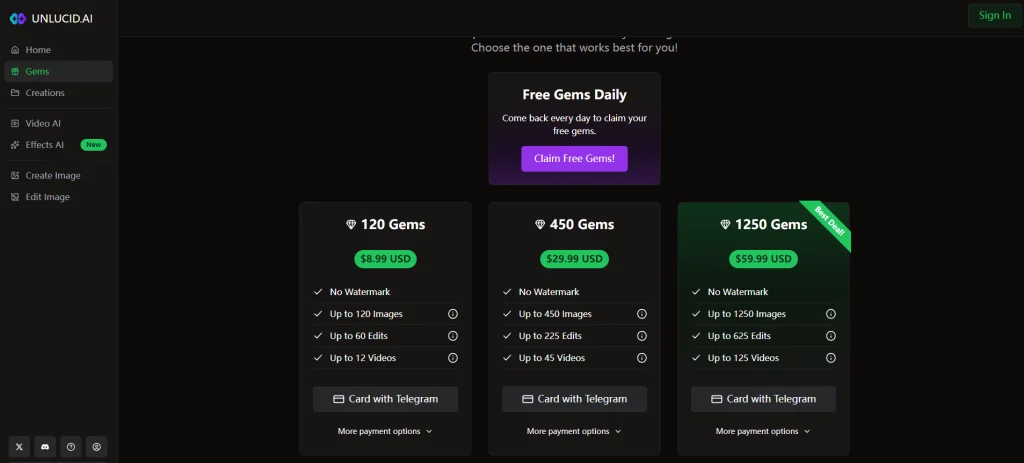
The headline feature is animation. Feed it a still image, pick a preset, and Unlucid turns it into a short clip. The effects library includes named presets like Dance, Squish, Smash, Crush, 360° spin, Flying, and Zoom, alongside text-to-video and a Prompt Enhancer that pads out short prompts. Finished clips export as MP4.
The trade-off is length. These are short animations, not minute-long scenes, so set expectations accordingly.
The “uncensored” / no-restrictions positioning — and its limits
Much of Unlucid’s buzz rides on an “uncensored” label, and it’s the thing most reviews fixate on. In practice that means looser content filtering than mainstream tools like ChatGPT or Gemini, not a complete absence of rules.
Worth stating plainly: looser moderation doesn’t suspend the law. Creating images of real people without consent carries serious legal and ethical risk, regardless of what a tool technically permits. Treat the “no restrictions” claim as a marketing flag, not a license.
How to Use Unlucid AI (Step-by-Step)
The workflows are short by design. Here’s how the three most common tasks go, plus how to keep your gem balance topped up.
How to generate an image from text
Open the image generator, type a description of what you want, and choose one of the five styles. Adjust the seed or add a reference image if you have a specific look in mind, then run the generation and download the result when it appears.
How to edit or retouch a photo
Upload your photo and pick an editing action, such as object removal or a background change. Mark the area with the auto-mask or brush, describe the change, and apply it. A few seconds later you can review the edit and save the version you like.
How to animate a photo into a short video
Head to the video or effects section and upload a starting image. Choose an effect like Dance or 360° spin, or write a short motion prompt, then generate. When the clip is ready, export it as an MP4.
How to earn free daily gems
You don’t have to pay to keep experimenting. New accounts receive a starter gem balance, daily check-ins add a few more, and referrals hand out extra credits. Stacking these is the realistic way to test the tool before deciding whether a paid pack is worth it.
Is Unlucid AI Free? Pricing & the Gems Credit System
Yes and no — and the “no” part is where most complaints come from.
How the Gems credit system works (and burn rate)
Every generation spends Gems, the in-app currency. Images cost roughly one to a few gems each, while video clips burn more, since rendering motion is heavier work. Free users get a starter bonus plus daily and referral gems, but the running total is capped at around 100.
The catch creators raise most often is burn rate. A failed or disappointing generation still costs gems, so a string of bad results can drain a free balance fast. The free tier is fine for casual testing; lean on it for steady video work and you’ll hit the wall quickly.
Gem packs and prices
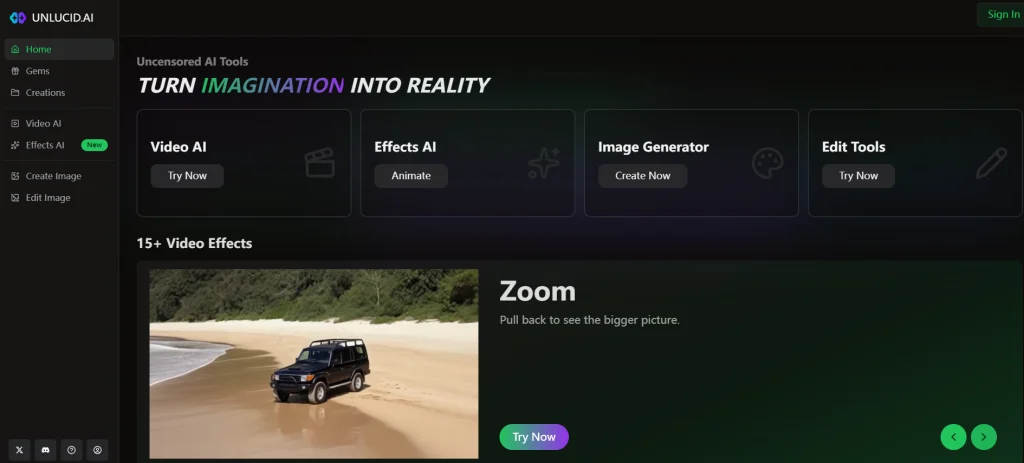
When the free gems run dry, you can buy more. The published packs are straightforward:
| Gem Pack | Price |
| 120 Gems | $8.99 |
| 450 Gems | $29.99 |
| 1,250 Gems | $59.99 |
How to pay (card, Telegram Stars, crypto)
Unlucid accepts standard cards, Telegram Stars, and cryptocurrency. The unusual options exist for a practical reason: some users report that regular cards get declined, likely tied to the platform’s payment processing and region. Telegram Stars and crypto are simply alternative rails when a card won’t go through — not something you should feel pressured into using.
Is Unlucid AI Safe and Legit?
This is the section competitors love to weaponize. Here are the facts with context, minus the fear-marketing.
Trust scores and ownership transparency
Third-party scanners send mixed signals. Services like ScamAdviser and Gridinsoft have flagged caution and assigned lower scores, and the site’s ownership isn’t publicly transparent. That’s a yellow flag, not a verdict — plenty of young, privacy-minded sites score low simply because they’re new and anonymous, not because they’re scams.
The sensible read: be cautious, don’t pour money in blindly, and verify the current scores yourself before you commit.
Privacy and your data
Because using paid features means creating an account and uploading images, your data does pass through the platform. Community threads repeatedly raise concerns about data retention and how uploaded photos are handled.
A safe habit: avoid uploading sensitive personal images, and assume anything you send to a free AI tool could be stored. That’s good practice with any service in this category, not just Unlucid.
Commercial rights and copyright of your outputs
If you plan to use generated content for business, slow down. The commercial-use and copyright status of Unlucid’s outputs is unclear, and AI-image rights remain a gray area broadly. For client work or anything you intend to sell, a tool with explicit commercial licensing — Adobe Firefly is the usual example — is the safer call.
Watermarks, mod-APK scams, and what to avoid
On the plus side, Unlucid advertises no watermark on exports. On the minus side, its popularity has spawned scams. You’ll find “Unlucid AI Mod APK — Unlimited Diamonds” videos and downloads floating around; these are not official, and several are flagged as referral wrappers or outright malware. Stick to the real website and skip any “modded” version entirely.
Unlucid AI Pros and Cons
Pros
- Lowest-friction path to image-to-video, with no install or sign-up to start
- No watermark on exported clips
- Generous-feeling free daily gems for casual testing
- Works in a mobile browser, so no app store needed
Cons
- Short video clips only
- No API and no native mobile app
- Gems burn even on failed generations
- Low third-party trust scores and anonymous ownership
- Unclear commercial-use and copyright status
Best Unlucid AI Alternatives (At a Glance)
Unlucid isn’t the only option, and the right pick depends on what you actually need. Here’s a quick comparison rather than a deep dive.
| Tool | Rough Price | Clip Length | Censorship | Best For |
| Unlucid AI | Free + gems from $8.99 | Short | Loose | Easy, no-setup creation |
| Runway | ~$15/mo | Longer | Strict | Cinematic, pro control |
| Kling AI | Free + paid tiers | Medium | Strict | Photorealism and physics |
| Pika | Free + ~$8/mo | Short | Moderate | Fast, social-friendly clips |
| Google Veo 3 | Premium | Longer | Strict | High-end text-to-video |
| ComfyUI + WAN (local) | Free (your GPU) | Flexible | None | Full control, no credit limits |
If your single goal is turning photos into clean, watermark-free clips, a dedicated image-to-video service such as AI Image to Video (aiimagetovideo.pro) is another option in this lane — it runs models like Kling, Veo, and Wan and exports up to 4K without watermarks. For total control with no credits at all, the local ComfyUI route is what experienced Reddit users keep recommending, though the learning curve is real.
FAQs of Unlucid AI
Is Unlucid AI free?
It’s free to start. You get daily and referral gems at no cost, but heavier use — especially video — eventually requires buying Gem packs, which begin at $8.99.
Is Unlucid AI safe to use?
It’s usable with caution. Some third-party scanners flag it, ownership is anonymous, and privacy details are thin. Don’t upload sensitive images, and verify current trust scores before paying.
How do I get free gems on Unlucid AI?
Three ways: the sign-up bonus when you create an account, daily check-in rewards, and referral credits for inviting others. Combined, they keep a casual user going without spending.
Does Unlucid AI add a watermark, and can I use outputs commercially?
Exports are advertised as watermark-free. Commercial rights, however, are unclear, so avoid using outputs for paid or client work until the licensing is spelled out.
Does Unlucid AI work on mobile?
Yes. It runs in a mobile browser with no app to install, which is part of its low-friction appeal.
What’s the difference between unlucid.ai and unlucid.info?
unlucid.ai is the real, gem-based product. unlucid.info promotes “completely free, unlimited” access that contradicts the actual pricing model, so trust the .ai site.
Conclusion
Unlucid AI earns its traffic by making image generation and photo-to-video animation genuinely easy — no install, no sign-up, no watermark. For quick, casual creative work, that low barrier is the real draw.
The caveats are just as real. Gems burn faster than the “free” framing suggests, video clips are short, trust signals are mixed, and commercial rights stay murky. None of that makes it a scam, but it does make it a try-before-you-trust tool.
Try the free daily gems first to see if it fits your workflow, check the current safety scores yourself, and only reach for the alternatives table if Unlucid AI falls short of what you actually need.