What if you could access Seedance, Kling, Sora, and Google Veo from a single dashboard — without managing separate subscriptions? That’s Akool’s image-to-video pitch. But most reviews are sponsored, the credit system confuses nearly everyone, and Reddit threads overflow with creators who’ve wasted credits on missed output.
This guide cuts through the noise with a transparent look at how Akool’s image-to-video platform works, what each clip truly costs, which AI model fits your project, and which alternatives may serve you better.
What Is Akool Image to Video?
Akool is a multi-model AI video platform that transforms still images into short animated clips by bundling multiple third-party AI engines into a single interface.
How Akool’s Multi-Model Platform Works
Within one dashboard, users choose from Seedance 2.0, Kling 3.0, Sora 2, Wan 2.7, Google Veo 3.1, and Minimax Hailuo. This distinguishes Akool from standalone platforms like Runway or Kling’s native site, where only one proprietary engine is available.
Key Features for Image-to-Video Generation
The platform’s core capabilities include:
- Resolution tiers spanning 720p through 8K
- 5–10 second clips per generation
- Aspect ratio and motion intensity adjustments
- First-and-last-frame input for improved character consistency
- Multiple output styles ranging from cinematic to social media-optimized
Who Is Akool Image to Video Built For?
Akool targets content creators, marketing teams, e-commerce businesses, and educators. The platform lists Fortune 500 clients like Canon and Coca-Cola and ranked #1 on the 2025 Inc. 5000. Enterprise credentials are solid, though solo creators on tight budgets may find the credit system less forgiving.
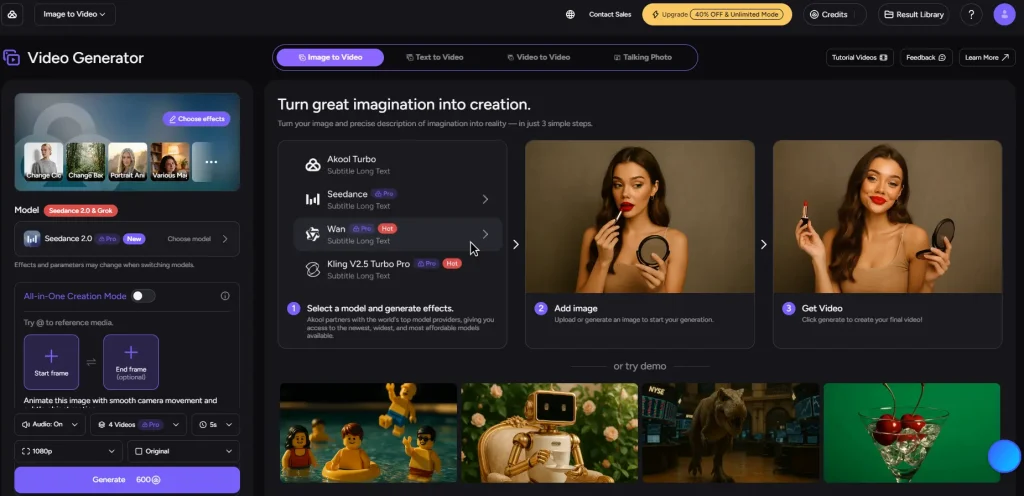
How to Use Akool Image to Video (Step-by-Step Tutorial)
Getting up and running is straightforward, but a few early decisions can prevent wasted credits and frustration later.
Creating Your Account and Understanding the Free Tier
Register at akool.com for the free plan: 720p resolution, watermarked output, access to the basic Akool model only, and just one concurrent generation. Premium engines like Seedance, Kling, and Sora require paid tiers. YouTube tutorials often present Akool as free without noting these limits — a point viewers consistently call out in comments.
Choosing the Right AI Model for Your Project
Model selection is where Akool’s aggregator advantage becomes tangible:
- Seedance 2.0 — Ideal for cinematic sequences with start/end frame control
- Kling 3.0 Pro — Strongest option for realistic face preservation
- Sora 2 — Best for physically accurate, world-consistent scenes
- Wan 2.7 — Reliable general-purpose engine
- Veo 3.1 — Excels at environmental and landscape realism
For most projects, Kling is a solid starting point. Branch out once you understand what each model handles best.
Uploading Your Image and Writing Effective Prompts
Use source images at 1080p or higher with clear subjects and even lighting. When writing prompts, describe the specific motion you want — “camera pans left while subject turns head” outperforms vague instructions like “make it move.” Each model interprets prompts differently, so tailor your language accordingly.
Generating, Previewing, and Exporting Your Video
Standard generation takes 1–5 minutes. However, “unlimited” mode users have reported waits of several hours. Concurrency limits also matter: 1 slot on free, 4 on Pro, and 8 on Pro Max.
Akool Pricing and Credit System Explained
Pricing confusion is the single most frequent complaint about Akool across Reddit, YouTube comments, and competitor reviews. Here’s the actual breakdown.
Free Plan vs. Pro vs. Pro Max vs. Enterprise
| Plan | Price | Credits | Max Resolution | Concurrent Jobs |
| Free | $0 | Limited | 720p | 1 |
| Pro | $18/mo* | 600 | 4K | 4 |
| Pro Max | $35.40/mo* | 1,200 | 8K | 8 |
| Enterprise | Custom | Custom | 8K | Custom |
Reflects the current 40% promotional discount. Standard pricing is $30 and $59 respectively.
How Many Credits Does Each Video Actually Cost?
Each video consumes 20–60 credits based on resolution and length. On Pro, that translates to roughly 10–30 videos per month. Pro Max yields around 20–60 videos. Higher resolutions and longer clips deplete credits fast.
Hidden Costs and How to Avoid Credit Waste
The per-generation pricing model discourages experimentation. Reddit users frequently mention losing credits on outputs that bear little resemblance to their prompts. To minimize this:
- Prototype at 720p before committing to high-resolution renders
- Write detailed, specific prompts to reduce output mismatches
- Commit to a model first — switching engines mid-project burns through credits quickly
Akool Image to Video Output Quality: What to Expect
Output quality varies considerably based on your model choice, the source image, and how precisely you craft your prompt.
Resolution and Visual Quality Across Models
At 4K, output from Kling 3.0 Pro and Seedance 2.0 can look genuinely impressive. Independent reviewers describe the results as solid for marketing use. On lower settings or weaker models, community reactions range from acceptable to harsh — one Reddit user compared certain outputs to dated CGI. Model and settings choices matter enormously.
Character Consistency and Identity Preservation
This remains the biggest unsolved challenge across every AI video tool, not just Akool. Faces distort, features drift, and objects reshape mid-clip. The community’s top workaround is the first-and-last-frame technique, which anchors the model with reference frames. Kling 2.1 Pro is widely regarded as the most reliable option for facial identity.
Video Length Limitations and Workarounds
Dependable output tops out around 5–10 seconds. Push beyond that and consistency degrades noticeably. Stitching shorter clips together introduces visible seams. Generating a stable 30-second video remains an industry-wide aspiration that no platform has reliably achieved in 2026.
Akool vs. Top Competitors: Head-to-Head Comparison
Here’s how Akool measures up against the platforms users compare it to most often.
Akool vs. Runway
Runway Gen-4.5 offers consistent single-model quality and supports clips up to 30 seconds. Akool counters with multi-model access. For a refined, focused creative workflow, Runway is the stronger pick.
Akool vs. Kling AI
Kling 2.1 Pro earns consistent praise on Reddit for superior facial consistency. The twist: Kling is also accessible within Akool as an aggregated model. The real choice is between Kling’s dedicated platform and accessing it through Akool’s dashboard.
Akool vs. HeyGen
HeyGen specializes in business avatar videos with 300+ voices and 40+ languages. For corporate training and talking-head content, HeyGen’s lip-sync quality outperforms Akool. For broader creative image-to-video work, Akool offers more versatility.
Akool vs. AI Image to Video
AI Image to Video offers a more streamlined alternative featuring Kling, Veo, and Wan models with 4K output and no watermarks included on standard plans. Its focused interface sidesteps the dashboard complexity that some Akool users find overwhelming, while batch processing support makes it particularly practical for high-volume content workflows.
Quick Comparison Table
| Platform | Models | Max Res | Free Tier | Starting Price | No Watermark | Batch | Best For |
| Akool | 6+ | 8K | Yes (limited) | $18/mo | Paid only | API | Multi-model flexibility |
| Runway | 1 | 4K | Yes (limited) | ~$12/mo | Paid only | No | Creative professionals |
| Kling AI | 1 | 4K | Yes | Varies | Paid only | No | Face consistency |
| HeyGen | 1 | 1080p | Yes | ~$24/mo | Paid only | No | Business avatars |
| AI Image to Video | 3 | 4K | Yes | Varies | Standard | Yes | Social media & batch |
| Synthesia | 1 | 1080p | No | ~$22/mo | Paid only | No | Enterprise training |
Best Use Cases for Akool Image to Video
Marketing and Social Media Content
Akool’s multi-model setup lets marketers test different visual styles for the same concept. Render a product teaser through Seedance for cinematic impact and Kling for photorealism, then go with whatever performs best.
E-Commerce Product Demos
Converting product photos into dynamic video clips is an increasingly popular application. For businesses with large catalogs, Akool’s API access (Pro Max tier and above) enables batch generation workflows.
AI Influencer and Creative Projects
A growing niche pairing Akool’s face swap with image-to-video generation. Several YouTube creators showcase end-to-end workflows for producing consistent AI influencer content this way.
Education and Training Videos
Talking photo and avatar tools complement image-to-video for instructional content. Combined with video translation spanning 155+ languages, this makes Akool a viable option for global educational distribution.
Tips for Getting the Best Results With Akool
Image Preparation Best Practices
Start with source images at 1080p or higher featuring even lighting and clearly defined subjects. Low-resolution or heavily compressed photos create amplified artifacts in the final video output.
Prompt Engineering for Each AI Model
Seedance responds best to directional cues like camera movements. Kling handles detailed scene descriptions well. Across all models, describe the motion you want — not just the scene — and keep prompts focused.
When to Use Free Tier vs. Paid (and When to Look Elsewhere)
Free tier works for testing and 720p drafts. Production work needing 4K, no watermarks, or premium models requires a paid plan. If predictable pricing matters most, evaluate alternatives that include watermark-free 4K as standard.
FAQs of Akool Image to Video
Is Akool image to video really free?
A free tier exists, but it caps you at 720p with watermarks, basic model access only, and one generation at a time. Premium models require paid plans from $18/month.
How much does it cost to make a video with Akool?
Each video consumes 20–60 credits based on resolution and length. The Pro plan ($18/month) includes 600 credits, which covers approximately 10–30 videos per month.
Which AI model should I choose in Akool for image to video?
Kling 3.0 Pro suits most general use cases and offers strong face consistency. Choose Seedance 2.0 for cinematic control, Sora 2 for physically realistic scenes, or Veo 3.1 for landscape and environmental shots.
Can Akool generate videos longer than 10 seconds?
Most models deliver dependable results at 5–10 seconds. Beyond that, quality and consistency degrade — a limitation shared industry-wide.
What are the best alternatives to Akool for image to video?
Leading alternatives include Runway for creative professionals, Kling AI for facial consistency, HeyGen for business-focused avatar videos, and AI Image to Video for watermark-free 4K generation with batch processing support.
Does Akool add watermarks to generated videos?
Yes — all free tier output carries watermarks. Removing them requires the Pro plan ($18/month) or a higher subscription tier.
How long does Akool take to generate a video?
Standard jobs take 1–5 minutes. “Unlimited” mode users report waits of several hours. Speed also depends on your plan’s concurrency limit (1, 4, or 8 slots).
Can I use Akool image to video for commercial projects?
Paid plans grant commercial usage rights, and Akool serves enterprise brands including Canon and Coca-Cola. Always review the current terms of service before launching large-scale commercial projects.
Conclusion
Akool’s multi-model access is a genuine differentiator — no other platform lets you compare six AI video engines in one place. For creators who value flexibility over simplicity, it’s worth exploring.
However, the credit system discourages experimentation, the free tier delivers less than its marketing implies, and output quality depends heavily on model selection and prompt quality.
Try Akool’s free tier to test the platform with the tips above, then compare results against focused alternatives before committing to a paid plan.